AI platform for upscaling images, enhancing photos, and generating high-quality creative assets with contextual detail.

Brow App
$12.9/moStarting price
0Popularity
About Brow App
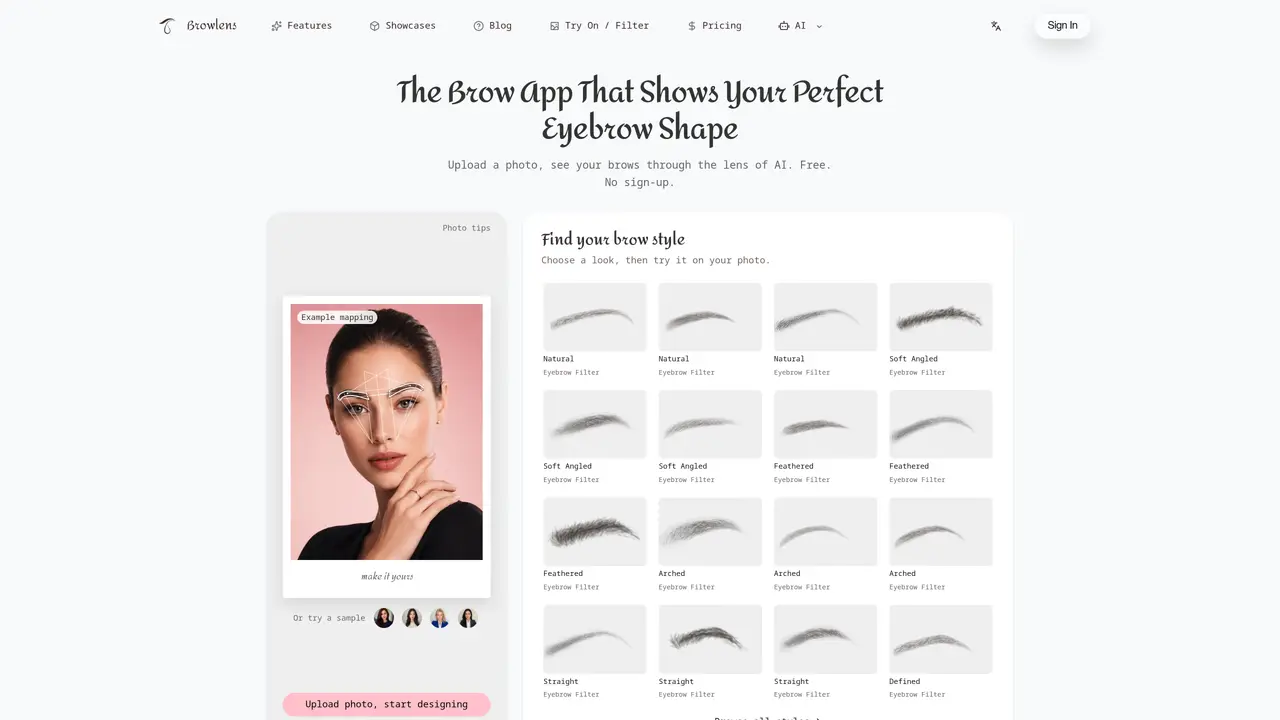
Brow App analyzes and modifies eyebrow shapes in uploaded portrait photos using AI landmark detection. The tool overlays guide lines for brow head, arch, and tail, then allows manual adjustment of six control points to refine placement. Users can preview different brow styles on their face, generate AI-generated images of the new shape, and compare results with the original photo. A balance report compares arch height and brow length between left and right sides without assigning a beauty score. The app supports JPG, PNG, and WebP formats up to 15 MB and operates without requiring sign-up for basic use. It is designed for individuals exploring eyebrow shape changes, offering both automatic detection and fine-tuned manual editing options.
Key features
- AI eyebrow landmark detection
- Six-point control for head, arch, and tail adjustment
- Brow style filters (Natural, Soft Angled, Feathered, Arched, Straight, Defined)
- Balance report comparing arch height and brow length
- Manual thickness, length, angle, spacing, and height adjustments
- AI photo preview generation
- Watermark-free HD downloads on paid plans
- Comparison export for multiple results
Use cases
- Previewing eyebrow shape changes before salon visits
- Comparing different brow styles on personal photos
- Analyzing natural brow balance for cosmetic decisions
Pros
- AI facial and eyebrow landmark detection
- Six-point manual adjustment for precise control
- Balance report comparing left and right brow metrics
- Multiple brow style filters available
- No sign-up required for basic use
Cons
- AI-generated previews consume credits
- Watermarked downloads on free plan
- Requires portrait photo with visible eyebrows
- No mobile app version mentioned
Frequently asked questions about Brow App
What does Brow App do?
Brow App analyzes uploaded portrait photos to detect facial and eyebrow landmarks using AI, then overlays guide lines for the brow head, arch, and tail. Users can manually adjust six control points to refine the shape, preview different brow styles, and generate AI-generated images of the new shape for comparison with the original.
Who is Brow App designed for?
The tool is designed for individuals exploring eyebrow shape changes, offering both automatic detection and fine-tuned manual editing options. It helps users understand their natural brow shape and experiment with different styles before making decisions.
Does Brow App require sign-up to use?
No, Brow App does not require sign-up for basic use. Users can upload photos and start designing without creating an account.
What image formats and sizes does Brow App support?
Brow App supports JPG, PNG, and WebP formats with a maximum file size of 15 MB. It is recommended to use evenly lit, front-facing portraits with both eyebrows visible for accurate results.
How does the balance report work in Brow App?
The balance report compares arch height and brow length between the left and right sides of the photo using image pixels. It helps users identify differences but does not assign a beauty score, as measurements can vary with image crop, angle, or expression.
Can I adjust both brows together or separately in Brow App?
Yes, users can adjust both brows together for an overall style change or refine each side individually when specific points or contours need attention. The tool allows fine-tuning of thickness, length, angle, spacing, overall height, and arch height.