AI ad creative and launch platform that generates UGC-style video and image ads, clones competitor concepts, and automates Meta campaign setup with performance tracking.
1.2M visits/mo+13.5%#47 Business & Marketing

AI-powered banner generation and editing for performance marketing teams
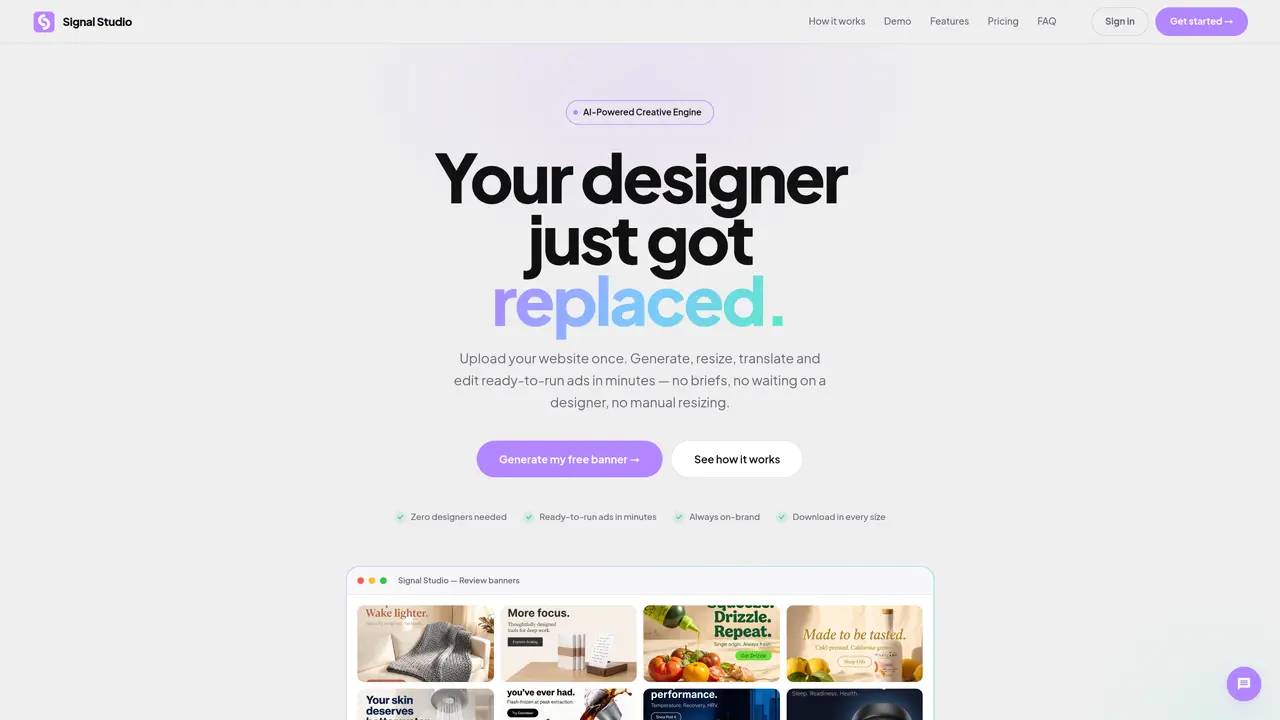
Signal Studio is an AI-driven tool that automates the creation, resizing, translation, and editing of digital banners for marketing campaigns. It allows users to upload brand assets such as logos, fonts, and product photos, which the AI analyzes to extract brand identity elements like colors, fonts, and tone of voice. Users can then generate banners by setting campaign parameters such as ad ratios, headlines, and CTAs, or let the AI handle these automatically. The tool produces twice the requested number of banners, enabling quick review and selection of the best options. Banners can be edited in plain English, translated into multiple languages, and resized into various ad formats with AI recomposition to maintain visual integrity. The platform supports direct integration with Meta Marketing API for seamless campaign deployment.
No assets are strictly required. Users can upload a brand book, logos, Figma link, fonts, or product photos in any combination. The AI can also start with just a company name and colors to extract brand identity elements.
When ordering a set of banners, Signal Studio generates twice the requested number. Users review all banners, approve the best options, and decline the rest, ensuring creative choice without additional cost.
Yes, users can edit any banner by describing changes in plain English, such as adjusting colors or headlines. The AI regenerates the banner in seconds without requiring Photoshop or manual adjustments.
Signal Studio supports Arabic, Chinese (Simplified), Spanish, French, German, Portuguese, Russian, Japanese, and Korean. The AI automatically handles right-to-left layouts for languages like Arabic and Hebrew.
Yes, all brand assets and generated banners are private to the user's account. Signal Studio does not use brand data to train AI models or share it with other clients. Unlimited plans include a data processing agreement for added security.
Users can start by uploading brand assets or entering a company name and colors. Signal Studio offers a free trial with a limited number of banners to test the tool before committing to a plan.
We use essential cookies to run aitoolnavio™, and optional cookies to analyze traffic and measure our marketing. You choose what we use — optional cookies stay off unless you turn them on. See our Privacy Policy.
One short email a week: fresh tools worth trying, honest takes and the updates that actually matter. No spam, unsubscribe any time.
AI ad creative and launch platform that generates UGC-style video and image ads, clones competitor concepts, and automates Meta campaign setup with performance tracking.
AI-powered platform that generates high-quality ad creatives and social media posts in minutes from user inputs.
Optimize creative assets, target engaged users, and manage campaigns easily with an intuitive interface.
Centralize, automate, and AI-optimize Facebook, Instagram, and Google ad campaigns from one dashboard.
All-in-one marketing platform for creating, launching, and optimizing campaigns with A/B testing and analytics to maximize ROI.
AI-powered platform to create, launch and scale digital ads
Streamlines ad creation, deployment, and optimization efficiently.
Influencer marketing platform for discovering creators, tracking campaigns, managing relationships, and producing resonant content.
AI-powered ad platform for SaaS founders and marketers to research competitor ads, generate creatives, and manage campaigns across Meta and Google.
Optimize campaigns, create targeted ads, and get personalized support for campaign advice.
Run full-funnel TikTok, Meta, Google ads with Navos AI advertising assistant.
AI-powered ad creative studio for brands to generate product videos and images from text, images or links
Matched on what this tool does — grouped by the job you would be replacing.
matches AI brand DNA extraction from brand books, logos, fonts, and Figma · Automated generation of 2× requested banners per run · One-click resizing into 1:1, 4:5, 9:16, 16:9, and Google Display sizes
AI tool that turns text prompts or Figma designs into animated banner ads quickly, with automated resizing for multiple platforms.
AI ad creative generator that produces branded images, banners, videos, and ad copy with performance insights for marketing teams and agencies.
AI banner generator that turns URLs, prompts, or concepts into on-brand ad and social banners with editing and multi-size exports.
matches Meta Marketing API integration for direct campaign deployment
Streamlines ad creation, deployment, and optimization efficiently.
AI-powered Google Ads management platform that automates campaign creation, keyword research, ad copy, and ongoing optimization for agencies and marketers.
Auto-create, test, and scale winning Meta/Google ads with Muze AI.
AI-powered platform for automated ad campaign creation and management across nine networks