AI-powered website builder that generates a professional site in under a minute and includes tools for content, SEO, and analytics.
52M visits/mo+0.7%#4 Coding & Development

Parallel AI coding agent IDE that runs multiple agents side by side in isolated git worktrees for faster, comparative development.
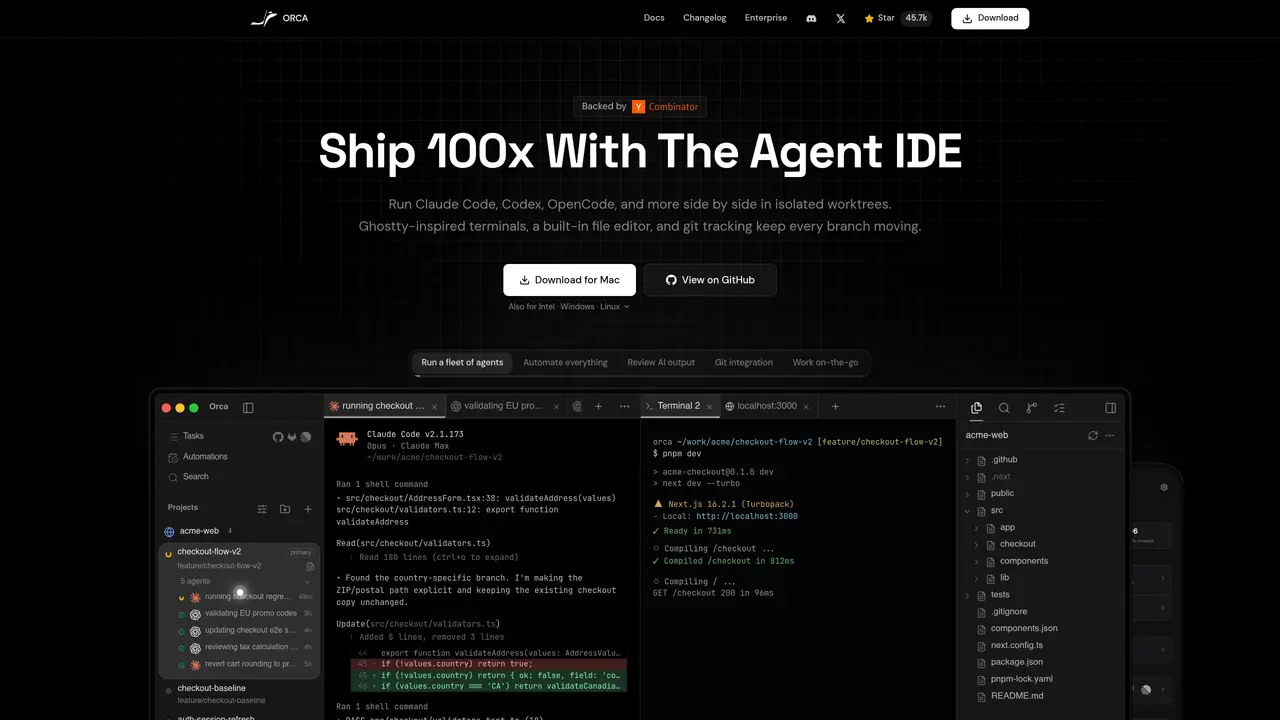
Orca is a free, open-source agent development environment designed for developers working with AI coding agents. Instead of running one agent at a time, it allows you to spin up multiple agents simultaneously in isolated git worktrees, each handling different parts of a codebase in parallel. The environment includes a terminal with WebGL rendering, a VS Code-based editor, and a browser window with design mode that feeds HTML and CSS directly into agent prompts. Users can annotate AI-generated diffs, drag files into agent conversations, and track usage across multiple AI agent subscriptions like Claude and Codex. A mobile companion app for iOS and Android enables remote monitoring of agent status, usage checks, and follow-up prompts when away from the desk. Orca is available on macOS, Windows, and Linux, making it accessible to a wide range of developers. The tool is particularly suited for software developers, engineering teams, solo developers, and AI coding enthusiasts who need to optimize workflows with parallel agent execution and comparative analysis.
Orca is an Agent Development Environment (ADE) designed to run multiple AI coding agents simultaneously in isolated git worktrees. It provides a terminal, editor, and browser interface to coordinate agents, track changes, and manage workflows across different AI subscriptions.
Orca is primarily aimed at software developers, engineering teams, and AI coding enthusiasts who need to manage multiple AI agents working in parallel on codebases. It is also useful for those who want to automate tasks and review AI-generated outputs efficiently.
Yes, Orca supports various AI agent subscriptions such as Claude Code, Codex, OpenCode, Grok, and others. Users can plug in their existing subscriptions and run them side by side within the Orca environment.
Yes, Orca offers a mobile companion app for iOS and Android. It allows users to monitor agent status, check usage, switch accounts, and send follow-up prompts remotely while away from their desk.
Orca is available on macOS, Windows, and Linux, making it accessible to a wide range of developers regardless of their preferred operating system.
Users can download Orca for their respective operating system from the official website or GitHub. After installation, they can set up workspaces, configure agents, and begin managing tasks through the integrated terminal, editor, and browser interface.
onorca.dev · third-party estimates from Similarweb
Last 4 months · grows by one month every month
Share of visits · estimated visits
Other countries: 46.1%
How people reach this site from other AI tools
5K a month · 0.5% of all visits
Coding & Development · Sep 2026
Traffic figures are third-party estimates, good for scale and trends; they can differ from a company's own numbers. Updated monthly.
We use essential cookies to run aitoolnavio™, and optional cookies to analyze traffic and measure our marketing. You choose what we use — optional cookies stay off unless you turn them on. See our Privacy Policy.
One short email a week: fresh tools worth trying, honest takes and the updates that actually matter. No spam, unsubscribe any time.
AI-powered website builder that generates a professional site in under a minute and includes tools for content, SEO, and analytics.
AI-powered coding platform that uses agents to plan, write, and test software with real-time feedback and verifiable artifacts.
Automate code, research, and documents using agents.
AI-powered code assistant that generates, reviews, optimizes, and debugs code with natural language prompts and editor integrations.
AI assistant for safe, reliable productivity with code, collaboration, and integrations.
AI-powered IDE for autonomous coding tasks and agentic development workflows
Privacy-focused AI chatbot that generates uncensored text, code, images, and translations without storing conversations or requiring an account.
A free web-based AI chatbot and agent for writing, coding, research, and content creation with multilingual support.
Write & run code in 50+ languages, auto-complete with AI, and code faster with an intuitive interface.
An IDE that automates legacy-to-modern code migration using autonomous coding agents.
AI models that return typed decisions with calibrated confidence for software automation
Practice coding challenges, improve technical skills, get detailed explanations, compare performance with peers.
Matched on what this tool does — grouped by the job you would be replacing.
matches Run multiple AI coding agents in parallel within isolated git worktrees · Compare results from different agents and merge the best output
Open-source control plane for orchestrating multiple coding agents
A macOS workspace for running and managing parallel AI coding agents with isolated shells and automatic git worktrees.
Shared workspace for teams of AI coding agents
Local AI coding agent manager that turns tickets into isolated worktrees and pull requests
matches Integrates with CLI-based agents like Claude Code, Codex, and Cursor · Track usage across multiple AI agent subscriptions · Open-source and free to use
matches Terminal with WebGL rendering and VS Code-based editor · Browser window with design mode for HTML/CSS integration · Annotate AI-generated diffs and drag files into agent conversations
Run and manage remote AI coding agents from any device with real-time sync and a clean UI.
Private cloud computer for AI agents to collaborate on coding and research tasks
Remote control of a developer’s Mac from a mobile device
A local browser for running AI agents with real user logins and session replay
Spatial IDE for orchestrating multiple AI coding agents on a shared canvas
AI-powered code editor and IDE for multi-file coding tasks across platforms
Desktop app for multi-agent coding sessions with AI PR review and CI debugging