Generate captions, optimize content, and enhance with custom images for maximum engagement.
46M visits/mo-10%#3 Image & Design

A macOS workspace for running and managing parallel AI coding agents with isolated shells and automatic git worktrees.
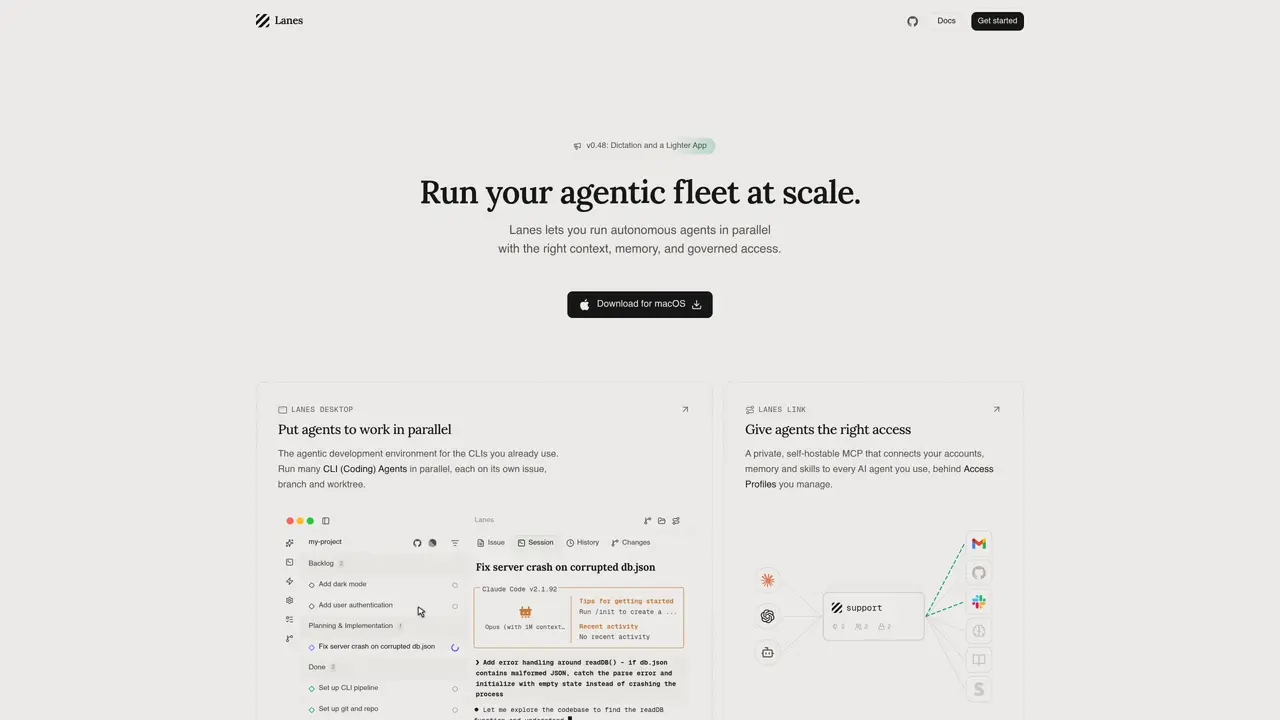
Lanes is a macOS-native workspace designed to run and orchestrate multiple AI coding agents in parallel. Each agent operates within an isolated shell environment that includes your personal dotfiles, ensuring consistency with your development setup. The tool automatically creates git worktrees for each session, preventing branch conflicts and enabling seamless collaboration. Conversation history is automatically resumed, allowing agents to pick up where they left off without losing context. Lanes combines an issue board for planning and review, CLI-injected quick commands for efficiency, live terminal status updates, and file/diff views to streamline workflows. Teams can delegate tasks to different agents, track progress in real time, and move from planning to shipping faster while maintaining vendor neutrality across tools like Claude Code, Codex, and Gemini CLI.
Lanes is a macOS-native workspace that runs and orchestrates multiple AI coding agents in parallel, each within isolated shell environments. It automates git worktrees, session management, and real-time tracking to streamline agentic development workflows.
Lanes suits teams and individuals who need to delegate coding tasks to AI agents, maintain vendor neutrality, and manage parallel development sessions without branch conflicts. It is particularly useful for agentic development environments and internal agent deployments.
Lanes uses a private, self-hostable MCP (Model Context Protocol) to connect accounts and manage access through customizable Access Profiles. These profiles define which accounts and actions each agent can access, with permissions enforced centrally.
Lanes integrates with over 100 providers including Gmail, Calendar, Drive, GitHub, Linear, Slack, Notion, and others. It also allows users to add their own integrations and extend functionality via the MCP framework.
Yes, Lanes automatically resumes conversation history, allowing agents to pick up where they left off without losing context. This ensures continuity in multi-session workflows.
To get started, download Lanes for macOS, initialize a project using the /init command, and configure your preferred AI coding agents. The tool provides documentation and tips to guide users through setup and usage.
lanes.sh · third-party estimates from Similarweb
Last 4 months · grows by one month every month
Share of visits by channel
Share of visits · estimated visits
Automation & Agents · Sep 2026
Traffic figures are third-party estimates, good for scale and trends; they can differ from a company's own numbers. Updated monthly.
We use essential cookies to run aitoolnavio™, and optional cookies to analyze traffic and measure our marketing. You choose what we use — optional cookies stay off unless you turn them on. See our Privacy Policy.
One short email a week: fresh tools worth trying, honest takes and the updates that actually matter. No spam, unsubscribe any time.
Generate captions, optimize content, and enhance with custom images for maximum engagement.
Build conversational forms, capture rich responses, and automate follow-ups with AI-powered surveys and workflows.
Automate code, research, and documents using agents.
AI-powered IDE for autonomous coding tasks and agentic development workflows
Source, match, and manage talent with predictive analytics for effortless recruiting.
Automate workflow, optimize operations, and detect potential issues with this efficient AI-driven solution.
Transforms thoughts into actions, enhancing productivity and efficiency.
AI Recruitment engine to hire top global talent
All-in-one team productivity platform combining chat, docs, video meetings, workflows, and AI tools in one place.
Personal assistant that coordinates tasks across apps and devices via text or call
AI automation and agent-building platform with 3,000+ app integrations
AI job search copilot that matches roles to skills, optimizes resumes for ATS, generates cover letters, and autofills applications with real-time insights.
Matched on what this tool does — grouped by the job you would be replacing.
matches Run multiple AI coding agents in parallel · Isolated shell sessions with your dotfiles · Auto-created git worktrees per session
Parallel AI coding agent IDE that runs multiple agents side by side in isolated git worktrees for faster, comparative development.
Run and manage remote AI coding agents from any device with real-time sync and a clean UI.
Keyboard-driven manager for running and reviewing multiple AI coding agents in parallel
Local AI coding agent manager that turns tickets into isolated worktrees and pull requests
matches Code generation, editing, and visualization · Infinite canvas for organizing agents and tools · Side-by-side diffs in Monaco editor
Private cloud computer for AI agents to collaborate on coding and research tasks
Spatial IDE for orchestrating multiple AI coding agents on a shared canvas