Generate captions, optimize content, and enhance with custom images for maximum engagement.
46M visits/mo-10%#3 Image & Design

Keyboard-driven manager for running and reviewing multiple AI coding agents in parallel
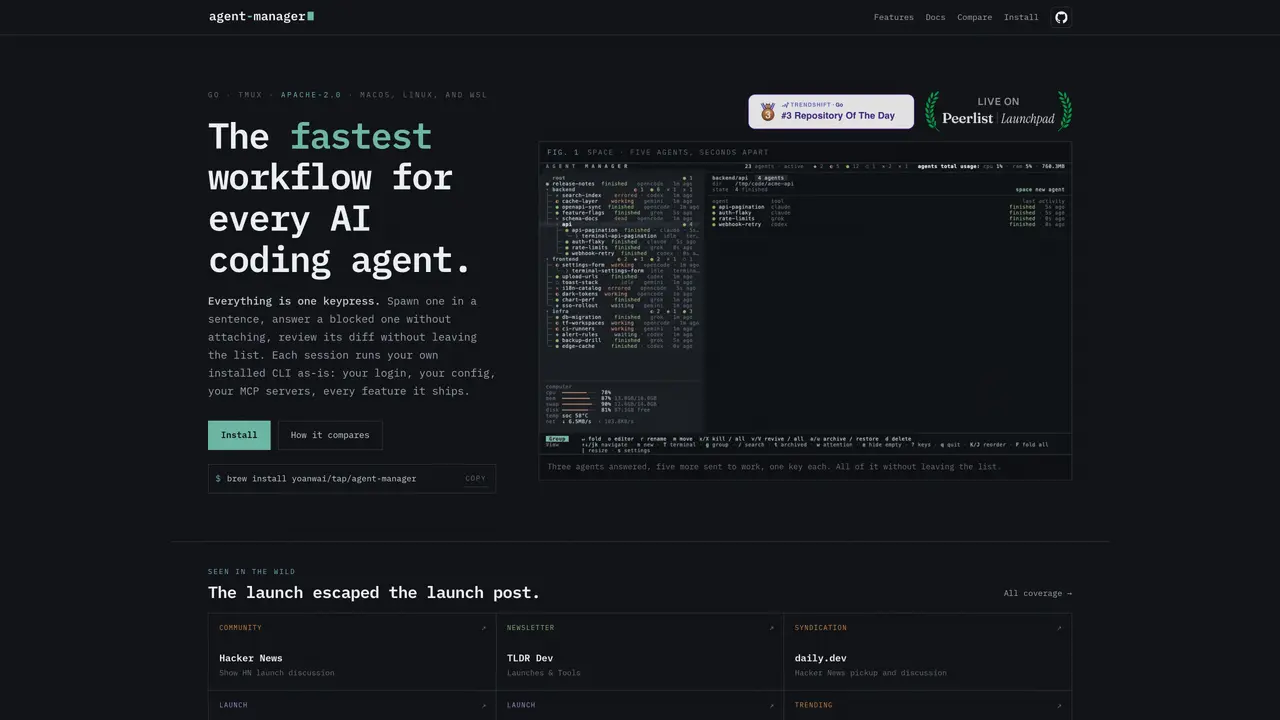
Agent Manager provides a keyboard-driven interface for spawning, monitoring, and interacting with multiple AI coding agents across projects. It runs each agent in its own session pane using the user’s installed CLI, preserving login credentials, configuration, and MCP servers without modification. Agents can be started with a single keypress from a session list, with each task described in plain language and executed immediately in the correct directory. The tool supports switching between different agent tools (e.g., claude, opencode, codex) without leaving the interface, and agents can spawn additional agents or communicate with each other to coordinate multi-step workflows. Sessions are organized in a collapsible tree structure, allowing users to fold inactive groups, archive completed sessions, and reorder tasks while maintaining context across restarts. Review mode provides a side-by-side diff view of an agent’s changes, refreshed in real time as the agent works, with syntax highlighting and file navigation.
Agent Manager is a keyboard-driven interface for spawning, monitoring, and interacting with multiple AI coding agents across projects. It runs each agent in its own session pane using the user’s installed CLI, preserving login credentials, configuration, and MCP servers without modification.
The tool is designed for developers who work with multiple AI coding agents and need a streamlined way to manage tasks, switch between agents, and review changes without leaving the interface.
Agent Manager allows users to cycle between different agent tools (e.g., Claude, OpenCode, Codex, Grok, Gemini) without leaving the interface. The footer shows which tool the next session will start.
Yes, Agent Manager includes a review mode that provides a side-by-side diff view of an agent’s changes, refreshed in real time as the agent works, with syntax highlighting and file navigation.
Yes, agents can spawn additional agents or communicate with each other to coordinate multi-step workflows. Sessions are organized in a collapsible tree structure, allowing users to manage complex workflows efficiently.
To get started, install Agent Manager using the provided command (e.g., `brew install yoanwai/tap/agent-manager`). Once installed, use the keyboard-driven interface to spawn agents, manage sessions, and review changes.
We use essential cookies to run aitoolnavio™, and optional cookies to analyze traffic and measure our marketing. You choose what we use — optional cookies stay off unless you turn them on. See our Privacy Policy.
One short email a week: fresh tools worth trying, honest takes and the updates that actually matter. No spam, unsubscribe any time.
Generate captions, optimize content, and enhance with custom images for maximum engagement.
Build conversational forms, capture rich responses, and automate follow-ups with AI-powered surveys and workflows.
Automate code, research, and documents using agents.
AI-powered IDE for autonomous coding tasks and agentic development workflows
Source, match, and manage talent with predictive analytics for effortless recruiting.
Automate workflow, optimize operations, and detect potential issues with this efficient AI-driven solution.
Transforms thoughts into actions, enhancing productivity and efficiency.
AI Recruitment engine to hire top global talent
All-in-one team productivity platform combining chat, docs, video meetings, workflows, and AI tools in one place.
Personal assistant that coordinates tasks across apps and devices via text or call
AI automation and agent-building platform with 3,000+ app integrations
AI job search copilot that matches roles to skills, optimizes resumes for ATS, generates cover letters, and autofills applications with real-time insights.
Matched on what this tool does — grouped by the job you would be replacing.
matches One-key agent spawning with plain-language task description · Multi-agent coordination and inter-agent messaging · Session state tracking (working, waiting, finished, errored, idle, dead)
Edit code, docs, diagrams with inspectable AI changes.
Run and manage remote AI coding agents from any device with real-time sync and a clean UI.
A macOS workspace for running and managing parallel AI coding agents with isolated shells and automatic git worktrees.
Native desktop cockpit to run and coordinate multiple AI coding agents on a local machine
matches Git worktree support for isolated agent branches · Run multiple AI coding agents in parallel
matches Multi-agent coordination and inter-agent messaging · Shared context across multiple agent terminals · Task hand-off between agents without context loss
Spatial IDE for orchestrating multiple AI coding agents on a shared canvas
Multi-agent orchestration with shared memory and GitHub-backed planning
Private cloud computer for AI agents to collaborate on coding and research tasks
A coordination layer for multiple AI coding agents working together
Open-source framework to build, orchestrate, and scale custom AI agents with tools, memory, and multi-agent systems.