AI platform for upscaling images, enhancing photos, and generating high-quality creative assets with contextual detail.
80M visits/mo-3.3%#1 Image & Design
Converts photos into soft, hand-painted Ghibli-style anime artwork
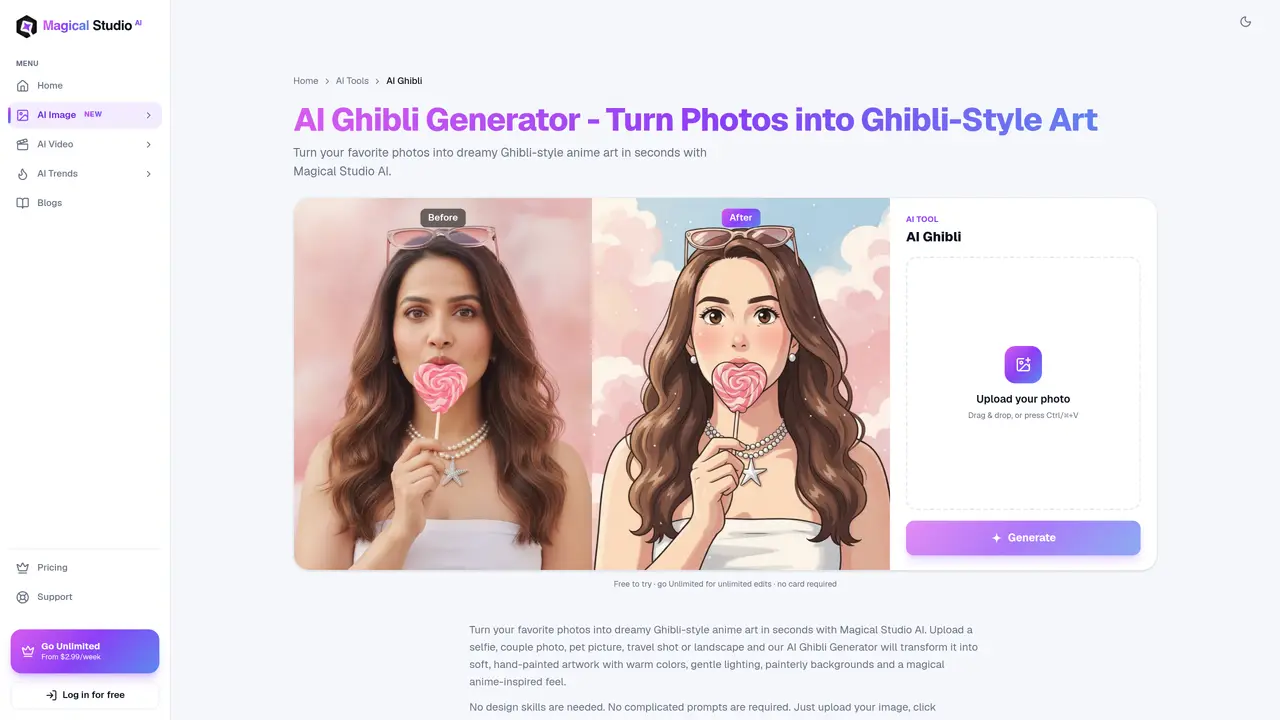
The AI Ghibli Generator is an online tool that converts ordinary photographs into hand-painted anime artwork inspired by Studio Ghibli’s signature visual style. Users can upload selfies, pet photos, landscapes, couple portraits, or group pictures to generate restyled versions featuring soft colors, gentle lighting, illustrated textures, and painterly backgrounds. The process requires no design experience or complex prompts—simply upload an image and click generate to produce a cinematic, storybook-like result. Designed for quick, browser-based editing, the tool enables the creation of anime-style profile pictures, illustrated pet portraits, fantasy travel landscapes, or social media content without installing software. It emphasizes accessibility, speed, and a beginner-friendly workflow, making it suitable for casual users and creators seeking visually distinctive artwork. The AI reimagines photos with expressive details and a magical illustrated style rather than applying simple filters, transforming the mood, lighting, and artistic context of the original image. Magical Studio AI’s Ghibli filter operates entirely in the browser, allowing users to create and download artwork from any device without specialized software or advanced editing steps.
Yes, users can try the AI Ghibli Generator for free with a limited number of daily generations included on every account. Upgrading to an Unlimited plan removes these restrictions.
Clear, well-lit photos tend to produce the best results. Portraits, pets, and landscapes all work well, provided they have visible faces, simple backgrounds, and natural lighting. Avoid dark, blurry, heavily filtered, or low-resolution images.
Users should ensure they have permission to use the original photo and review usage rights before publishing or selling the final artwork. The tool itself does not grant commercial rights to the generated images.
Simply visit the tool’s webpage, upload your photo, and click the generate button. No prompts or design skills are required. The AI will restyle your image into Ghibli-style artwork, which you can then download.
No, the tool works entirely in your browser, so there is no need to install software or apps. It is accessible from phones, tablets, laptops, or desktops.
Unlike standard filters that adjust colors or brightness, the AI Ghibli Generator reinterprets the photo as illustrated artwork, changing the mood, lighting, background, and artistic style to create a new anime-inspired illustration.
We use essential cookies to run aitoolnavio™, and optional cookies to analyze traffic and measure our marketing. You choose what we use — optional cookies stay off unless you turn them on. See our Privacy Policy.
One short email a week: fresh tools worth trying, honest takes and the updates that actually matter. No spam, unsubscribe any time.
AI platform for upscaling images, enhancing photos, and generating high-quality creative assets with contextual detail.
Generate unique artwork, customize with an intuitive interface, and push creative boundaries with AI-generated art.
Generate unique AI art, share your creations, and explore a vast selection of AI artwork.
Easily find and explore diverse AI art and prompts with a vast library of 10 million+ creations.
Generate accurate visuals, create impressionist-style art from text, and explore a range of options effortlessly.
Generate art, explore vTuber & anime content, and create visuals effortlessly.
Generate stunning images, boost productivity, explore creativity effortlessly.
Generate unique palettes, create personalized looks, and find perfect colors for any concept.
Vheer is a free AI image generator that turns your ideas into stunning visuals.
Create custom illustrations, generate blog post images, and design anime-style art for any purpose.
Free stock image platform offering over 16,000 AI-generated photos, illustrations, and 3D assets with commercial use rights.
Transform text into art, create unique stylish images, and generate surreal visuals effortlessly.
Matched on what this tool does — grouped by the job you would be replacing.
matches Instant AI restyling into Ghibli artwork · Drag-and-drop image upload · Online editor with no external software
A web-based AI image generator and enhancer that turns text prompts or photos into styled images and upscales low-quality photos.
Transform any photo into stunning AI artwork with 38+ styles — Studio Ghibli, Pixar, Disney, anime, watercolor, oil painting, and more.
Free AI anime generator turning photos and text into anime art with diverse models and styles.
AI-powered tool to transform existing images via text prompts without creating from scratch