AI-powered tool for creating professional product descriptions, designing 3D avatars, and generating engaging product videos.
4.6M visits/mo+179.4%#23 Image & Design

Create custom avatars, design logos, and generate business team avatars with just a few clicks.
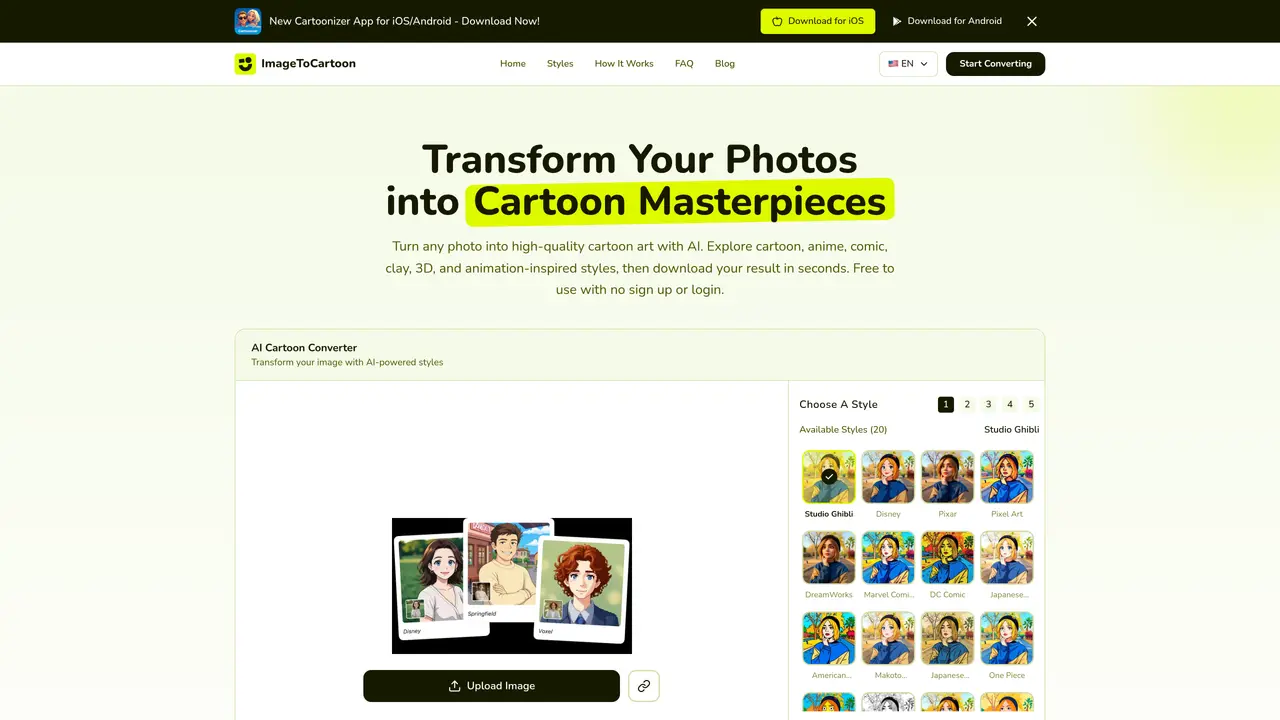
With Imagetocartoon, you can create a unique, cartoon version of yourself to use in your profile pictures, logos, and other graphics. This tool is designed for individuals who want to personalize their online presence or businesses that need to create custom avatars for their team members. The process is straightforward: simply upload an image, and the AI will generate a cartoon version of it. You can then customize the output by adjusting parameters such as color, style, and expression. Imagetocartoon is suitable for social media profiles, logos, business cards, and other visual materials where a personalized touch is desired. The tool’s ease of use makes it accessible to users with no prior experience in graphic design or AI technology.
The best way is to use the AI-powered tool which automatically converts photos into cartoon-style images with high precision. Simply upload your photo, adjust the cartoon effect strength, and download the result in seconds without manual editing.
Yes, you can cartoonize a face online for free. Upload a selfie or photo, adjust the settings, and download the cartoonized version without signing up or paying any fees.
Yes. Uploaded images are used only to create your cartoon result, and both the original and generated images are automatically deleted from the system within 2 hours. No registration or payment is required.
You can apply a wide range of styles including classic cartoon, anime, manga, comic, watercolor, clay-style, pop art, 3D animation-inspired portraits, and more. The tool offers over 80 unique styles to choose from.
No download is required. The tool is 100% web-based and works directly in your browser on any device, including PCs, Macs, tablets, and smartphones.
Generated cartoon images can be used for personal or commercial projects as long as you own or have permission to use the original photo and comply with applicable laws and third-party rights.
imagetocartoon.com · third-party estimates from Similarweb
Last 4 months · grows by one month every month
Share of visits · estimated visits
Other countries: 34%
Image & Design · Sep 2026
Traffic figures are third-party estimates, good for scale and trends; they can differ from a company's own numbers. Updated monthly.
We use essential cookies to run aitoolnavio™, and optional cookies to analyze traffic and measure our marketing. You choose what we use — optional cookies stay off unless you turn them on. See our Privacy Policy.
One short email a week: fresh tools worth trying, honest takes and the updates that actually matter. No spam, unsubscribe any time.
AI-powered tool for creating professional product descriptions, designing 3D avatars, and generating engaging product videos.
Upload a photo to receive AI-generated celebrity look-alike suggestions based on facial recognition.
All-in-one AI platform for face swapping, image generation, upscaling, and art creation with free access and batch processing.
Generate unique avatars and craft effective, engaging copy effortlessly.
VTuber software suite to create and animate custom VTuber avatars with VTuber Maker.
AI-enhanced photo editing with background removal and enhancements.
Create face swap memes, generate AI-powered GIFs, make movie role-refacing videos.
Create precise images, videos, and talking photo avatars with Dzine AI.
Generate realistic avatars, online store models, and unique faces for web design projects.
Create unique art, transform yourself in GIFs and videos, and share with friends using fun memes and artwork.
AI-powered selfie editor and profile picture generator for enhancing photos and videos with filters and touch-ups.
Free Japanese kaomoji library with 10,000+ text emoticons, an AI generator, and one-click copy for any platform.
Matched on what this tool does — grouped by the job you would be replacing.
matches Create custom avatars · Design logos · Generate business team avatars
Create personalized avatars for social media, prank friends, and generate game profiles effortlessly.
Transform any photo into stunning AI artwork with 38+ styles — Studio Ghibli, Pixar, Disney, anime, watercolor, oil painting, and more.
Create personalized anime avatars, customize with hairstyles, clothes, accessories, and add flair to profile pictures.
Create a custom logo in minutes with customizable templates and high-quality images.