AI chatbot for conversation, work, research, coding, and content creation.

AI Screenshot Generator
$9.99/moStarting price
0Popularity
About AI Screenshot Generator
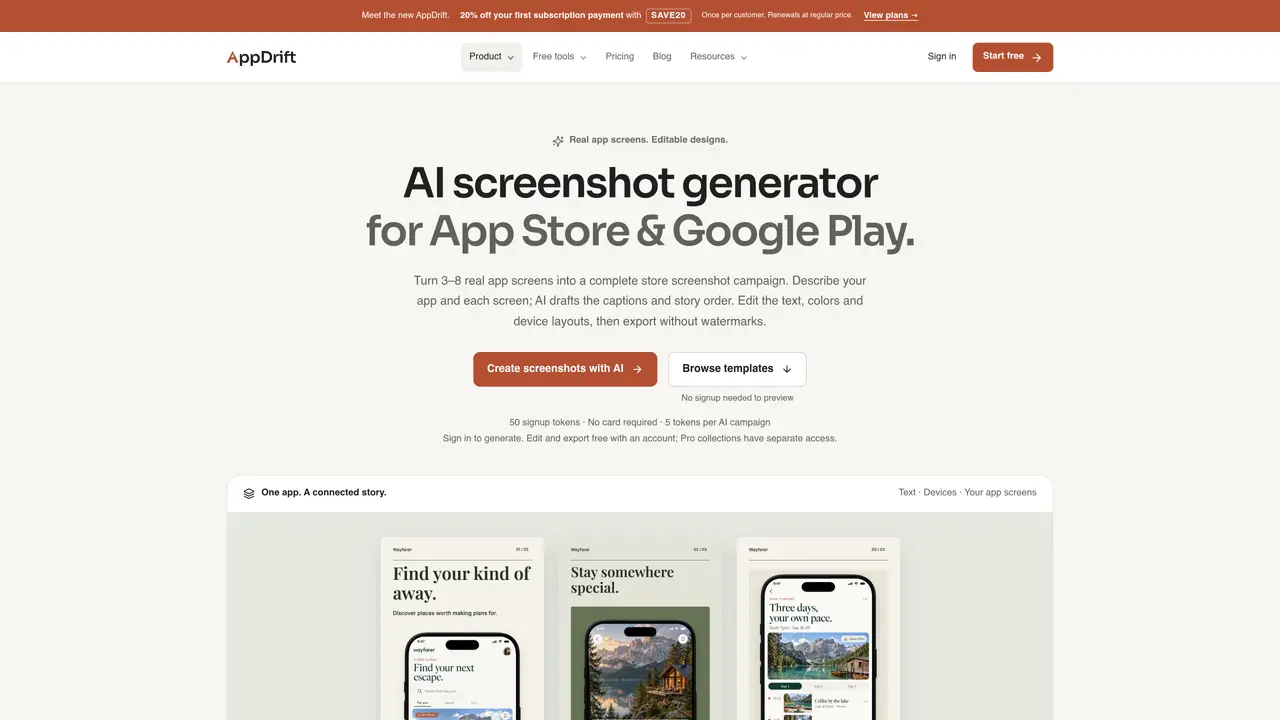
The AI Screenshot Generator creates editable store listing screenshots for mobile apps by transforming a brief and 3–8 real app screenshots into a coherent visual story. Users describe their app and each screen’s purpose, then the tool drafts captions and suggests an order. The output is presented as editable artboards where text, colors, device layouts, and images can be adjusted. The generator preserves the original app UI as images, ensuring controls and details remain accurate while AI handles the marketing copy. Projects can be saved and revisited, and exports are watermark-free. The editor supports manual adjustments without consuming AI tokens, and paid plans enable batch refreshes and direct uploads to App Store Connect. Templates are available for both quick starts and custom designs.
Key features
- AI-generated captions and story order
- Editable device layouts and brand colors
- Watermark-free exports
- Manual editing without token cost
- Template library for quick starts
- Batch screenshot refresh on paid plans
- Direct upload to App Store Connect on paid plans
- Translation of captions for multiple languages
Use cases
- Creating App Store and Google Play screenshots from existing app screens
- Refreshing store listings for app updates
- Generating localized screenshots for new markets
Pros
- Preserves original app UI as images
- Editable captions, fonts, colors and layouts
- No watermarks on exports
- Free account allows previewing templates and generating up to 10 campaigns
- Supports translation of captions into multiple languages
Cons
- Requires an account to save or export
- Pro template collections are paid features
- AI generation costs tokens beyond the free allowance
- Desktop-only editor
Frequently asked questions about AI Screenshot Generator
What does the AI Screenshot Generator create?
It turns an app brief and notes about 3–8 app screens into an ordered screenshot story with headlines and supporting copy. The tool builds that story into editable artboards with the user's original screen images, device frames, text, and shapes for review and finalization.
Does AI redraw my app or invent features?
No. The uploaded app screens remain intact as images. The AI works from the written brief and screen notes, and does not receive the screen images. Users should review every suggested caption against their actual app before exporting.
Can I use the AI Screenshot Generator for free?
A free account includes 50 signup tokens without requiring a payment method. One successful campaign of 3–8 screenshots costs 5 AI tokens, covering up to 10 campaigns if used only for generation. Manual editing and watermark-free exports cost no tokens but require an account.
How is AI generation different from the free screenshot editor?
Use AI generation to turn an app brief and screen notes into captions, a sequence, and an editable layout. Use the free editor when you already have a design in mind and want to arrange screens yourself with a free template or blank canvas.
Can I change the generated design?
Yes. Users can review and edit the story, then open the desktop editor to change captions, fonts, colors, device placement, and screenshot images. The app UI inside each phone remains a replaceable image, and projects can be saved for later editing.
Can I browse screenshot templates without signing up?
Yes. The featured free and Pro collections can be previewed without an account, including all five screens and enlarged views. Free templates can be tried in the desktop editor, but saving and exporting require a free account.