
Online language-learning platform offering interactive courses, progress tracking, rewards, and personalized feedback for all skill levels.
2.4M visits/mo-4.2%#19 Lifestyle & Education
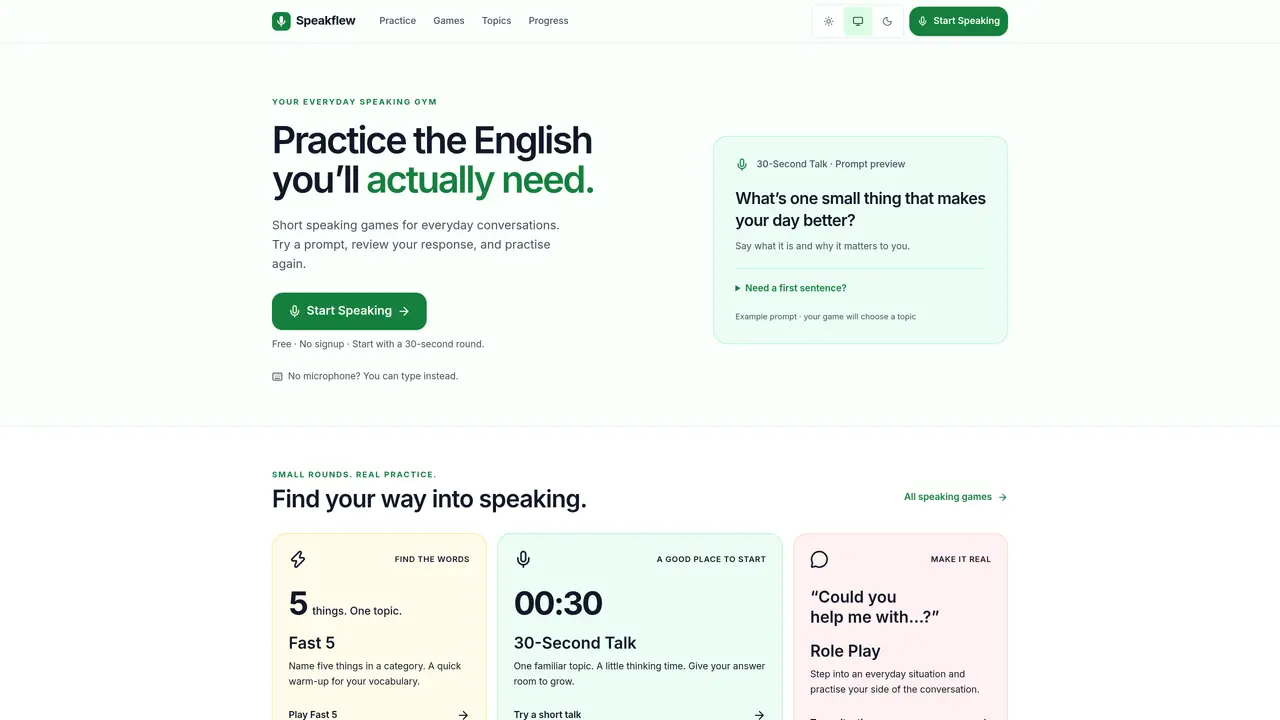
Speakflew provides brief, focused speaking exercises designed for everyday English practice. Users engage with short prompts on topics relevant to daily life, work, or travel, recording spoken responses that can be reviewed immediately. The platform offers a library of practice games, including timed challenges, vocabulary warm-ups, and role-play scenarios. Each session is self-paced, with no requirement to create an account or log in. Responses are captured in a Speaking Snapshot that displays word counts and transcripts without evaluating pronunciation, fluency, or grammar. Users can choose to type answers if microphone access is unavailable, and all progress is saved locally in the browser. The tool emphasizes practical, low-pressure speaking drills rather than formal language assessment.
Speakflew is a free tool offering short, focused English speaking exercises for everyday life, work, or travel. It is designed for learners seeking practical, low-pressure speaking practice without formal assessments.
No, Speakflew does not require account creation or login. Users can start practicing immediately, and progress is saved locally in the browser.
Yes, Speakflew offers a typing option for each game if microphone access is unavailable or speech recognition is not supported.
The Speaking Snapshot displays captured answers, word or entry counts, and activity time, followed by a self-review question. It does not evaluate pronunciation, fluency, grammar, or English level.
Speech recognition depends on the user's browser and its provider, which may process audio remotely. Users can review their browser’s privacy settings or choose the typing option instead.
Speakflew offers games like 30-Second Talk, Fast 5, and Role Play, each designed for short, manageable practice sessions with real-world topics.
We use essential cookies to run aitoolnavio™, and optional cookies to analyze traffic and measure our marketing. You choose what we use — optional cookies stay off unless you turn them on. See our Privacy Policy.
One short email a week: fresh tools worth trying, honest takes and the updates that actually matter. No spam, unsubscribe any time.
Online language-learning platform offering interactive courses, progress tracking, rewards, and personalized feedback for all skill levels.
Practice conversing with AI, improve pronunciation, and learn a new language in an immersive, safe environment.
AI app that helps non-native English speakers practice real-world conversations with instant pronunciation and fluency feedback.
Bulk translation tool that handles text, audio and files in over 60 languages with offline and privacy features.
Receive real-time pronunciation feedback, practice with AI partner, and get personalized learning for better progress.
Personalized language lessons with AI Avatars, tailored feedback, and a virtual learning environment for faster progress.
Discover vocabulary with real-world videos, interactive captions, instant definitions, and personalized progress tracking.
Personalized language lessons for conversation, grammar, pronunciation with feedback from experienced teachers.
An AI English tutor that provides real-time speaking practice with grammar, vocabulary, and pronunciation corrections for learners.
AI-powered app that simulates real-life conversations to improve speaking fluency and pronunciation with personalized feedback.
Master English fluency with AI-powered personalized coaching.
Chat about any topic and get instant feedback from the world's most advanced AI language model, powered by ChatGPT technology.
Matched on what this tool does — grouped by the job you would be replacing.
matches 30-second timed speaking rounds · Speaking Snapshot with transcript review · Typing alternative for microphone-free practice
An AI English tutor that provides real-time speaking practice with grammar, vocabulary, and pronunciation corrections for learners.
An iOS AI language tutor offering real-world speaking practice with instant pronunciation and grammar corrections.
AI language learning platform offering text and voice practice, pronunciation scoring, corrections, and QR-verifiable CEFR certificates.
AI-powered English speaking practice with pronunciation and grammar feedback