Generate content, correct spelling, suggest synonyms to enhance writing.
173M visits/mo+0.1%#1 Productivity & Office

A visual workspace for turning PDF highlights into flashcards and organizing them spatially
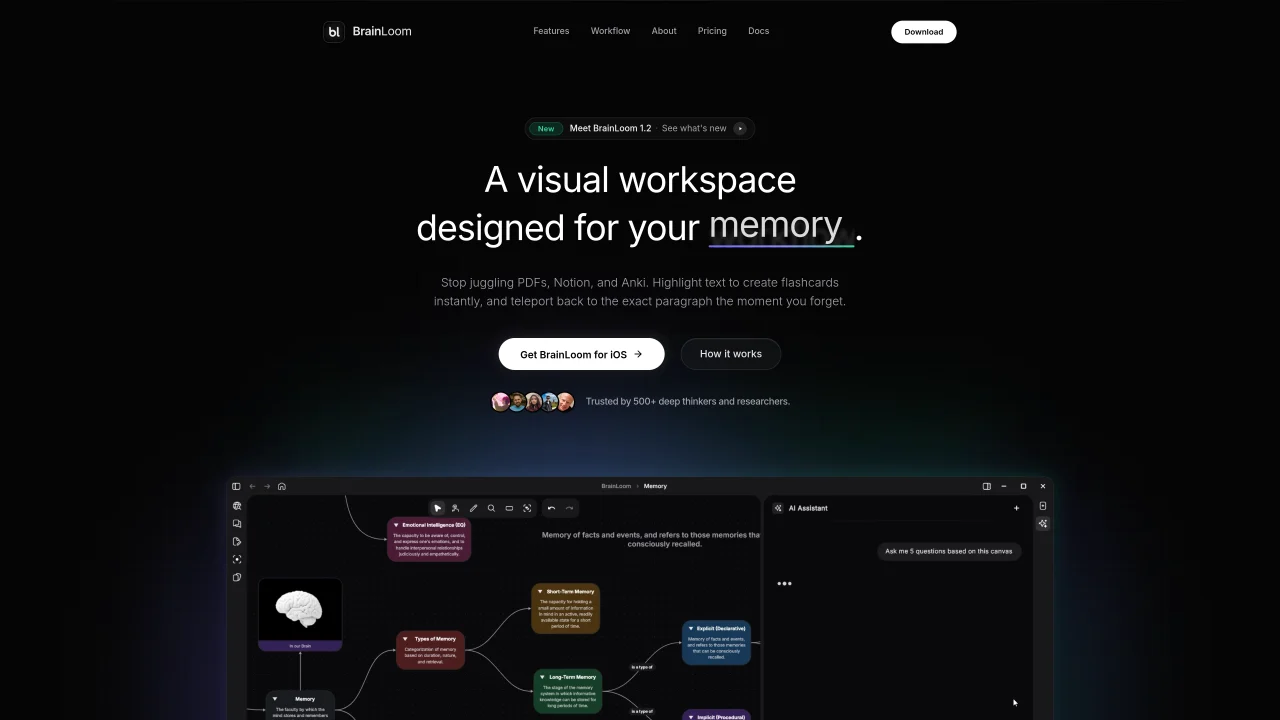
BrainLoom provides a visual workspace designed for memory workflows, combining a PDF reader, note-taking, and flashcard creation in one interface. Highlighted text from PDFs can be instantly converted into flashcards that retain links to their original sources, allowing users to revisit the exact paragraph when reviewing. The application features an infinite canvas where flashcard decks can be arranged spatially, supporting linear and nonlinear thinking with freehand drawing and stylus annotations. Flashcards can be graded through a swipe-based interface, and the tool tracks retention using forgetting curves and daily streaks. BrainLoom includes a Mastery Lifecycle that visually tracks progress from idea to mastery, and it can auto-detect labels on diagrams to generate visual flashcards. The software emphasizes local-first storage with optional cloud sync and is built for users who prioritize deep context and distraction-free learning environments.
BrainLoom is an AI-powered learning operating system and second brain designed to help users organize, retain, and master information. It combines a PDF reader, note-taking, and flashcard creation in a single visual workspace.
BrainLoom is ideal for students, researchers, professionals, and lifelong learners who need to process large volumes of information efficiently while maintaining deep context and structured understanding.
Highlighted text from PDFs can be instantly converted into flashcards that retain links to their original sources, allowing users to revisit the exact paragraph during review sessions.
Yes, BrainLoom features an infinite canvas where users can arrange flashcard decks spatially, add freehand drawings, and use stylus annotations to enhance visual learning and organization.
The tool tracks retention using forgetting curves and daily streaks, while the Mastery Lifecycle visually represents progress from initial idea to full mastery of the material.
Yes, BrainLoom can auto-detect labels on diagrams to generate visual flashcards, supporting a more comprehensive learning approach.
brainloom.app · third-party estimates from Similarweb
Last 2 months · grows by one month every month
Share of visits by channel
No measurable traffic from Social, Paid Referrals, Mail or Search.
Share of visits · estimated visits
Productivity & Office · Sep 2026
Traffic figures are third-party estimates, good for scale and trends; they can differ from a company's own numbers. Updated monthly.
We use essential cookies to run Aitoolnavio, and optional cookies to analyze traffic and measure our marketing. You choose what we use — optional cookies stay off unless you turn them on. See our Privacy Policy.
One short email a week: fresh tools worth trying, honest takes and the updates that actually matter. No spam, unsubscribe any time.
Generate content, correct spelling, suggest synonyms to enhance writing.
Capture, organize, and share ideas, notes, and documents effortlessly.
Markdown-based note-taking and personal knowledge management app that turns notes into a connected system of ideas.
Easily create and track training courses, design learning environments, and access from any device with an intuitive interface.
An AI-powered note-taking app for students and professionals to write, sketch, annotate PDFs, record audio, and generate summaries, quizzes, and flashcards.
Handwritten note-taking app with searchable ink, PDF annotation, synced audio, and AI-powered study tools.
AI-enhanced note-taking and research organization tool.
AI-powered process documentation tool that captures workflows into visual step-by-step guides with screenshots, editing, and exports.
A note-taking and spaced-repetition flashcard app for students and learners, with PDF annotation plus AI tools for generating cards, quizzes, and study summaries.
AI web app that transcribes audio, video, and YouTube links into text in 98 languages with summaries, mind maps, and export formats for students and teams.
AI-powered PDF editor with built-in agents for summarization, translation, and document analysis.
Create accurate notes, extract relevant information, stay organized, and never miss important details.
Matched on what this tool does — grouped by the job you would be replacing.
matches PDF highlight to flashcard conversion · Source paragraph linking for flashcards · Swipe-based flashcard grading
AI tool that converts study materials into organized guides, quizzes and flashcards
AI-powered medical flashcard app for iOS and Android
matches Infinite canvas with freehand drawing · Local-first storage with cloud sync
Privacy-focused open-source workspace combining docs, whiteboards, and databases with offline-first storage and optional AI features.
An infinite canvas workspace that merges web browsing, reading, and visual content organization in one app.
Visual note-taking and research tool for organizing ideas with linked docs, boards, and real-time collaboration.
AI-powered canvas workspace for organizing ideas, notes and plans in one place