Generate content, correct spelling, suggest synonyms to enhance writing.
173M visits/mo+0.1%#1 Productivity & Office

AI-powered student workspace combining assignments, AI tutoring, focus tools and notes
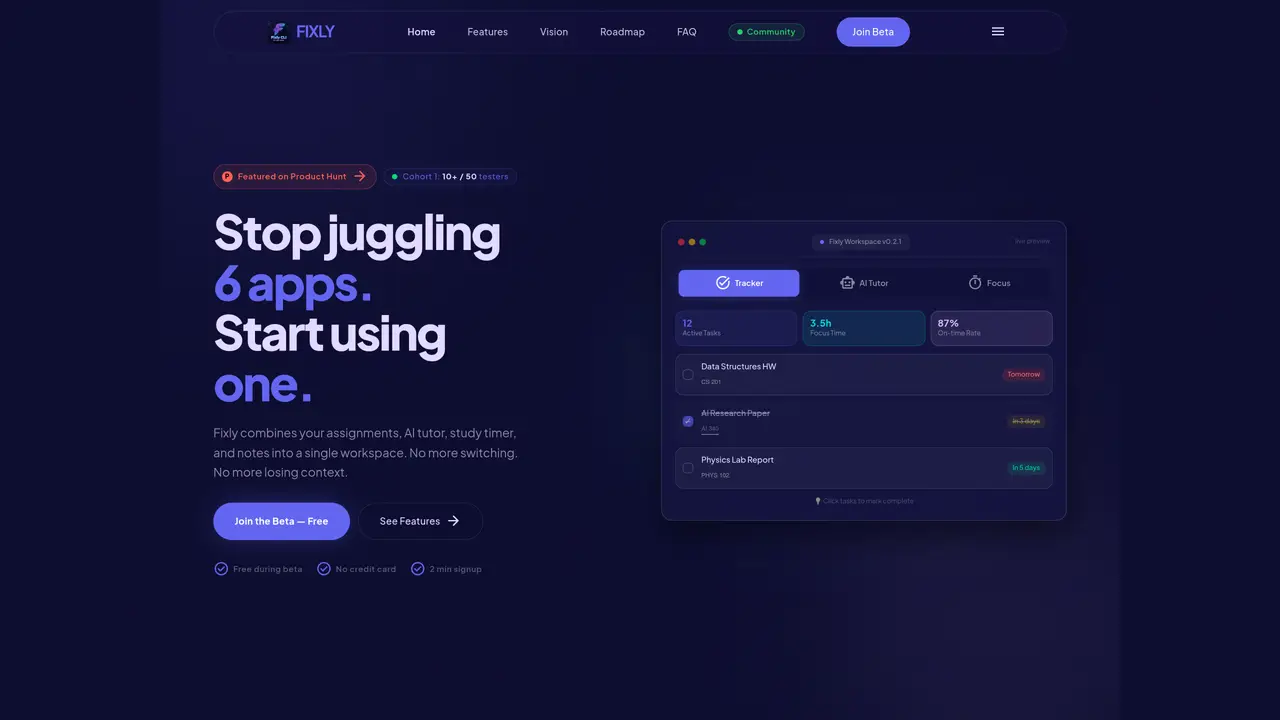
Fixly is an AI-powered workspace designed for students to consolidate multiple disconnected tools into a single platform. It integrates assignment tracking, an AI study assistant, a focus timer, note-taking, and progress analytics into one interface. Users can manage deadlines, receive AI-generated explanations, and maintain focus through Pomodoro sessions with ambient sounds. The tool supports PDF analysis, AI draft generation, and screenshot OCR for problem extraction. Data syncs in real time across desktop, web, and mobile devices, ensuring assignments, AI interactions, and productivity metrics remain consistent. The workspace includes features like daily briefings, progress insights, and customizable settings for notifications and study preferences. It targets students struggling with fragmented workflows across tools like Google Calendar, ChatGPT, Trello, Notion, and Forest.
Fixly is an AI-powered workspace designed for students to consolidate multiple disconnected tools into a single platform. It combines assignment tracking, an AI study assistant, a focus timer, note-taking, and progress analytics into one interface.
Fixly replaces the need for multiple apps by integrating assignment tracking, AI tutoring, focus tools, and progress analytics into one unified workspace. It syncs data in real time across devices to ensure assignments, AI interactions, and productivity metrics remain consistent.
Fixly offers features such as assignment tracking, an AI study assistant, a focus timer with ambient sounds, PDF analysis, AI draft generation, screenshot OCR for problem extraction, daily briefings, progress insights, and cross-platform sync.
Fixly is available for free during its beta phase, and no credit card is required to sign up. The tool is currently in beta testing with a waitlist for additional users.
To get started, users can sign up in under two minutes by creating a free account with just their name and email. After signing up, users can add their courses, set deadlines, and begin using the AI study assistant and other features.
Fixly supports real-time sync across desktop, web, and mobile devices. Mobile apps for iOS and Android are planned for the future, but the workspace can currently be accessed via any web browser.
We use essential cookies to run aitoolnavio™, and optional cookies to analyze traffic and measure our marketing. You choose what we use — optional cookies stay off unless you turn them on. See our Privacy Policy.
One short email a week: fresh tools worth trying, honest takes and the updates that actually matter. No spam, unsubscribe any time.
Generate content, correct spelling, suggest synonyms to enhance writing.
Markdown-based note-taking and personal knowledge management app that turns notes into a connected system of ideas.
Capture, organize, and share ideas, notes, and documents effortlessly.
Easily create and track training courses, design learning environments, and access from any device with an intuitive interface.
An AI-powered note-taking app for students and professionals to write, sketch, annotate PDFs, record audio, and generate summaries, quizzes, and flashcards.
Handwritten note-taking app with searchable ink, PDF annotation, synced audio, and AI-powered study tools.
AI-powered process documentation tool that captures workflows into visual step-by-step guides with screenshots, editing, and exports.
AI web app that transcribes audio, video, and YouTube links into text in 98 languages with summaries, mind maps, and export formats for students and teams.
A note-taking and spaced-repetition flashcard app for students and learners, with PDF annotation plus AI tools for generating cards, quizzes, and study summaries.
AI-powered research assistant for organizing, analyzing, and synthesizing information from notes and documents.
Capture thoughts, create documents, and access on any device for convenient organization and productivity.
AI-powered PDF editor with built-in agents for summarization, translation, and document analysis.
Matched on what this tool does — grouped by the job you would be replacing.
matches AI study assistant for explanations and summaries · AI draft generation from notes and prompts · Screenshot OCR for problem extraction
AI-powered STEM problem solver with step-by-step explanations
Help students solve homework and assignments by providing step-by-step explanations and guided reasoning.
Access accurate answers, connect with experts, and get personalized help for your specific needs.
All-in-one homework app with an AI tutor for students with ADHD, autism or dyslexia
matches Assignment tracking across subjects · Daily briefing of deadlines and tasks · Progress analytics and completion tracking
matches PDF analysis and key point extraction
AI study app that turns PDFs, notes, and videos into quizzes, flashcards, summaries, podcasts, mind maps, games, and an AI tutor for students.
All-in-one AI-powered workspace for students to manage and complete academic work
AI study coach that plans study sessions from course materials and deadlines
Summarizes, extracts, and rewrites content from files.
An AI-powered note-taking app for students and professionals to write, sketch, annotate PDFs, record audio, and generate summaries, quizzes, and flashcards.
AI-powered app that records audio, transcribes conversations, and turns them into summaries, tasks, and study aids in real time.
All-in-one AI workspace for recording, transcribing and transforming lectures into study materials