

Create stunning visuals, develop ideas with AI-powered tools, and instantly share content without coding or formatting.
21M visits/mo+6.5%#6 Writing & Content
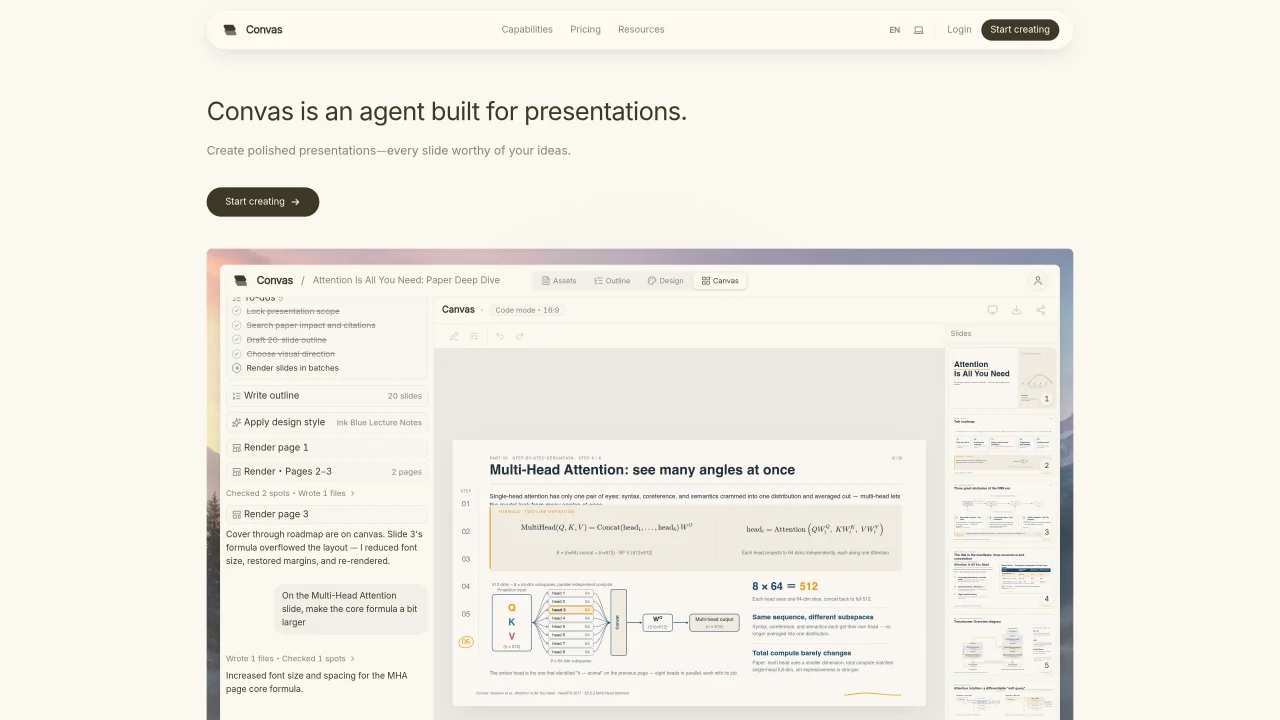
Convas is an AI agent designed to generate and refine presentation slides. It accepts text prompts or uploaded files such as Excel, CSV, PDF, or PowerPoint to produce polished decks. The agent handles slide-level and cross-slide edits through natural language commands, adjusting colors, sizes, titles, and layouts in real time. It can incorporate data tables into charts, perform statistical analysis, and generate icons, diagrams, and motion elements that align with the user’s design language. Convas supports read-only sharing via links for live presentations and allows exports to PDF or PowerPoint formats. The tool also assists in research by searching the web with citations, sourcing visuals, and matching brand styles from uploaded documents. Projects are managed within a workspace that tracks usage and credits.
Convas is an AI agent designed specifically for creating and refining presentation slides. It transforms text prompts or uploaded files into polished decks and handles edits through natural language commands.
Convas is ideal for professionals, researchers, and teams who need to quickly generate high-quality presentations from data or ideas. It suits users who want to automate slide design while maintaining control over edits and branding.
Convas can read data tables from Excel or CSV files, compute statistics, and generate accurate charts directly on slides. Users can edit KPIs and apply advanced statistical visualizations like heatmaps or correlations.
Yes, Convas can align with a brand's style by uploading existing PowerPoint files to extract color palettes and design elements. It also generates icons, diagrams, and motion elements that fit the user's design language.
Convas allows users to share presentations via read-only links for live presentations without requiring sign-ins. Exports are available in PDF or PowerPoint formats for takeaways or further editing.
Convas can perform web searches with citations, source visuals, and generate editorial illustrations or vector art. It also extracts embedded figures from PDFs and prepares all elements before generating the final deck.
We use essential cookies to run aitoolnavio™, and optional cookies to analyze traffic and measure our marketing. You choose what we use — optional cookies stay off unless you turn them on. See our Privacy Policy.
One short email a week: fresh tools worth trying, honest takes and the updates that actually matter. No spam, unsubscribe any time.
Create stunning visuals, develop ideas with AI-powered tools, and instantly share content without coding or formatting.
Create captivating, customizable presentations and easily share them across devices with a cloud-based platform.
Engage audience with interactive polls, quizzes, and surveys, and monitor responses with powerful analytics.
All-in-one AI workspace for creating presentations, essays, images, videos, podcasts, and AI-powered chat responses from a single platform.
Visual collaboration platform for creating diagrams, mind maps, wireframes, and workflows with real-time teamwork.
Skywork Super Agents: Workspace productivity suite with specialized AI for research-grade documents, slides & spreadsheets + multimedia tools.
AI-powered design tool that turns templates into professional presentations, infographics, and timelines with no graphic design skills required.
AI-powered platform for creating presentations, infographics, reports, and social media graphics from text prompts with built-in brand management and collaboration tools.
Visualize processes, design network diagrams, and collaborate in real-time with templates and easy-to-use interface.
AI-powered presentation tool that generates professional slides from text with a vast library of templates, images, and customization options.
AI-powered presentation maker that generates PowerPoint and Google Slides decks from prompts, documents, or URLs for professionals, educators, and students.
Generate presentations, create interactive slideshows, and customize with themes, fonts, and colors.
Matched on what this tool does — grouped by the job you would be replacing.
matches Natural language slide editing · Data table to chart conversion · Cross-slide modifications via chat
Generate presentations, create interactive slideshows, and customize with themes, fonts, and colors.
An AI productivity workspace that turns documents and text into presentations, chats with PDFs, and generates long-form content for students, educators, and marketers.
AI tool that converts documents into polished presentations automatically
Generates editable PowerPoint presentations from topics, documents, or itineraries
matches Brand style matching from PPTX · Icon, diagram, and motion generation · Cross-slide modifications via chat
Prompt up editable, on-brand multi-format files.
AI-powered visual communication tool for creating infographics, reports, presentations, and social graphics from templates with AI assistance.