AI assistant for safe, reliable productivity with code, collaboration, and integrations.

FormCaddie
FreeStarting price
0Popularity
About FormCaddie
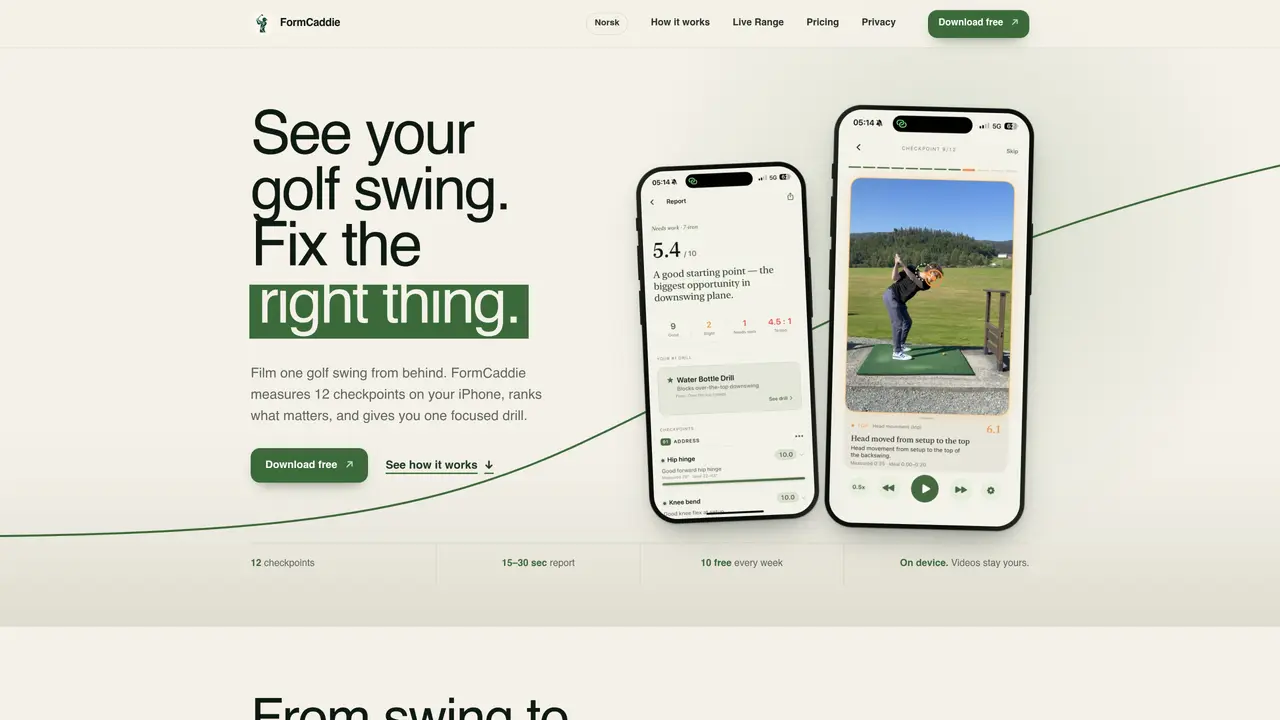
FormCaddie is an iPhone application that analyzes golf swings using Apple Vision and a club-tracking model. It measures 12 specific checkpoints from a down-the-line video taken 4–5 meters behind the golfer. The app compares these measurements against tour-pro calibrated ranges and ranks visible faults by their impact on the swing. It then provides a single, prioritized drill to address the most significant issue. The analysis takes 15–30 seconds and is performed entirely on the device, with videos and data remaining local. Users can import existing swings from their camera roll or film new ones directly in the app. The tool supports irons, wedges, hybrids, and fairway woods but excludes driver and putter due to its focus on full swings with lofted clubs. It offers hands-free Live Range mode for continuous practice without handling the phone between shots.
Key features
- 12 swing checkpoints measured
- Tour-pro calibrated comparison ranges
- Single prioritized drill recommendation
- Slow-motion and frame-by-frame playback
- Hands-free Live Range coaching
- Local video storage with no cloud uploads
- Import swings from camera roll
- 23 available drills to choose from
Use cases
- Practicing at the driving range with immediate feedback
- Reviewing recorded swings to identify recurring faults
- Receiving a focused correction after a practice session
Pros
- On-device processing with no video uploads
- Provides a single prioritized drill instead of multiple corrections
- Supports slow-motion and frame-by-frame review of checkpoints
- Hands-free Live Range mode for uninterrupted practice
- Available in English and Norwegian
Cons
- Requires iPhone with iOS 17 or later
- Excludes driver and putter from analysis
- Limited to 10 free analyses per week
- No desktop or Android support
Frequently asked questions about FormCaddie
What do I need to film a golf swing for FormCaddie?
You need an iPhone running iOS 17 or later and something to lean it against. Position the phone at stomach height, 4–5 meters directly behind you on the ball-to-target line, ensuring your entire body and both hands are in frame. Filming at 60 fps is recommended for sharper checkpoints.
Which golf clubs does FormCaddie support?
FormCaddie works with irons, wedges, hybrids, and fairway woods. Driver and putter are excluded because the tool is designed for full swings with lofted clubs, and ideal measurement ranges shift based on the club selected.
Does FormCaddie upload my golf swing videos to the cloud?
No. The video is processed entirely on your iPhone, and all swing clips, measurements, and analysis results remain local in your library. Videos and data are not sent to analytics or external servers.
How long does it take to analyze a golf swing in FormCaddie?
The analysis typically takes 15–30 seconds from the end of the video clip to the completion of a 12-checkpoint report. The process is performed on the device without requiring an internet connection.
What does the pricing model for FormCaddie look like?
FormCaddie offers ten free swing analyses every week. The Pro version adds unlimited analyses, unlimited Live Range sessions, and a personal training plan. Pricing options are available as monthly or yearly subscriptions in the local currency through the App Store.
Does FormCaddie replace the need for a golf coach?
No. FormCaddie measures what a single down-the-line camera can capture and provides a focused drill based on the analysis. It serves as a supplementary tool or second opinion to support range sessions rather than replacing professional coaching.