Generate captions, optimize content, and enhance with custom images for maximum engagement.
46M visits/mo-10%#3 Image & Design
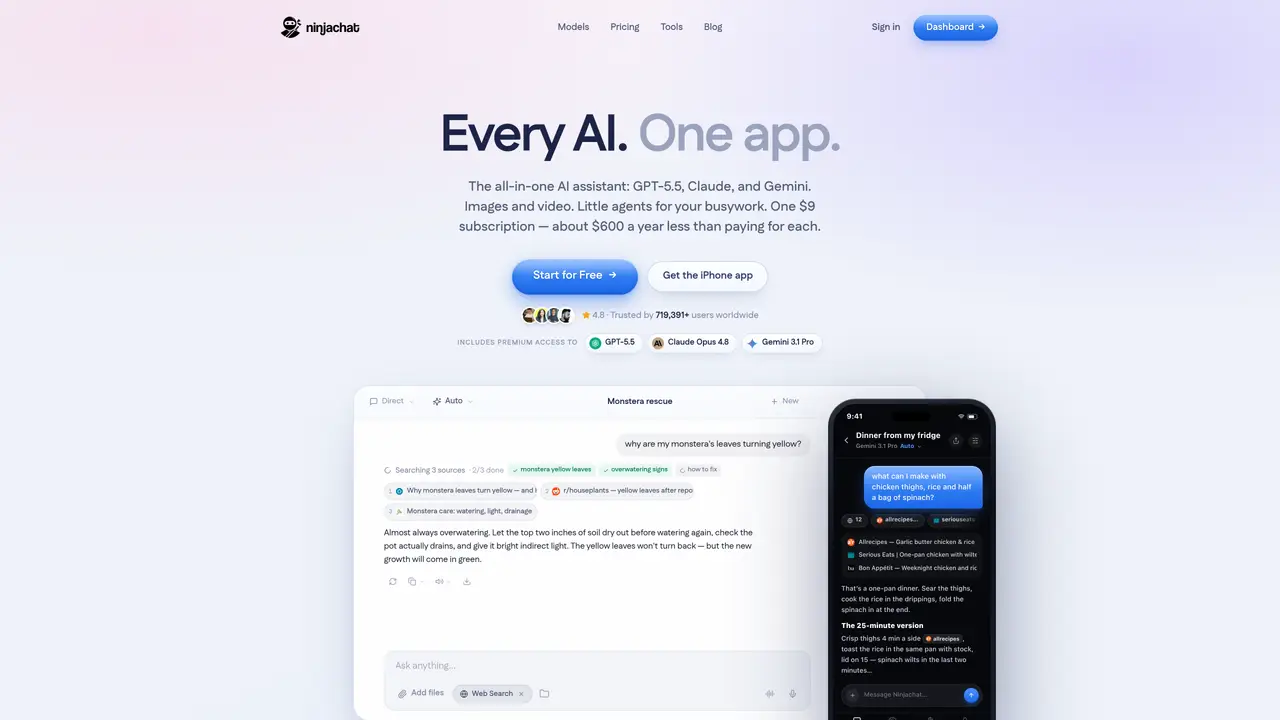
Ninjachat AI revolutionizes the way we interact with artificial intelligence by providing a comprehensive, all-in-one platform that integrates multiple AI models, such as ChatGPT, Claude, and Stable Diffusion. Designed for individuals and professionals seeking efficiency and cost-saving solutions, Ninjachat AI simplifies complex tasks ranging from writing and image generation to document analysis and music composition. Key Features: Multiple AI Models: Access top-tier AI models like GPT-4, Claude 3, and Mistral in one platform, ensuring versatility and powerful performance for various tasks. AI Writing Tools: Enhance your writing with tools such as Text Naturalizer, Conclusion Writer, Professional Email Drafter, and Attention Grabber, among others. Interactive Story Plotter: Develop branching storylines for interactive narratives, perfect for writers and game designers. AI Music Generator: Compose unique tracks without any musical experience, making it easy to create custom soundtracks for projects. PDF Analysis: Unlock insights from your documents quickly, saving hours of reading time. Ninjachat AI stands out with its integration of multiple leading AI models in a single platform, a game-changer for productivity and creativity. Its ability to seamlessly switch between different AI tools and provide a unified user experience sets it apart from other solutions, making it indispensable for users who require a diverse set of AI functionalities. Compatibilities and Integrations: Google Workspace Integration: Easily use Ninjachat AI within Google Docs and Sheets for enhanced productivity. Slack Integration: Integrate with Slack to streamline team communications and automate responses. API Access: Developers can harness Ninjachat AI’s API for custom integrations and tailored solutions. Third-Party Integration: Supports integration with various third-party tools, enhancing its versatility. Ninjachat AI Tutorials: Explore the comprehensive tutorial series on YouTube, covering everything from basic setup to advanced features of Ninjachat AI. These tutorials help users maximize the tool’s potential and streamline their workflows.
Ninjachat AI is an all-in-one platform that integrates multiple leading AI models, including ChatGPT, Claude, and Stable Diffusion, into a single interface. It enables users to perform a variety of tasks such as writing, image generation, document analysis, and music composition.
The platform is designed for individuals and professionals seeking efficient and cost-effective AI solutions. It caters to writers, developers, designers, and teams looking to streamline workflows and enhance productivity across different domains.
Ninjachat AI provides access to top-tier AI models such as GPT-4, Claude 3, and Mistral, among others. Users can switch between these models seamlessly within the platform to suit their specific needs.
Yes, Ninjachat AI supports integrations with Google Workspace, Slack, and offers API access for developers. It also supports third-party tool integrations to enhance versatility and workflow automation.
Ninjachat AI provides a comprehensive tutorial series on YouTube, covering everything from basic setup to advanced features. These resources help users maximize the tool’s potential and optimize their workflows.
Users can get started by visiting the Ninjachat AI website and signing up for an account. The platform offers tutorials and documentation to guide users through the setup and usage process.
ninjachat.ai · third-party estimates from Similarweb
Last 4 months · grows by one month every month
Share of visits · estimated visits
Other countries: 59.4%
How people reach this site from other AI tools
910 a month · 0.1% of all visits
Writing & Content · Sep 2026
Traffic figures are third-party estimates, good for scale and trends; they can differ from a company's own numbers. Updated monthly.
We use essential cookies to run aitoolnavio™, and optional cookies to analyze traffic and measure our marketing. You choose what we use — optional cookies stay off unless you turn them on. See our Privacy Policy.
One short email a week: fresh tools worth trying, honest takes and the updates that actually matter. No spam, unsubscribe any time.
Generate captions, optimize content, and enhance with custom images for maximum engagement.
Create stunning visuals, develop ideas with AI-powered tools, and instantly share content without coding or formatting.
Headless CMS that lets developers manage structured content and deliver it anywhere via flexible APIs and real-time collaboration tools.
Analyze, collaborate, optimize content for quality, speed, and wider reach, with tailored suggestions.
Solvely is an AI homework-help app that solves math, science, and liberal arts problems with photos.
AI-driven tool for seamless, high-quality content generation.
Generate unique avatars and craft effective, engaging copy effortlessly.
Accurately detects AI-generated content, monitors real-time dashboard, and ensures content is plagiarism-free.
Generate high-quality, SEO-optimized content effortlessly, saving time for blog posts, social media, and marketing copy.
Generate professional copy in seconds, customize with an intuitive platform, and access pre-written content for inspiration.
AI SEO platform that automates keyword research, content creation, and publishing for websites and e-commerce stores.
Create blog posts, generate tailored product descriptions, and automate content creation for websites and social media.
Matched on what this tool does — grouped by the job you would be replacing.
matches AI Writing Tools · Interactive Story Plotter
Generate content, correct spelling, suggest synonyms to enhance writing.
AI-powered writing tool for paraphrasing, summarizing, and enhancing writing effortlessly.
Get quick copywriting help, generate marketing copy, and easily translate, explain, and rephrase web page text.
AI Doc GPT automates document generation, generates high-quality content quickly, and summarizes large documents.
matches AI Music Generator
matches Multiple AI Models · API Access · Third-Party Integration
Generate full songs with vocals, lyrics, and instrumentals from text prompts in minutes.
AI music generator that turns text prompts into original songs with vocals, lyrics, and full production.
Unified AI workspace combining chat, writing, coding, and productivity tools for streamlined workflows.
Ninja AI is a comprehensive AI assistant that integrates over 25 leading AI models for research, writing, and coding.