

Craft captivating stories effortlessly using AI-powered GPT technology and an intuitive interface.
5.1M visits/mo+5.5%#12 Writing & Content
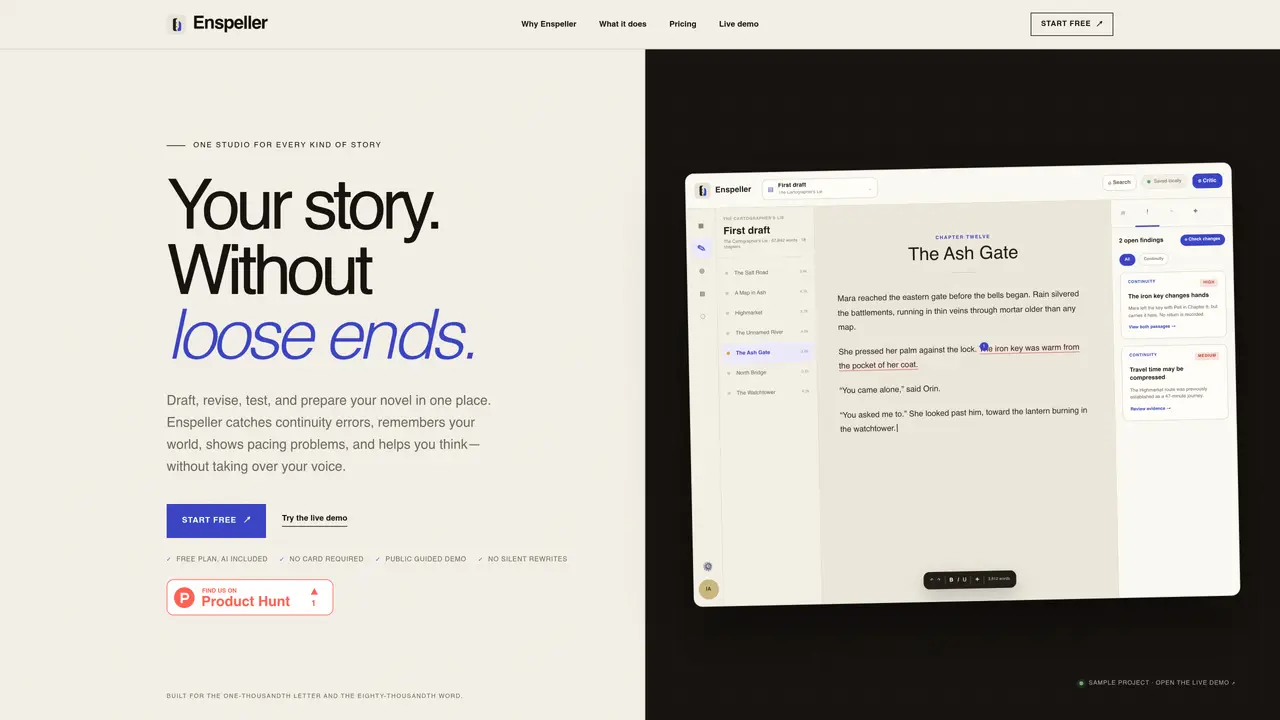
Enspeller provides a single workspace for drafting, revising, and analyzing novels. It tracks continuity errors, world details, pacing, and character arcs while preserving the author’s voice. The tool imports drafts from Word, Markdown, or plain text and organizes them into chapters and scenes. It includes features like a continuity critic, living story bible, character and structure analysis, and fiction-aware formatting. AI features such as manuscript chat, discourse mode, and simulated reader panels are available to help writers refine their work. Exports produce properly formatted manuscripts without requiring manual cleanup. The studio supports offline work with cloud sync and is designed specifically for novel-length manuscripts.
Enspeller is a writing studio designed for novelists to draft, revise, and analyze their work in a single workspace. It helps authors track continuity, world details, pacing, and character arcs while preserving their unique voice.
Yes, Enspeller allows users to import drafts from Word, Markdown, or plain text files. The tool organizes the draft into chapters and scenes for further analysis and revision.
Enspeller includes AI features such as manuscript chat, discourse mode, and simulated reader panels to help writers refine their work. These tools assist with questions, discussions, and feedback without altering the draft without user consent.
Enspeller tracks continuity errors, locations, objects, timelines, and world rules through its continuity critic and living story bible. It flags inconsistencies and provides evidence from the manuscript for review.
Yes, Enspeller supports offline work with cloud sync. Changes are saved locally and synced when reconnecting, allowing users to continue writing without an internet connection.
Users can start with a free plan that includes AI features. No credit card is required, and a live demo is available to explore the tool’s capabilities without creating an account.
We use essential cookies to run aitoolnavio™, and optional cookies to analyze traffic and measure our marketing. You choose what we use — optional cookies stay off unless you turn them on. See our Privacy Policy.
One short email a week: fresh tools worth trying, honest takes and the updates that actually matter. No spam, unsubscribe any time.
Craft captivating stories effortlessly using AI-powered GPT technology and an intuitive interface.
Create and play endless AI-generated text adventures with customizable stories, characters, and choices online or via the app.
An AI creation platform for turning images into videos, adding twist endings, and building interactive roleplay stories.
Web-based novel writing software for authors, offering outlining, world-building, reviewing tools, and AI assistance for drafting and analysis.
Squibler is an AI-powered writing tool designed to streamline the creative process for authors, screenwriters, and content creators.
AI creation studio for generating short dramas and narrative videos with consistent characters and scenes.
Generate visuals, modify details, and fulfill any concept or idea with stunning images in seconds.
An AI-powered video and story creation platform that turns prompts into animated films, storyboards, and storybooks for creators and publishers.
AI Character Roleplay Platform!
Mobile AI-powered text RPG that generates choice-based adventures with voice narration, AI art, dynamic soundtracks, and co-op play.
AI-powered manuscript analysis and reader feedback for authors
AI-powered manuscript review service providing feedback from multiple virtual reader personas
Matched on what this tool does — grouped by the job you would be replacing.
matches Continuity analysis for time, travel, locations, and cause and effect · Living Story Bible for characters, places, and world rules · Character and structure analysis including pacing and POV shifts
Web-based novel writing software for authors, offering outlining, world-building, reviewing tools, and AI assistance for drafting and analysis.
Desktop AI writing studio for planning, drafting and revising novels with integrated context
AI-powered literary intelligence for analyzing fiction manuscripts
AI coauthor for long-form fiction that builds and refines worlds, plots, and drafts through conversation
matches Living Story Bible for characters, places, and world rules · Character and structure analysis including pacing and POV shifts
AI tool for developing and conversing with fictional characters
A co-writing tool for fiction writers to build and maintain original characters and worlds