Craft captivating stories effortlessly using AI-powered GPT technology and an intuitive interface.
5.1M visits/mo+5.5%#12 Writing & Content

Free web-based tool that drafts personalized eulogies from user memories and tone preferences
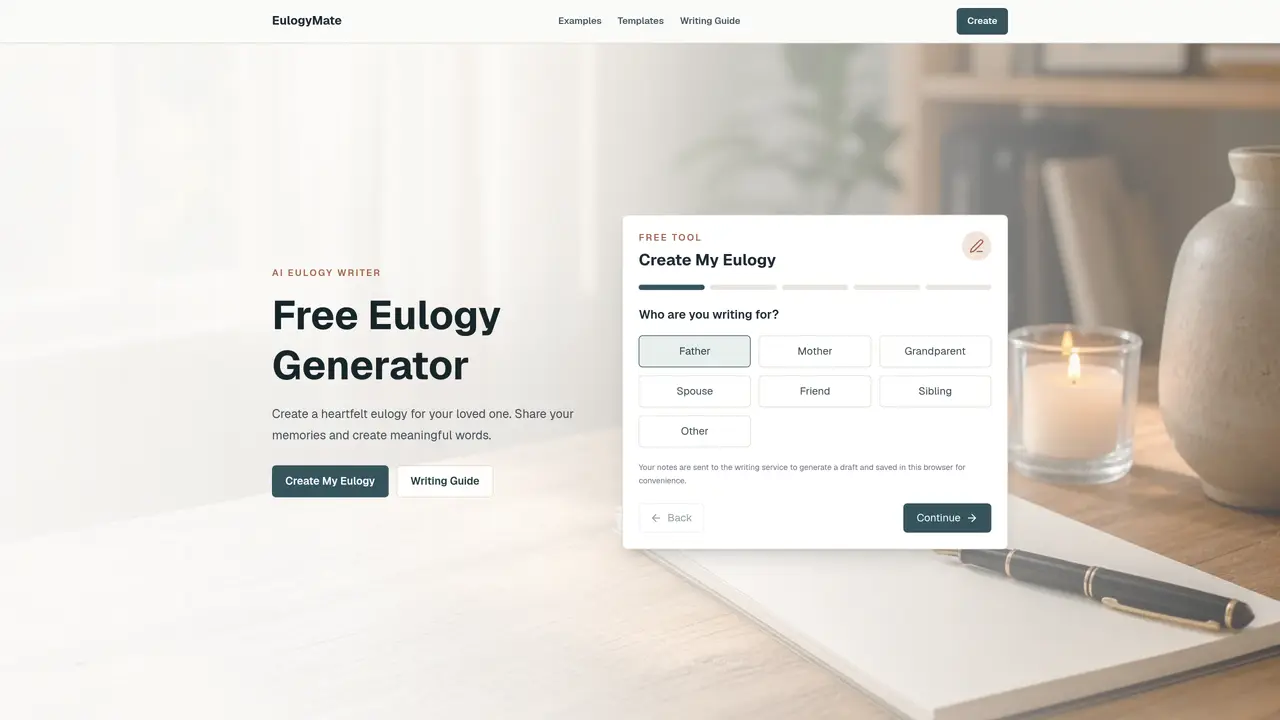
EulogyMate is a free online tool designed to help users create a heartfelt eulogy by guiding them through a structured writing process. It asks for the relationship to the deceased, specific memories, personality traits, lessons learned, and the desired tone before generating a draft. The tool organizes the input into a clear beginning, middle, and farewell, ensuring the speech is respectful and easy to read aloud. Users can edit the result to better reflect their voice and add personal details. The generator avoids inventing stories and relies solely on the information provided by the user. It supports various styles, including formal, simple, and celebration-of-life, making it suitable for funerals, memorials, and celebrations of life. The tool does not require an account and saves drafts locally in the browser for convenience.
EulogyMate offers a free eulogy generator with copy support and a daily guest limit. The tool does not require an account or payment to create a draft.
No. The generator is instructed to use only the details you provide and to avoid inventing memories or stories about the deceased.
Yes. The speech is written to sound natural when read aloud, and you can edit it before speaking to ensure it reflects your voice and the setting.
No account is required. Your draft is saved locally in the browser for convenience, and you can clear it anytime.
The tool organizes your input into a clear beginning, middle, and farewell, softening transitions and making sentences easier to read aloud.
The tool supports heartfelt, formal, simple, and celebration-of-life styles, making it suitable for funerals, memorials, and celebrations of life.
eulogymate.com · third-party estimates from Similarweb
Last 2 months · grows by one month every month
Share of visits by channel
Share of visits · estimated visits
Writing & Content · Sep 2026
Traffic figures are third-party estimates, good for scale and trends; they can differ from a company's own numbers. Updated monthly.
We use essential cookies to run aitoolnavio™, and optional cookies to analyze traffic and measure our marketing. You choose what we use — optional cookies stay off unless you turn them on. See our Privacy Policy.
One short email a week: fresh tools worth trying, honest takes and the updates that actually matter. No spam, unsubscribe any time.
Craft captivating stories effortlessly using AI-powered GPT technology and an intuitive interface.
Create and play endless AI-generated text adventures with customizable stories, characters, and choices online or via the app.
An AI creation platform for turning images into videos, adding twist endings, and building interactive roleplay stories.
Web-based novel writing software for authors, offering outlining, world-building, reviewing tools, and AI assistance for drafting and analysis.
Squibler is an AI-powered writing tool designed to streamline the creative process for authors, screenwriters, and content creators.
AI creation studio for generating short dramas and narrative videos with consistent characters and scenes.
Generate visuals, modify details, and fulfill any concept or idea with stunning images in seconds.
An AI-powered video and story creation platform that turns prompts into animated films, storyboards, and storybooks for creators and publishers.
AI Character Roleplay Platform!
Mobile AI-powered text RPG that generates choice-based adventures with voice narration, AI art, dynamic soundtracks, and co-op play.
AI-powered manuscript analysis and reader feedback for authors
AI-powered manuscript review service providing feedback from multiple virtual reader personas
Matched on what this tool does — grouped by the job you would be replacing.
matches Relationship selection (father, mother, friend, etc.) · Memory and personality trait collection · Tone and length customization
Online apology card maker with AI message generator and shareable cards
Generate personalized wedding speeches with AI assistance in minutes.
Generates editable letters for housing, work and service issues
Generates personalized card messages from brief user input
matches Draft generation with beginning, middle, and farewell · Editable output for personalization
Generate full songs with vocals, lyrics, and instrumentals from text prompts in minutes.
Turns personal stories into custom AI-generated songs with studio-quality MP3 delivery for gifts and keepsakes.
Creates a custom song from personal stories and memories for special occasions
Creates personalized song gifts from user memories in multiple languages and genres