
Quickly and accurately translate documents with unparalleled precision and confidence for business, legal, and academic purposes.
97M visits/mo-2.3%#1 Writing & Content
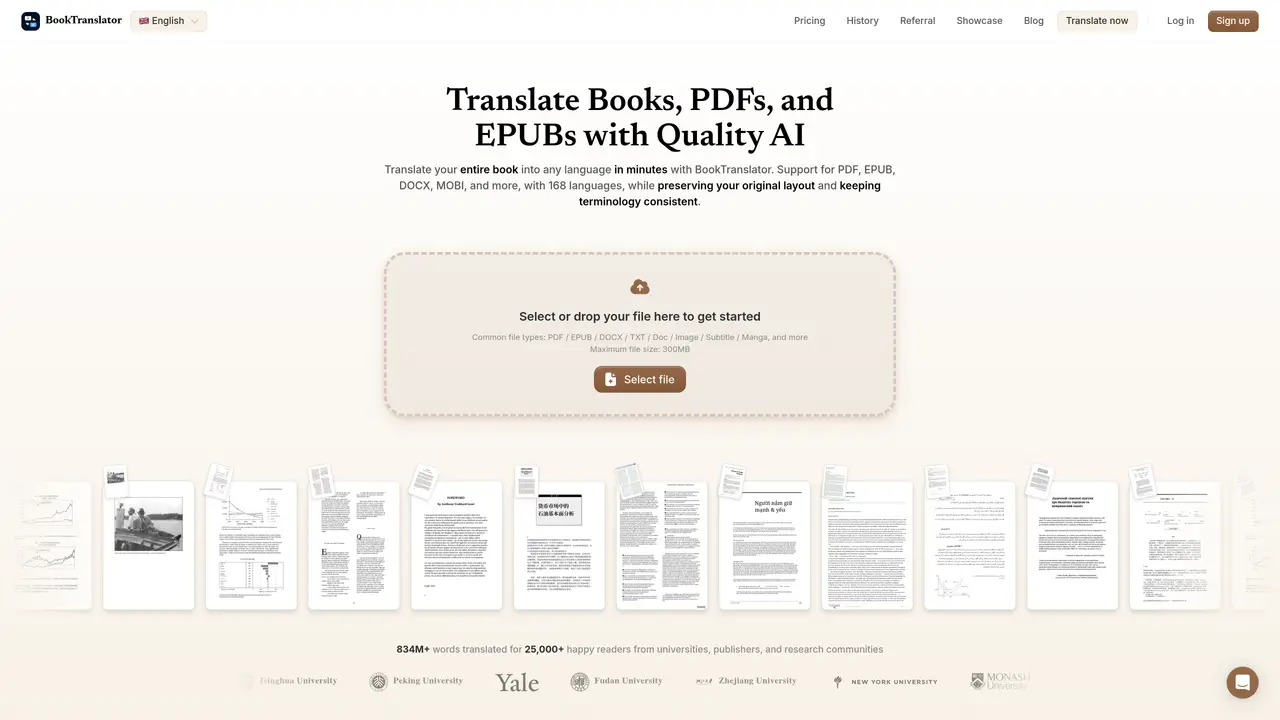
BookTranslator is an AI-powered tool designed to translate entire books, documents, and subtitles while preserving the original formatting and structure. It supports a wide range of file formats, including EPUB, PDF, DOCX, MOBI, TXT, and SRT, allowing users to upload files directly without manual text extraction. The tool maintains chapter divisions, paragraph flow, and layout details, ensuring the translated output remains readable and closely mirrors the source document. It is particularly useful for individuals who need to translate foreign-language books, academic papers, or professional documents without losing the original structure. BookTranslator streamlines the translation process by automating the workflow, reducing the need for repetitive manual input. Users can quickly convert subtitle files or lengthy documents into their preferred language while keeping the content organized and accessible. The platform caters to readers, researchers, professionals, and educators who require accurate translations without compromising on document integrity.
BookTranslator supports over 50 file formats, including PDF, EPUB, DOCX, MOBI, TXT, SRT, HTML, spreadsheets, comics, and scanned files.
The tool supports translation into 168 languages with context-aware results and glossary consistency.
Yes, BookTranslator preserves layout, formatting, chapter structure, paragraph flow, tables, images, footnotes, and other document details during translation.
Yes, BookTranslator includes built-in OCR to read and translate text from scanned books and image-only PDFs.
BookTranslator offers a bilingual reading mode that displays the original and translated text side by side for accuracy checks.
Files uploaded to BookTranslator are not used to train AI models, ensuring privacy and security for user content.
booktranslator.app · third-party estimates from Similarweb
Last 4 months · grows by one month every month
Share of visits · estimated visits
Other countries: 56.6%
How people reach this site from other AI tools
3 a month
Writing & Content · Sep 2026
Traffic figures are third-party estimates, good for scale and trends; they can differ from a company's own numbers. Updated monthly.
We use essential cookies to run aitoolnavio™, and optional cookies to analyze traffic and measure our marketing. You choose what we use — optional cookies stay off unless you turn them on. See our Privacy Policy.
One short email a week: fresh tools worth trying, honest takes and the updates that actually matter. No spam, unsubscribe any time.
Quickly and accurately translate documents with unparalleled precision and confidence for business, legal, and academic purposes.
Revolutionize your web experience with seamless, customizable, bilingual translations across devices—free.
Instantly convert text to 100+ languages, with accurate results and an intuitive interface.
AI-powered translation tool that detects and converts text between 15+ languages instantly with a single click.
Lara Translate is an AI-powered translator delivering fast, accurate, and context-aware translations.
AI-powered grammar and writing assistant that corrects English text, rephrases sentences, suggests synonyms, and translates content.
Cloud platform combining AI translation, a CAT editor, and a human linguist marketplace for 280+ languages.
Bulk translation tool that handles text, audio and files in over 60 languages with offline and privacy features.
AI-powered platform for translating and managing content across multiple languages with machine translation, AI post-editing, and human review.
Translate text, convert audio to text, access pronunciation guides, phrasebooks, and over 100 languages.
Create accurate global content with cultural understanding and comprehensive language services.
Localizes videos with AI translation and dubbing.
Matched on what this tool does — grouped by the job you would be replacing.
matches Context-aware translation · Layout preservation · OCR for scanned PDFs
An AI translation platform that converts documents, images, audio, and video into 130+ languages while preserving formatting and layout.
AI-powered document translation with perfect formatting
AI-powered document translator that preserves layout, tables, images and structure across 16+ file formats.
Translates PDFs, Word files, images and scanned documents while preserving layout