Quickly and accurately translate documents with unparalleled precision and confidence for business, legal, and academic purposes.
97M visits/mo-2.3%#1 Writing & Content
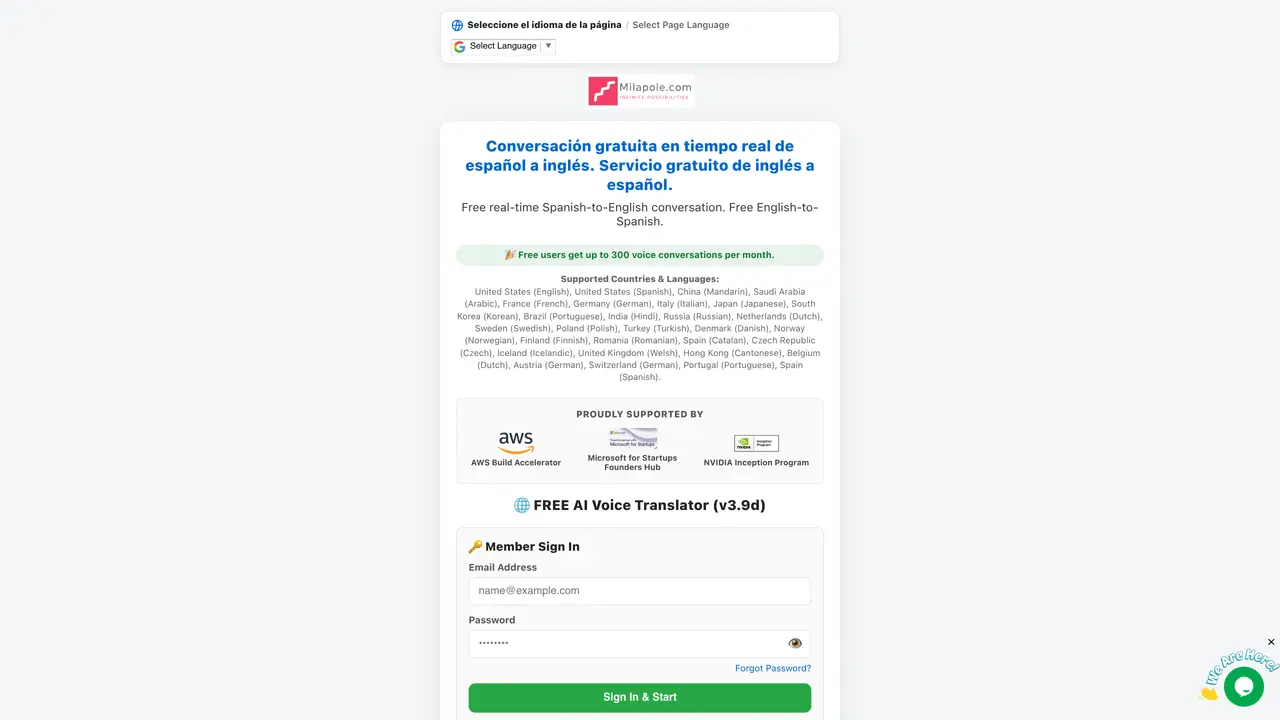
Milapole provides a free web-based service for real-time voice translation between Spanish and English. Users can engage in live conversations where spoken input in one language is translated and spoken aloud in the other. The platform supports additional languages including Mandarin, Arabic, French, German, Italian, Japanese, Korean, Portuguese, Hindi, Russian, Dutch, Swedish, Polish, Turkish, Danish, Norwegian, Finnish, Romanian, Catalan, Czech, Icelandic, Welsh, and Cantonese. Voice translation is initiated by clicking a microphone button, speaking clearly, and stopping the recording to hear the translated output. The interface allows repeating the translation and switching speaker roles. Account registration is required, with email verification using a six-digit code sent to the user’s inbox. Free accounts are limited to 300 voice conversations per month.
After submitting the registration form, the system sends a 6-digit confirmation code to your email. This code must be entered in the second step of registration to activate the account before signing in with your email and password.
Check your email inbox for a message with the subject line 'Your verification code' from [email protected]. If it is not found, inspect your Spam, Junk, or All Mail folders for the email.
The 6-digit code is entered in the designated box during the second step of registration or on the 'Resend Activation Code' page. It is only required once for account activation; subsequent logins only need your email and password.
Use the language selector bar at the top of the page titled 'Seleccione el idioma de la página / Select Page Language' to choose your preferred language from the Google Translate dropdown.
Active sessions expire automatically after 5 minutes of inactivity. For security on shared devices, it is recommended to click the 'Log Out' button when finished using the application.
Tap '🎤 Speak A' or '🎤 Speak B', speak clearly into the device microphone, and tap the button again to stop recording. The translated audio is played back automatically, and you can tap '🔊 Repeat' to re-listen.
milapole.com · third-party estimates from Similarweb
Last 4 months · grows by one month every month
Share of visits by channel
Share of visits · estimated visits
Writing & Content · Sep 2026
Traffic figures are third-party estimates, good for scale and trends; they can differ from a company's own numbers. Updated monthly.
We use essential cookies to run aitoolnavio™, and optional cookies to analyze traffic and measure our marketing. You choose what we use — optional cookies stay off unless you turn them on. See our Privacy Policy.
One short email a week: fresh tools worth trying, honest takes and the updates that actually matter. No spam, unsubscribe any time.
Quickly and accurately translate documents with unparalleled precision and confidence for business, legal, and academic purposes.
Revolutionize your web experience with seamless, customizable, bilingual translations across devices—free.
Instantly convert text to 100+ languages, with accurate results and an intuitive interface.
AI-powered translation tool that detects and converts text between 15+ languages instantly with a single click.
Lara Translate is an AI-powered translator delivering fast, accurate, and context-aware translations.
AI-powered grammar and writing assistant that corrects English text, rephrases sentences, suggests synonyms, and translates content.
Cloud platform combining AI translation, a CAT editor, and a human linguist marketplace for 280+ languages.
Bulk translation tool that handles text, audio and files in over 60 languages with offline and privacy features.
AI-powered platform for translating and managing content across multiple languages with machine translation, AI post-editing, and human review.
Translate text, convert audio to text, access pronunciation guides, phrasebooks, and over 100 languages.
Create accurate global content with cultural understanding and comprehensive language services.
Localizes videos with AI translation and dubbing.
Matched on what this tool does — grouped by the job you would be replacing.
matches Real-time voice translation · Microphone input and playback controls · Repeat translation option
An AI translation tool that handles text, PDFs, images, voice, and documents in 100+ languages with encrypted processing and daily free limits.
Real-time AI voice translator supporting 500+ languages
Browser-based live voice translation for face-to-face conversations in 60+ languages
Voice and chat AI agent that responds in real time across languages
matches Multi-language support
Instant translations across 100+ languages, voice, text, and image.
Web-based AI translator and voice assistant for Indian and global languages
Online document translator supporting PDF, Word, Excel, PowerPoint and scanned files