
Generate full songs with vocals, lyrics, and instrumentals from text prompts in minutes.
75M visits/mo+3.8%#1 Audio & Voice
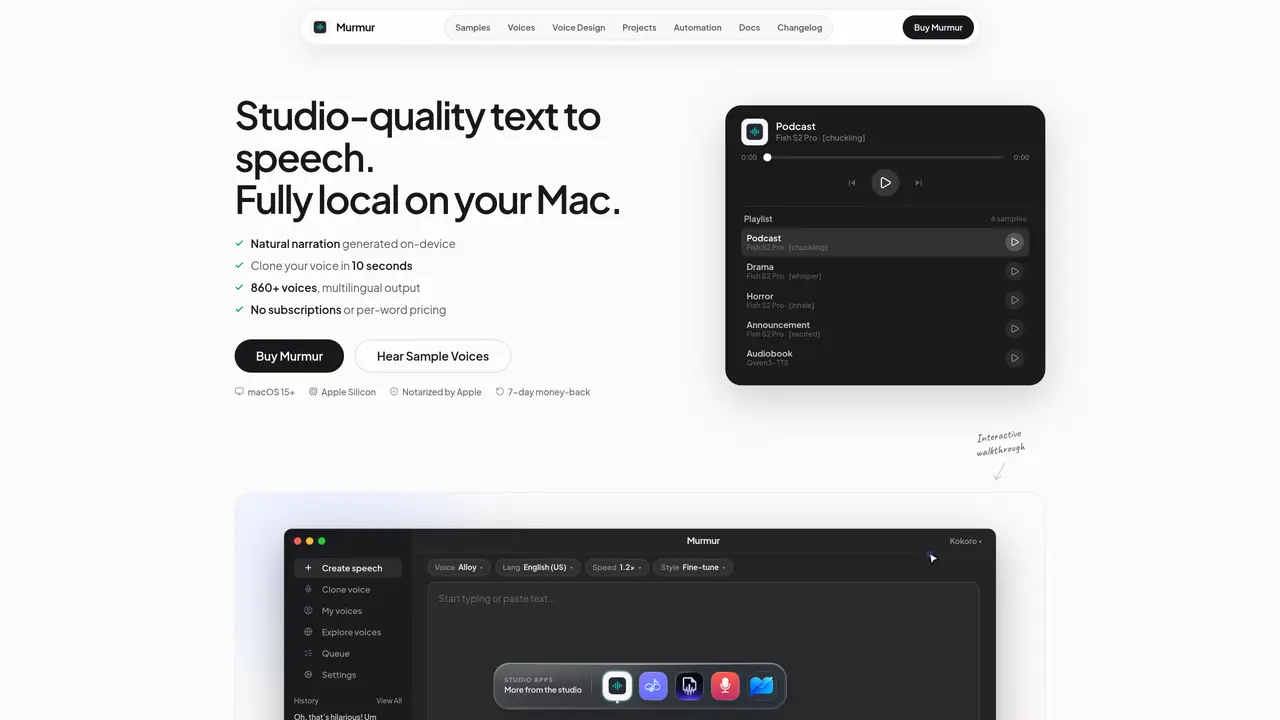
Murmur is a desktop application for macOS that converts written text into natural-sounding speech entirely on-device. It supports voice cloning from short audio samples, allowing users to create reusable voice profiles without external servers. The tool provides over 860 multilingual voices and includes features for designing custom voice personas, managing projects, and batch-processing large scripts into audiobooks or podcast episodes. Users can generate speech through the graphical interface or via command-line automation, with outputs saved locally in standard audio formats. The application emphasizes privacy by keeping all data—scripts, voices, and generated audio—on the user’s machine without cloud uploads or third-party involvement. It operates offline after initial setup and supports Apple Silicon for faster-than-real-time processing.
Murmur is a macOS desktop application that converts written text into natural-sounding speech entirely on-device. It supports voice cloning from short audio samples, project management, and batch processing of scripts into audiobooks or podcast episodes.
Murmur is designed for creators such as podcasters, audiobook narrators, YouTube content creators, and course developers who need high-quality, private, and offline text-to-speech capabilities without relying on cloud services.
No, Murmur operates offline after the initial setup. All processing, including voice cloning and speech generation, occurs locally on the user’s Mac, ensuring no data leaves the device.
Voice cloning in Murmur is done by recording a short audio clip, typically around 10 seconds, which the app uses to create a reusable voice profile. This profile can then be applied to generate speech in various projects.
Yes, Murmur supports command-line automation through its CLI tool and integrates with coding agents via the MCP protocol, allowing users to generate speech and manage projects without using the graphical interface.
Murmur saves generated audio locally in standard formats such as WAV and M4A, ensuring compatibility with most audio editing and publishing workflows.
murmurtts.com · third-party estimates from Similarweb
Last 4 months · grows by one month every month
Share of visits · estimated visits
Audio & Voice · Sep 2026
Traffic figures are third-party estimates, good for scale and trends; they can differ from a company's own numbers. Updated monthly.
We use essential cookies to run aitoolnavio™, and optional cookies to analyze traffic and measure our marketing. You choose what we use — optional cookies stay off unless you turn them on. See our Privacy Policy.
One short email a week: fresh tools worth trying, honest takes and the updates that actually matter. No spam, unsubscribe any time.
Generate full songs with vocals, lyrics, and instrumentals from text prompts in minutes.
Create instrumental versions, enhance clarity, and boost music quality effortlessly.
Generate original songs, lyrics, and studio-quality soundtracks from text prompts in minutes using AI.
Create funny videos with unique voices, modify pitch and speed for custom sound, and apply sound effects.
Remove vocals, extract audio stems, and refine audio for optimal sound quality.
Convert audio and video into text, sync transcripts with media, and edit easily.
Generates AI videos, images and audio from text prompts, photos or audio
Create podcasts, audiobooks, and voiceovers, customize voice style, and generate natural speech from text.
Create studio-ready vocals, choirs, and instruments from MIDI.
An AI music platform that generates royalty-free songs, instrumentals, and lyrics from text prompts, with stem splitting, vocal removal, and mastering tools.
Use this online audio cleaner to remove background noise from recordings and enhance sound quality.
Enhance audio quality, remove background noises, create professional recordings with any format.
Matched on what this tool does — grouped by the job you would be replacing.
matches Local text-to-speech generation · Offline operation after setup
Local AI voice generation studio with unlimited text-to-speech and audio processing
Browser-based AI text-to-speech, voice cloning, and custom voice design tool
Offline Windows AI text-to-speech and voice cloning app with local exports, batch processing, and 13 built-in voices.
Local macOS app for generating studio-grade speech from text
matches Voice cloning from short audio clips
Generate studio-quality speech and clone voices from text using AI-driven neural models.
Create ultra-realistic AI voices for voiceovers, content creation, and applications via voice cloning and text-to-speech.