Generate full songs with vocals, lyrics, and instrumentals from text prompts in minutes.
75M visits/mo+3.8%#1 Audio & Voice
Desktop app that transcribes local voice recordings and lets users slice audio clips by selecting text in the transcript.
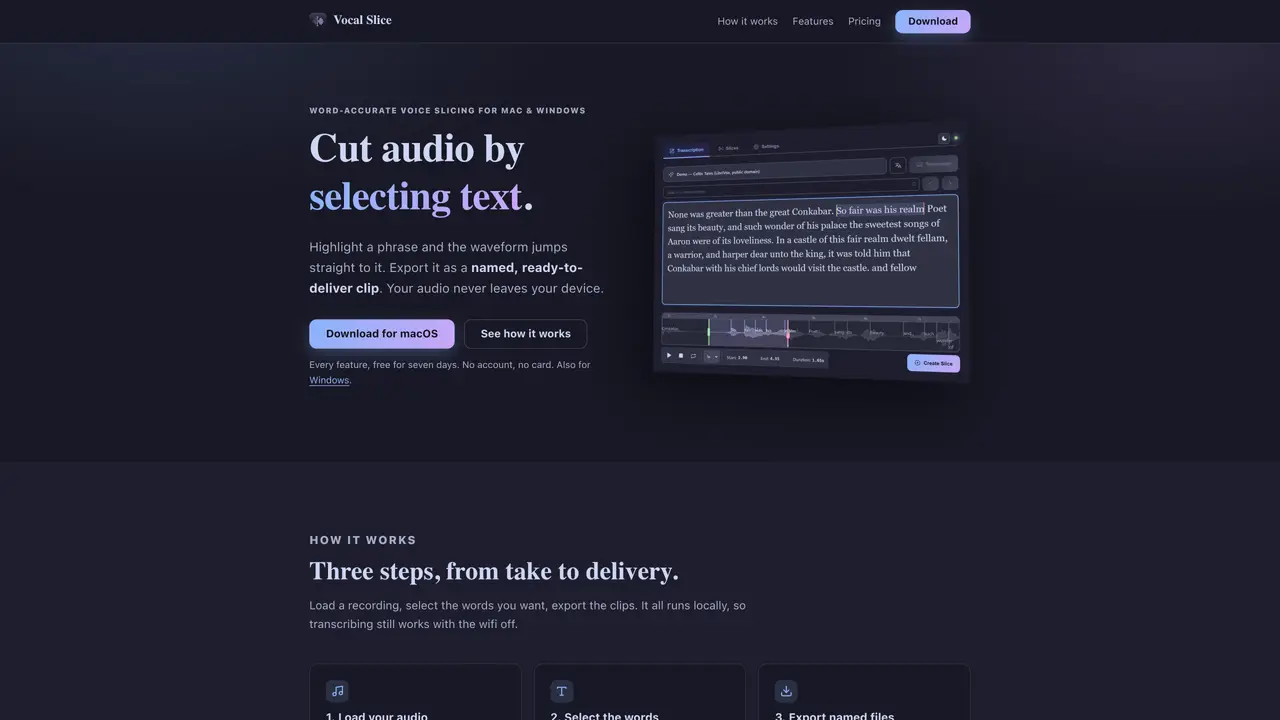
Vocal Slice is a desktop application for Mac and Windows that transcribes voice recordings locally using Whisper. Users can then cut precise audio clips by highlighting words in the generated transcript. The waveform view jumps to the selected phrase instantly, and draggable handles allow for frame-accurate trimming. Audio files are sliced losslessly at the byte level, ensuring the original sample rate, bit depth, and channel count are preserved. All transcription and export processes occur entirely on the user’s device, with no account required and no audio sent to external servers. The tool is designed for users who need to edit voice recordings without relying on cloud services or complex audio software. It is particularly useful for podcasters, journalists, and content creators who require quick, accurate audio editing from transcriptions.
Vocal Slice supports WAV, MP3, FLAC, M4A, AAC, and OGG files of any length.
No, transcription occurs entirely on your device and does not require an internet connection after the initial model download.
Yes, Vocal Slice offers multiple Whisper models, ranging from fast and light to slow and accurate, supporting multiple languages.
Exported clips are named according to a customizable template, such as {source}_{index}_{slug}, matching your project's naming conventions.
Yes, Vocal Slice offers a seven-day trial with all features unlocked and no payment or account required.
Yes, you can open any slice and adjust its boundaries by dragging the waveform or entering exact start and end times without restarting the process.
We use essential cookies to run aitoolnavio™, and optional cookies to analyze traffic and measure our marketing. You choose what we use — optional cookies stay off unless you turn them on. See our Privacy Policy.
One short email a week: fresh tools worth trying, honest takes and the updates that actually matter. No spam, unsubscribe any time.
Generate full songs with vocals, lyrics, and instrumentals from text prompts in minutes.
Create instrumental versions, enhance clarity, and boost music quality effortlessly.
Generate original songs, lyrics, and studio-quality soundtracks from text prompts in minutes using AI.
Create funny videos with unique voices, modify pitch and speed for custom sound, and apply sound effects.
Remove vocals, extract audio stems, and refine audio for optimal sound quality.
Convert audio and video into text, sync transcripts with media, and edit easily.
Generates AI videos, images and audio from text prompts, photos or audio
Create podcasts, audiobooks, and voiceovers, customize voice style, and generate natural speech from text.
Create studio-ready vocals, choirs, and instruments from MIDI.
An AI music platform that generates royalty-free songs, instrumentals, and lyrics from text prompts, with stem splitting, vocal removal, and mastering tools.
Use this online audio cleaner to remove background noise from recordings and enhance sound quality.
Enhance audio quality, remove background noises, create professional recordings with any format.
Matched on what this tool does — grouped by the job you would be replacing.
matches Local transcription using Whisper · Frame-accurate audio trimming via transcript selection · Lossless audio slicing at the byte level
Automate audio transcription, convert recordings to transcripts, and transcribe lectures in multiple languages.
Privacy-first desktop app that converts voice to text offline using on-device AI for secure, instant transcription in 99 languages.
Windows dictation tool that transcribes speech locally without cloud upload
Local AI tool that transcribes and summarizes voice recordings into searchable notes
matches Frame-accurate audio trimming via transcript selection · Instant waveform navigation to selected transcript phrases · Draggable handles for precise clip editing
GPT-powered voice collaboration platform that transcribes audio/video, generates summaries, and supports multilingual translation for teams.
Desktop app that listens to technical interviews and suggests answers using a local transcription and a
Offline dictation tool for macOS that types spoken words into any application