Generate speech with customizable voices in any language, and create captivating stories using natural-sounding voices.
34M visits/mo-7.6%#2 Audio & Voice

Narrate stories, create voiceovers, and customize voices with natural-sounding audio, accents, genders, and styles.
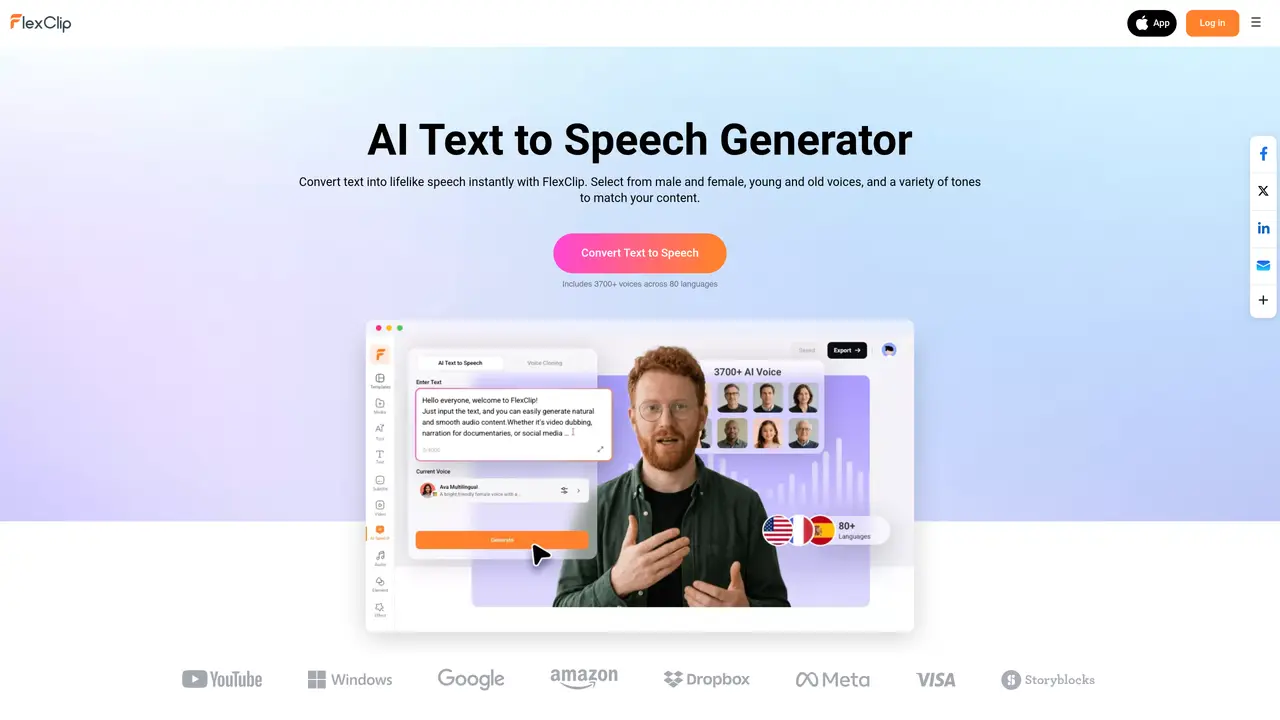
FlexClip’s Text to Speech tool is the perfect way to make your videos come alive. With just a few clicks, you can create engaging audio content for your videos that sounds natural and professional. Our tool uses advanced AI technology to generate realistic voices that can be used to narrate stories, narrate tutorials, or even create voiceovers for commercials. The voices are also customizable, allowing you to choose from a variety of accents, genders, and styles. With our Text to Speech tool, you can easily create compelling audio content that stands out and grabs the attention of your audience. Our AI technology also ensures that your audio content is free from errors and sounds natural, making it perfect for any type of video.
FlexClip's Text to Speech tool converts written text into lifelike speech for video production, e-learning, marketing, audiobooks, and YouTube content. It supports multiple languages and voices, enabling users to generate narration, voiceovers, or commercial audio efficiently.
The tool suits content creators, marketers, educators, businesses, and YouTubers who need professional-grade voiceovers without recording. It is ideal for those seeking customizable, realistic AI voices for diverse projects.
Yes, users can select from over 3,700 voices across 80 languages, adjust pitch and speed, and even create a custom voice model by uploading an audio file. This allows for tailored audio output to match branding or project needs.
Yes, the generated AI voice can be seamlessly integrated into FlexClip's video editor. Users can sync it with video timelines, trim, split, or adjust volume directly within the platform for a streamlined workflow.
FlexClip prioritizes user privacy and employs secure data handling practices to protect uploaded content during the generation process. This ensures confidentiality for sensitive or proprietary materials.
To begin, paste your text into FlexClip's AI Text to Speech tool, choose or generate a voice model, and click 'Generate.' The output can be downloaded as an MP3 file or used directly in a video project within FlexClip's editor.
We use essential cookies to run aitoolnavio™, and optional cookies to analyze traffic and measure our marketing. You choose what we use — optional cookies stay off unless you turn them on. See our Privacy Policy.
One short email a week: fresh tools worth trying, honest takes and the updates that actually matter. No spam, unsubscribe any time.
Generate speech with customizable voices in any language, and create captivating stories using natural-sounding voices.
Generate audio content for podcasts, e-learning, or video production with natural-sounding voices on any device.
Create audio versions of documents, listen to text in multiple languages, and customize voice, pitch, and volume.
Cloud communications platform that lets developers embed SMS, voice, WhatsApp, email, video, verification, and conversational AI via APIs.
Create podcasts, audiobooks, and voiceovers, customize voice style, and generate natural speech from text.
Create transcripts of meetings, voice-overs for videos, and transcribe and review customer feedback efficiently.
Create engaging educational, marketing, and training videos using pre-built assets and an AI-driven text-to-speech engine.
AI-powered translation tool that detects and converts text between 15+ languages instantly with a single click.
Cartesia delivers real-time AI voice and TTS models with low-latency streaming, voice cloning, and transcription for interactive applications.
Create natural audio for podcasts, automate customer service responses, and generate audio for online courses.
Web-based AI toolkit for creators to generate AI videos, images, and natural voiceovers with credit-based plans.
Generate professional voiceovers, enhance language learning, and add synthesized speech to applications effortlessly.
Matched on what this tool does — grouped by the job you would be replacing.
matches Generate realistic voices · Customize voices with accents, genders, and styles · Create engaging audio content for videos
Create personalized audio projects, generate realistic voices in any language, and voice music, videos, and more.
Generate audio in 80+ languages with 900+ voices, customize pitch, speed, volume; create professional-grade content effortlessly.
Create engaging audio for podcasts, video games, and interactive stories with realistic and expressive voices.
Generate audio content in 90+ languages, create voiceovers for tutorials and presentations, add life to static content.