Revolutionize transcription with unmatched accuracy, speed, and language support.
27M visits/mo+0.9%#4 Audio & Voice

Transcribe Audio, Video and YouTube to Text wIth AI, 100% Free, No Sign-up.
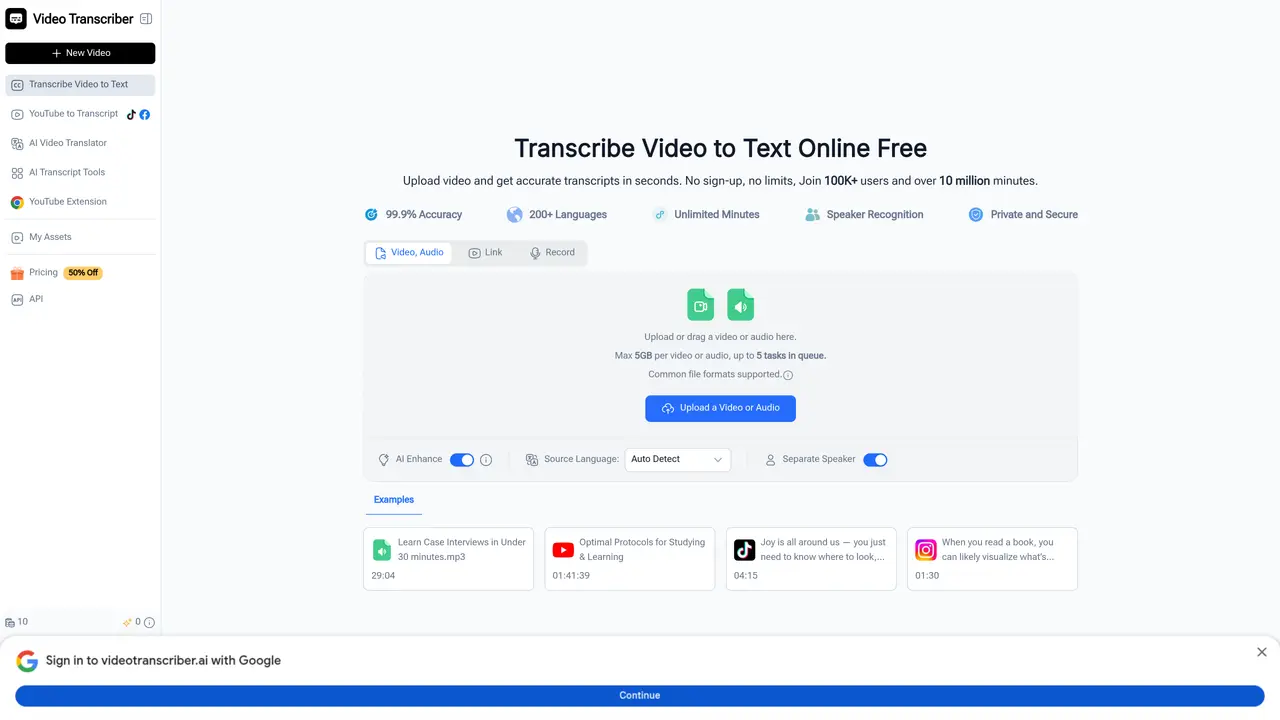
Video Transcriber AI is a web-based application that uses AI to convert video (and audio) content into text, extract summaries and key points, and facilitate workflows such as transcription, note-taking, meeting documentation and content repurposing. It supports uploads (e.g., MP4, Zoom recordings, YouTube links), multiple languages, speaker-recognition and is offered free (no sign-up required) for many tasks. The tool is designed to help various users including students, teachers, trainers, content creators, YouTubers, podcasters, and video makers by providing them with transcripts or summaries of their videos. This can save time and effort in re-watching hours of video, generating handouts for students who missed a class, or repurposing content for other formats such as blog posts or captions. The tool’s features include the ability to upload files, recognize speakers, and provide transcripts in multiple languages. It also supports YouTube links and can be used for transcription, note-taking, meeting documentation, and content repurposing. The tool is free to use with no sign-up required, making it accessible to a wide range of users. Overall, Video Transcriber AI is a useful tool for anyone who needs to transcribe or summarize video content quickly and efficiently.
Video Transcriber AI supports common video and audio formats such as MP4, MOV, AVI, and recordings from platforms like Zoom. It also accepts YouTube links and other online video sources for direct transcription.
Yes, the tool allows users to transcribe videos or audio files without requiring sign-up or registration, making it accessible immediately.
Yes, the tool includes an option to recognize and label different speakers in the transcript, making it easier to identify who said what during recordings.
The tool claims a transcription accuracy of 99.9% and offers multiple accuracy modes to balance speed and precision based on user needs.
Yes, Video Transcriber AI supports transcription from major platforms including YouTube, TikTok, Instagram, Facebook, X, and Bilibili, as well as Zoom recordings.
The tool allows uploads up to 5GB per video or audio file and supports up to 5 tasks in the queue at a time. Specific limits may apply based on usage conditions.
videotranscriber.ai · third-party estimates from Similarweb
Last 4 months · grows by one month every month
Share of visits · estimated visits
Other countries: 59.3%
How people reach this site from other AI tools
2.4K a month · 0.2% of all visits
Audio & Voice · Sep 2026
Traffic figures are third-party estimates, good for scale and trends; they can differ from a company's own numbers. Updated monthly.
We use essential cookies to run aitoolnavio™, and optional cookies to analyze traffic and measure our marketing. You choose what we use — optional cookies stay off unless you turn them on. See our Privacy Policy.
One short email a week: fresh tools worth trying, honest takes and the updates that actually matter. No spam, unsubscribe any time.
Revolutionize transcription with unmatched accuracy, speed, and language support.
Hardware device that records conversations and converts them into searchable transcripts, summaries, and notes.
Automate transcription, generate summaries, identify speakers, and timestamps for video-conferencing conversations.
NoteGPT – Convert Speech to Text and Text to Speech with AI
Automatically record, transcribe, take notes, and create summaries with key insights during meetings.
Transforms audio/video to summarized text, instantly, across platforms.
Transcribe and summarize audio or video recordings with AI-powered speech recognition and summarization.
Automatically transcribe meetings, create summaries, and securely store audio files in a searchable format.
Convert audio and video into text, sync transcripts with media, and edit easily.
Streamline healthcare admin tasks, and enhance patient focus with Heidi AI.
Create transcripts of meetings, voice-overs for videos, and transcribe and review customer feedback efficiently.
Wearable AI device that captures conversations and meetings, then auto-generates transcripts, summaries, action items, mind maps, and searchable notes.
Matched on what this tool does — grouped by the job you would be replacing.
matches Transcribes audio and video files into text · Supports multiple languages · Recognizes speakers in videos
AI web app that transcribes audio, video, and YouTube links into text in 98 languages with summaries, mind maps, and export formats for students and teams.
Automate audio transcription, convert recordings to transcripts, and transcribe lectures in multiple languages.
Quickly generate content, transcribe audio/videos in multiple languages, and perfect transcripts with GPT-assisted editor.
AI-powered transcription tool that converts audio/video to text with speaker labels and supports 99+ languages.
matches Provides summaries and key points of videos · Facilitates workflows such as transcription, note-taking, meeting documentation, and content repurposing
AI-powered meeting assistant for transcription, summaries and action items
AI meeting assistant that transcribes, translates, and summarizes conversations in real time across 74+ languages with structured outputs like slides and spreadsheets.
An AI note-taking app for Apple devices that records, transcribes, and summarizes audio or video into searchable notes and action items.
iOS app that records, transcribes, and summarizes spoken conversations into organized notes with action items.