Generate captions, optimize content, and enhance with custom images for maximum engagement.
46M visits/mo-10%#3 Image & Design

CLI tool to publish live documents that readers can query and report back on
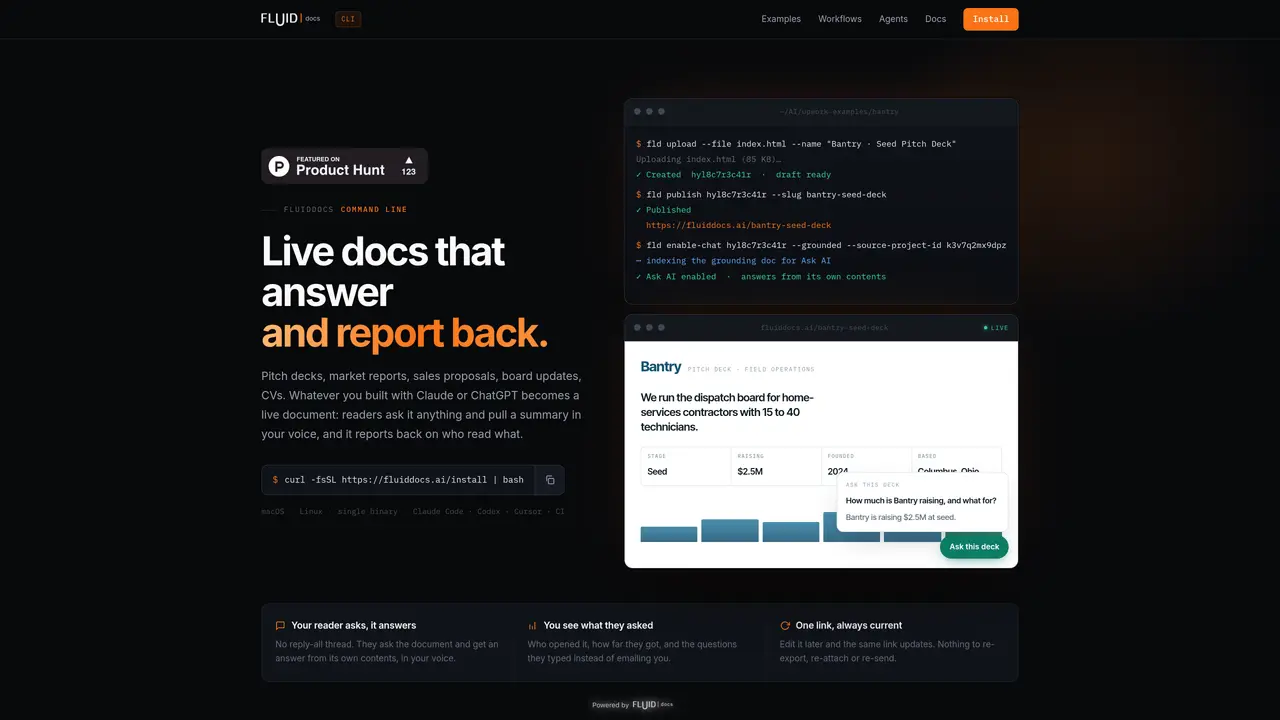
FluidDocs CLI is a command-line interface that converts static documents into interactive, live resources. Users can publish files, directories, or zip archives as documents that answer reader questions in the author’s voice and provide summaries on demand. The tool tracks reader engagement, including who opened the document, how far they progressed, and the specific questions asked, without requiring email threads. Documents remain updatable after publishing; edits propagate to the same link automatically, eliminating the need for re-exporting or re-sending. It supports integration with coding agents like Claude Code, Codex, and Cursor, enabling automated workflows through structured JSON output and predictable commands. The CLI handles tasks such as creating, updating, publishing, and enabling AI-driven interactions, with background job management for long-running operations. Outputs are machine-readable and errors are returned in a structured format, making it suitable for unattended automation.
FluidDocs CLI is a command-line tool that converts static documents into interactive, live resources. It allows users to publish files, directories, or zip archives as documents that answer reader questions in the author’s voice, provide summaries, and track reader engagement without requiring email threads.
The tool is designed for professionals who create and share documents that require ongoing interaction, such as sales proposals, pitch decks, market reports, board updates, or CVs. It is particularly useful for teams or individuals who need to track reader engagement and keep documents updated after publishing.
Documents remain updatable after publishing; edits propagate to the same link automatically, eliminating the need for re-exporting or re-sending. Users can edit documents later, and the changes are reflected in the live document without requiring manual redistribution.
Yes, FluidDocs CLI supports integration with coding agents such as Claude Code, Codex, Cursor, and Windsurf. It provides structured JSON output and predictable commands, enabling automated workflows and unattended automation.
FluidDocs CLI tracks reader engagement, including who opened the document, how far they progressed, and the specific questions they asked. This data is reported back to the author without requiring email threads or manual follow-ups.
To get started, install the CLI using a one-line command that detects your OS and architecture. After installation, run `fld login` to authorize in the browser, and then publish your first document using the available commands.
We use essential cookies to run aitoolnavio™, and optional cookies to analyze traffic and measure our marketing. You choose what we use — optional cookies stay off unless you turn them on. See our Privacy Policy.
One short email a week: fresh tools worth trying, honest takes and the updates that actually matter. No spam, unsubscribe any time.
Generate captions, optimize content, and enhance with custom images for maximum engagement.
Build conversational forms, capture rich responses, and automate follow-ups with AI-powered surveys and workflows.
Automate code, research, and documents using agents.
AI-powered IDE for autonomous coding tasks and agentic development workflows
Source, match, and manage talent with predictive analytics for effortless recruiting.
Automate workflow, optimize operations, and detect potential issues with this efficient AI-driven solution.
Transforms thoughts into actions, enhancing productivity and efficiency.
AI Recruitment engine to hire top global talent
All-in-one team productivity platform combining chat, docs, video meetings, workflows, and AI tools in one place.
Personal assistant that coordinates tasks across apps and devices via text or call
AI automation and agent-building platform with 3,000+ app integrations
AI job search copilot that matches roles to skills, optimizes resumes for ATS, generates cover letters, and autofills applications with real-time insights.
Matched on what this tool does — grouped by the job you would be replacing.
matches Publish files, directories, or zip archives as live documents · Enable AI-driven interactions grounded in document content · Track reader analytics (who opened, progress, questions)
Turn company documents into RAG assistants that deliver sourced answers via API, widget, or MCP for support, research, and workflow automation.
Add a conversational AI assistant to any website to answer visitor questions and guide users in real time.
Publish, version and collect feedback on agent-generated HTML or Markdown files via shareable links
matches Automate workflows with coding agents via structured JSON · Background job management with polling and streaming
Terminal-based coding agent that executes locally or via remote models
Local coding agent coordination workspace for macOS
Local evidence system that adds citations to agent answers by indexing project files