Generate captions, optimize content, and enhance with custom images for maximum engagement.
46M visits/mo-10%#3 Image & Design

An AI coworker in Slack that automates team tasks by gathering context from over 25 tools to produce completed drafts, summaries, and task updates.
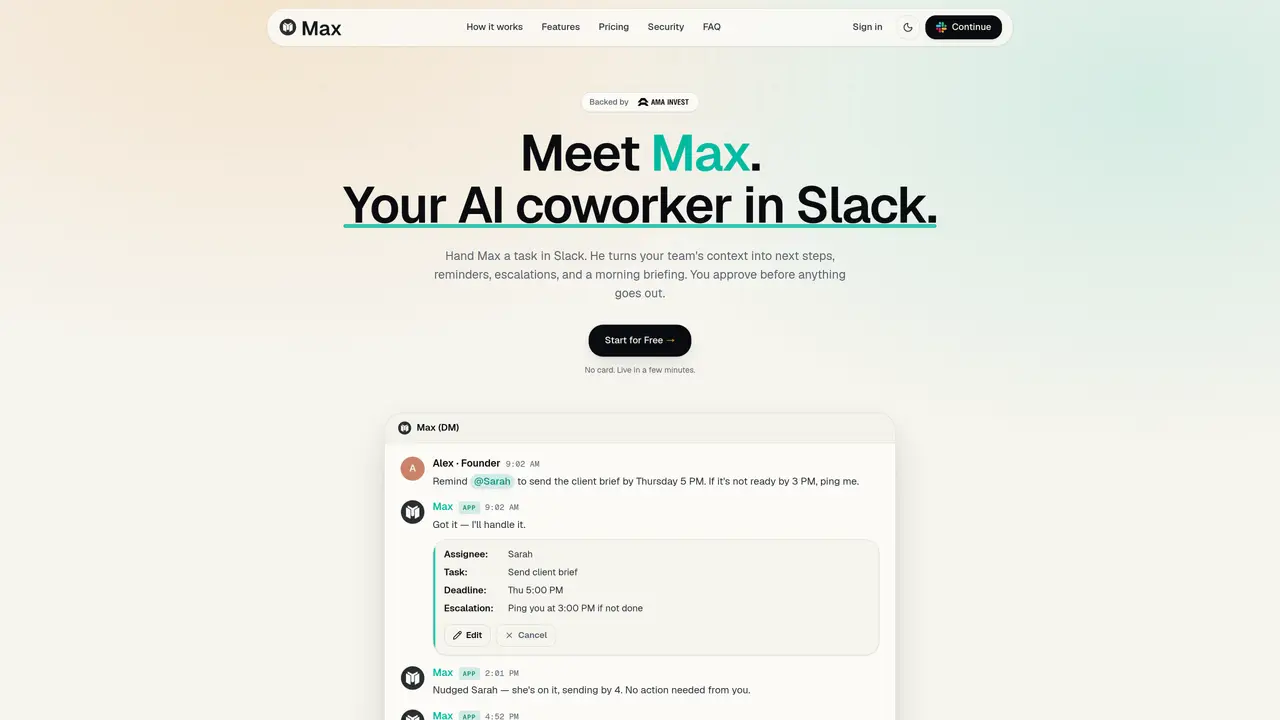
Max is an AI coworker integrated directly into Slack, designed to transform scattered team context into actionable, reviewable work. It connects to more than 25 tools—including HubSpot, Jira, Gmail, Google Drive, and Notion—to pull relevant information and deliver completed drafts, summaries, follow-ups, and task updates. The tool operates through two core workflows: Delegation, which manages reminders, escalations, and completion tracking, and Morning Brief, which provides a daily summary of open tasks, emails, and calendar events. Max is built for busy teams that need real output with human approval controls, avoiding the pitfalls of chatbots that require users to do the heavy lifting afterward. By automating repetitive tasks while ensuring human oversight remains central, Max enables teams to focus on high-value work without losing track of critical details. It is particularly suited for teams that rely on Slack for collaboration and need structured, actionable insights without manual effort. The tool emphasizes efficiency by bridging the gap between scattered context and actionable outcomes, ensuring nothing slips through the cracks.
Max is an AI coworker that operates inside Slack, designed to turn scattered team context into actionable work. Users give Max tasks in plain language, and it pulls relevant information from connected tools to draft responses, reminders, or updates, which are then reviewed and approved before being sent.
Max is designed for busy teams that rely on Slack for collaboration and need structured, actionable insights without manual effort. It is particularly useful for managers, sales teams, and operations professionals who need to track deadlines, follow-ups, and task completions.
Max integrates with over 25 tools, including Slack, Gmail, Google Calendar, Google Drive, Microsoft 365, HubSpot, Salesforce, Linear, Jira, Asana, Notion, Airtable, GitHub, Trello, ClickUp, Monday.com, Intercom, Zendesk, Calendly, Stripe, Zoom, Figma, Dropbox, Loom, and Mailchimp.
Yes, Max ensures human oversight by requiring approval before any draft, reminder, or update is sent. This ensures that the final output aligns with the user's expectations and maintains quality control.
Getting started with Max is simple: sign up, connect your tools, and begin delegating tasks in Slack. Max can be set up and running in minutes without requiring a credit card.
Max is designed to handle tasks that require judgment and approval, such as drafting client updates or preparing sales reports. However, it relies on human oversight to ensure the final output meets the desired standards.
maxworker.ai · third-party estimates from Similarweb
Share of visits · estimated visits
Traffic figures are third-party estimates, good for scale and trends; they can differ from a company's own numbers. Updated monthly.
We use essential cookies to run aitoolnavio™, and optional cookies to analyze traffic and measure our marketing. You choose what we use — optional cookies stay off unless you turn them on. See our Privacy Policy.
One short email a week: fresh tools worth trying, honest takes and the updates that actually matter. No spam, unsubscribe any time.
Generate captions, optimize content, and enhance with custom images for maximum engagement.
Build conversational forms, capture rich responses, and automate follow-ups with AI-powered surveys and workflows.
Automate code, research, and documents using agents.
AI-powered IDE for autonomous coding tasks and agentic development workflows
Source, match, and manage talent with predictive analytics for effortless recruiting.
Automate workflow, optimize operations, and detect potential issues with this efficient AI-driven solution.
Transforms thoughts into actions, enhancing productivity and efficiency.
AI Recruitment engine to hire top global talent
All-in-one team productivity platform combining chat, docs, video meetings, workflows, and AI tools in one place.
Personal assistant that coordinates tasks across apps and devices via text or call
AI automation and agent-building platform with 3,000+ app integrations
AI job search copilot that matches roles to skills, optimizes resumes for ATS, generates cover letters, and autofills applications with real-time insights.
Matched on what this tool does — grouped by the job you would be replacing.
matches Operates as an AI coworker within Slack · Delivers structured, reviewable work directly in Slack · Core workflows: Delegation for reminders and completion tracking
AI assistant that automates routine work across email, calendar, Slack, files and other tools with human oversight.
AI assistant that coordinates tasks across messaging and productivity apps via text
Connects enterprise apps like Slack, Gmail, and Jira into a private AI workspace to automate tasks and surface insights.
Turns directives into owned, typed work across Linear, Slack, Notion, and Gmail
matches Connects to over 25 tools including HubSpot, Jira, Gmail, Google Drive, and Notion · Produces completed drafts, summaries, follow-ups, and task updates · Automates repetitive team tasks with contextual accuracy
Automate ops across tools, delivering reports and campaigns.
No-code AI workflow automation platform that builds, deploys, and manages AI agents to automate repetitive knowledge work across apps like Gmail, Calendar, Slack, and Notion.
Connects Slack, meetings, performance reviews with AI work companion.