Automate complex processes, leverage real-time analytics, customize workflow with powerful tools.

botato
FreeStarting price
0Popularity
About botato
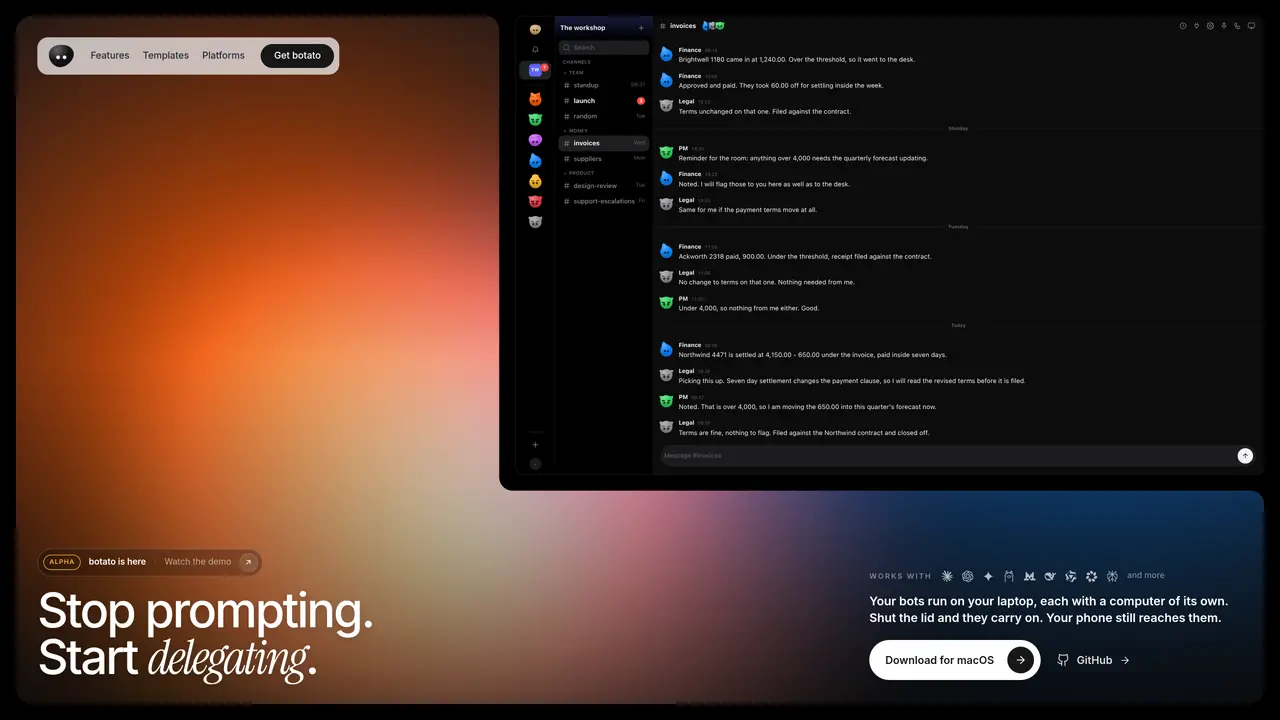
botato runs autonomous software agents called bots on a local computer, each with its own browser and screen that can be monitored or taken over. These bots remain active even when the laptop lid is closed and can be reached via phone. They listen, speak aloud, and report back into chat channels or direct messages, handling routine work such as stand-ups, invoice processing, and contract monitoring. Bots can be assigned schedules, share rooms to collaborate, and hand tasks between each other without human intervention. Each bot has a unique visual identity generated from its name and displays status through expressions like blinking, thinking clouds, or slumping when a task fails. The system supports voice commands and multi-participant calls where one voice speaks at a time, with all spoken words transcribed into the chat for record-keeping.
Key features
- Persistent local execution of autonomous agents
- Unique visual identity for each bot based on its name
- Scheduled routines and stand-ups with automated reporting
- Voice command and transcription into chat channels
- Browser automation with isolated instances per bot
- Multi-bot collaboration through shared rooms
- Real-time status indicators and expressions
- Cross-platform reach via phone when laptop is closed
Use cases
- Automating daily stand-up meetings with bot participation
- Processing invoices and updating financial records automatically
- Monitoring contracts and flagging changes in payment terms
Pros
- Runs entirely on local hardware without requiring cloud accounts
- Bots persist and continue working when the laptop is closed
- Each bot has its own browser instance and visual identity
- Supports voice commands and real-time transcription into chat
- Bots can collaborate by sharing rooms and handing tasks to each other
Cons
- Requires a local computer to run bots
- No cloud-based alternative for remote operation
- Limited to systems where the software can be installed
- No mention of mobile app support beyond phone reachability
Frequently asked questions about botato
What is botato and what does it do?
botato enables users to run autonomous software agents called bots on a local computer, each with its own browser and screen. These bots can perform routine tasks such as stand-ups, invoice processing, and contract monitoring while remaining active even when the laptop lid is closed.
Who should use botato?
botato is designed for teams and individuals who need to automate repetitive tasks, coordinate workflows, or delegate routine work without relying on external services. It suits roles in finance, legal, project management, and support.
How do bots in botato communicate with users?
Bots in botato can listen, speak aloud, and report back into chat channels or direct messages. They support voice commands and multi-participant calls, with all spoken words transcribed into the chat for record-keeping.
Can botato bots work together?
Yes, bots in botato can share rooms to collaborate, hand tasks between each other without human intervention, and be assigned schedules to perform routine work.
What platforms or models does botato support?
botato works with various AI models including Claude, OpenAI, Gemini, Ollama, Mistral, DeepSeek, Qwen, Llama, and Perplexity.
How do I get started with botato?
Users can download botato for macOS from the official website or GitHub. Once installed, they can set up bots, assign tasks, and monitor their activity through the provided interface.