Generate content, correct spelling, suggest synonyms to enhance writing.
173M visits/mo+0.1%#1 Productivity & Office

Unified Calendar, Scheduling Links, and Task Manager for efficient organization.
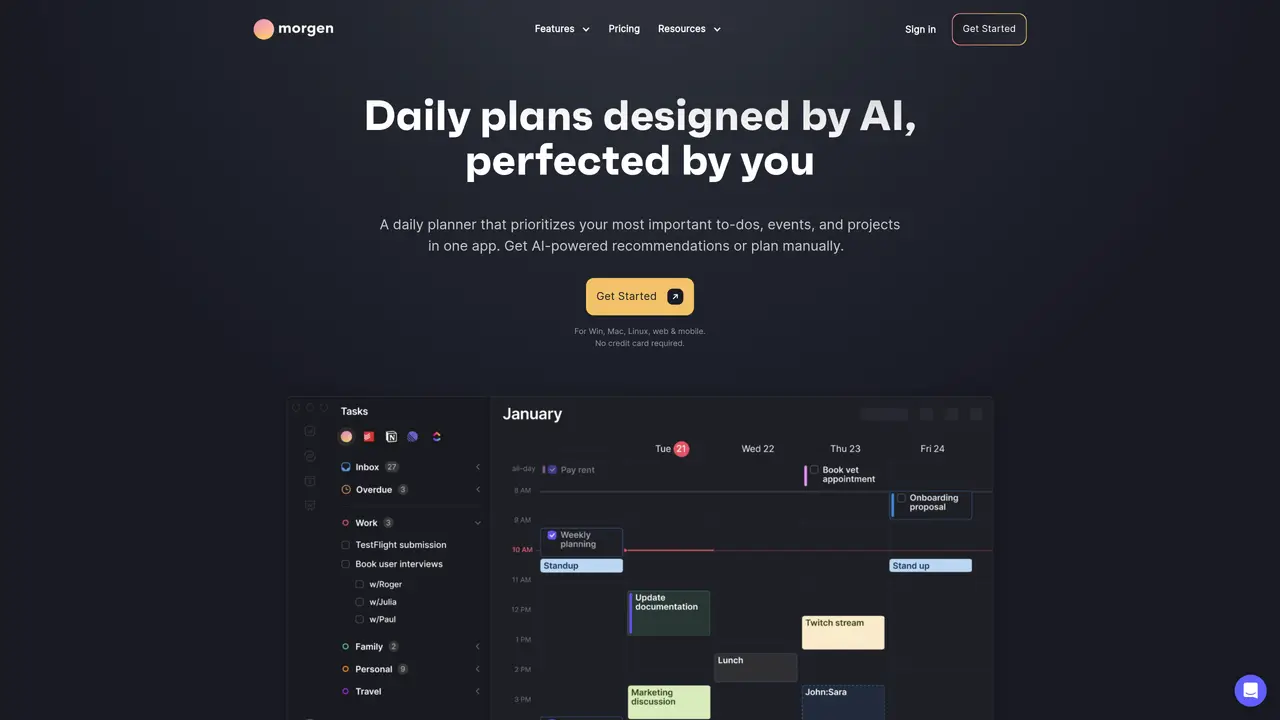
Morgen is an all-in-one productivity platform designed to consolidate calendars, schedule meetings, and automatically block dedicated time for focused work. The tool synchronizes with major calendar services such as Google Calendar, Outlook, and Apple Calendar, ensuring that all events and commitments are visible in a single interface. Users can create and manage to-do lists directly within Morgen, or import existing tasks from other task management tools, allowing for seamless integration into daily workflows. Morgen offers customizable booking pages and scheduling links, enabling users to share availability with colleagues, clients, or friends without switching between applications. The platform supports real-time collaboration features, such as shared calendars and team scheduling, making it suitable for both individual users and small teams. Available across Windows, Mac, Linux, Android, and iOS, Morgen provides a consistent experience across devices, ensuring that schedules and tasks remain accessible wherever users are. It emphasizes intelligent time blocking, helping users allocate focused work periods and reduce context-switching. By centralizing calendar management, task tracking, and meeting scheduling, Morgen aims to simplify planning and improve productivity for professionals, freelancers, and small businesses.
Morgen is an AI-powered daily planner that consolidates calendars, tasks, and scheduling in one app. It is designed for individuals and teams who want to streamline planning, prioritize important work, and manage their schedules efficiently across multiple tools and platforms.
The AI Planner prioritizes tasks and events, adapts plans in real-time to conflicts, and highlights tasks at risk of being late. Users can guide the AI by setting templates for their ideal week, and the system provides live recommendations for scheduling tasks directly into the calendar.
Yes, Morgen integrates with popular task management tools like Notion, ClickUp, Linear, and Todoist, as well as calendar services such as Google, Outlook, Apple, and Fastmail. This allows users to consolidate tasks and events from multiple sources into one unified view.
Morgen includes features for team workflows, such as viewing colleagues’ availability, scheduling meetings without disrupting focus time, and automating calendar syncs to avoid double bookings. It also offers shared booking links for external scheduling.
Morgen is available on Windows, Mac, Linux, and as a mobile app for Android and iOS. It also offers a web version, ensuring cross-platform accessibility for users.
Users can sign up for Morgen through their website, which offers a free tier with no credit card required. The onboarding process includes connecting calendars, importing tasks, and setting up preferences to begin using the AI Planner and other features.
morgen.so · third-party estimates from Similarweb
Last 4 months · grows by one month every month
Share of visits · estimated visits
Other countries: 62%
How people reach this site from other AI tools
1.1K a month · 0.4% of all visits
Productivity & Office · Sep 2026
Traffic figures are third-party estimates, good for scale and trends; they can differ from a company's own numbers. Updated monthly.
We use essential cookies to run aitoolnavio™, and optional cookies to analyze traffic and measure our marketing. You choose what we use — optional cookies stay off unless you turn them on. See our Privacy Policy.
One short email a week: fresh tools worth trying, honest takes and the updates that actually matter. No spam, unsubscribe any time.
Generate content, correct spelling, suggest synonyms to enhance writing.
Turn messy team ideas into actionable plans with Miro's visual workspace.
Leverage analytics, automate tasks, share documents, and coordinate projects.
Integrates AI into Airtable to analyze data, summarize insights, draft content, and automate workflows without prior AI experience.
Cloud accounting software that automates bookkeeping, invoicing, and financial reporting for small and growing businesses.
Streamline teamwork, manage projects, automate tasks efficiently.
Automate code, research, and documents using agents.
AI assistant for safe, reliable productivity with code, collaboration, and integrations.
Create customizable tables, databases, and spreadsheets, share data securely with team members.
Easy-to-use CRM platform that automates lead capturing, prioritizes tasks, and provides sales pipeline analytics for businesses of all sizes.
Transforms thoughts into actions, enhancing productivity and efficiency.
Write & run code in 50+ languages, auto-complete with AI, and code faster with an intuitive interface.
Matched on what this tool does — grouped by the job you would be replacing.
Paid placement · similar tools from listings that support aitoolnavio™
Instant lead response for home-service pros: your phone rings on every new lead, plus 14 days of follow-up
matches Unified Calendar · Scheduling Links · Seamless Scheduling
matches Task Manager · Calendar Integration
matches AI note-taking
Tailor your booking page, sync availability with calendars, set recurring events, and avoid double-booking with reminders.
Appointment scheduling and booking platform that customizes booking pages, manages multiple options, processes payments, and includes marketing tools.
AI calendar assistant that streamlines meeting scheduling and busy schedule management with fast booking and smart automation.
An AI calendar app that creates, updates, and answers questions about events using natural language with Google Calendar sync.
AI-powered task manager that auto-prioritizes work, breaks tasks into steps, and syncs with Todoist for professionals.
AI task manager that captures work from email and chat, auto-plans time blocks, and replans instantly when priorities change.
AI-powered task planning and work management that schedules projects around real calendar availability with Gantt views and timesheets.
Assign, prioritize, track tasks, monitor progress, improve efficiency, automate notifications, customize reports.
Syncs Google, Outlook and other calendars into one view and generates AI-powered meeting notes.
AI tool that drafts follow-up emails and extracts action items from meeting transcripts