AI-powered video messaging tool that records, shares, and manages video messages with AI-generated titles, summaries, and tasks.
16M visits/mo-3.4%#5 Chatbots & Assistants

AI tool that drafts follow-up emails and extracts action items from meeting transcripts
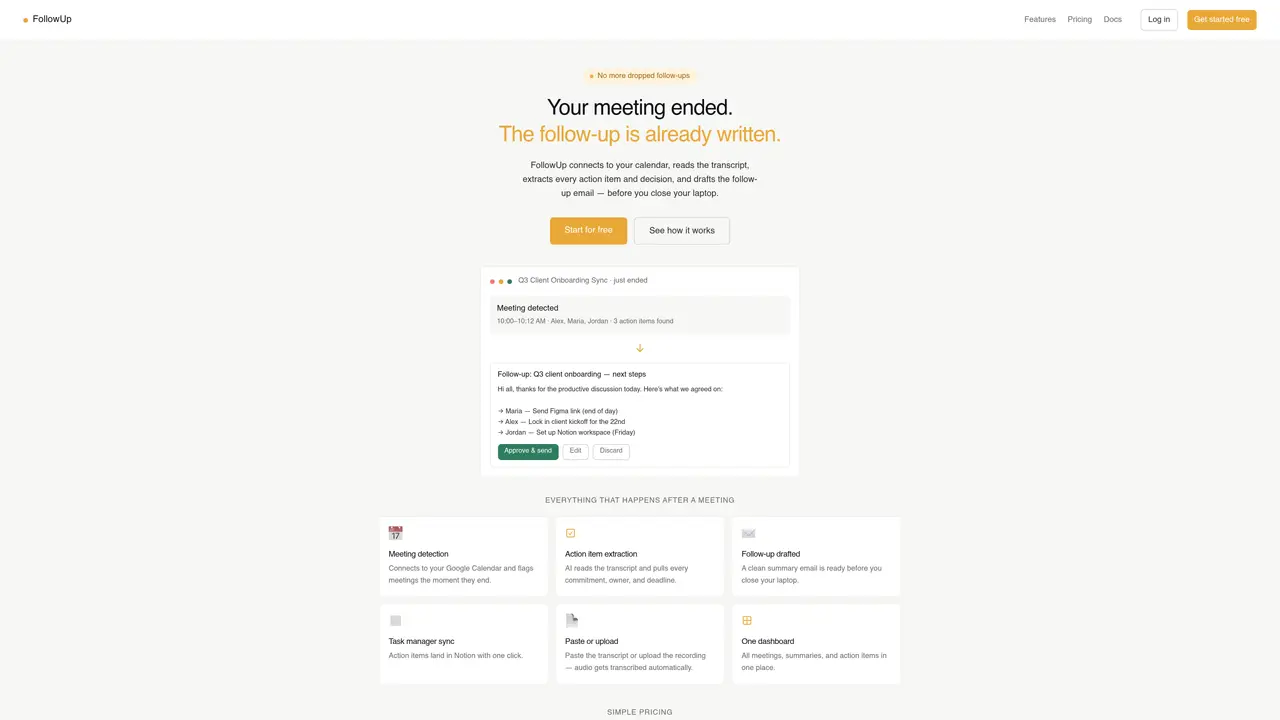
FollowUp connects to a user’s Google Calendar to detect meetings as they end. It reads the meeting transcript, extracts every action item, owner, and deadline, and automatically drafts a follow-up email summarizing decisions and next steps. The tool can paste or upload transcripts or recordings, which are transcribed automatically if audio is provided. Action items can be synced to Notion with one click, and all meetings, summaries, and action items are displayed in a single dashboard. The service aims to eliminate missed follow-ups by generating a ready-to-send email before the meeting concludes. It is designed for teams and individuals who rely on structured post-meeting communication and task tracking.
FollowUp connects to a user’s Google Calendar to detect meetings as they end, reads the meeting transcript, extracts action items, owners, and deadlines, and automatically drafts a follow-up email summarizing decisions and next steps.
The tool is designed for teams and individuals who rely on structured post-meeting communication and task tracking, such as project managers, sales teams, and client onboarding specialists.
Users can paste or upload meeting transcripts or recordings, and audio files are automatically transcribed. The tool then extracts action items and drafts follow-up emails from the content.
Yes, action items can be synced to Notion with one click, and all meetings, summaries, and action items are displayed in a single dashboard for centralized tracking.
FollowUp currently supports Notion integration, with additional integrations listed as 'coming soon' on the website.
Users can start for free by signing up on the FollowUp website, connecting their Google Calendar, and enabling meeting detection to begin receiving automated follow-ups.
We use essential cookies to run aitoolnavio™, and optional cookies to analyze traffic and measure our marketing. You choose what we use — optional cookies stay off unless you turn them on. See our Privacy Policy.
One short email a week: fresh tools worth trying, honest takes and the updates that actually matter. No spam, unsubscribe any time.
AI-powered video messaging tool that records, shares, and manages video messages with AI-generated titles, summaries, and tasks.
Hardware device that records conversations and converts them into searchable transcripts, summaries, and notes.
Automate transcription, generate summaries, identify speakers, and timestamps for video-conferencing conversations.
AI-powered meeting recorder and summarizer that captures, transcribes, and generates actionable insights from conversations.
Automatically record, transcribe, take notes, and create summaries with key insights during meetings.
Transforms audio/video to summarized text, instantly, across platforms.
Automatically transcribe meetings, create summaries, and securely store audio files in a searchable format.
Automatically turn meetings into searchable notes and tasks.
Wearable AI device that captures conversations and meetings, then auto-generates transcripts, summaries, action items, mind maps, and searchable notes.
Record, transcribe, and share key insights from virtual trainings, online meetings, and content creation.
Record, transcribe, and summarize online meetings from Google Meet and Zoom with AI, then share insights across collaboration tools.
Transform audio/video to text with precision, supporting 1500+ platforms, enriched by AI features.
Matched on what this tool does — grouped by the job you would be replacing.
matches AI-powered transcript analysis · Automatic follow-up email drafting · Notion task manager sync
AI notetaker for sales and customer success teams that records meetings, transcribes with speaker ID, generates summaries and action items, and syncs insights to CRM.
Automatically transcribes meetings, identifies speakers, and generates structured notes, action items, and follow-up emails without manual input.
AI assistant that drafts follow-ups and files decisions into team tools after meetings
Bot-free meeting follow-through with timecoded transcripts and action items
matches Calendar integration for meeting detection · AI-powered transcript analysis · Manual transcript or recording upload
AI meeting recorder that transcribes, summarizes, and extracts actionable items from calls and lectures in real time.
AI meeting assistant that transcribes calls, generates summaries, action items, and follow-up emails for teams.
AI-powered meeting transcription and note-taking tool
Converts meeting audio into structured notes, decisions, and action items