
AI-powered video messaging tool that records, shares, and manages video messages with AI-generated titles, summaries, and tasks.
16M visits/mo-3.4%#5 Chatbots & Assistants

Bot-free meeting follow-through with timecoded transcripts and action items
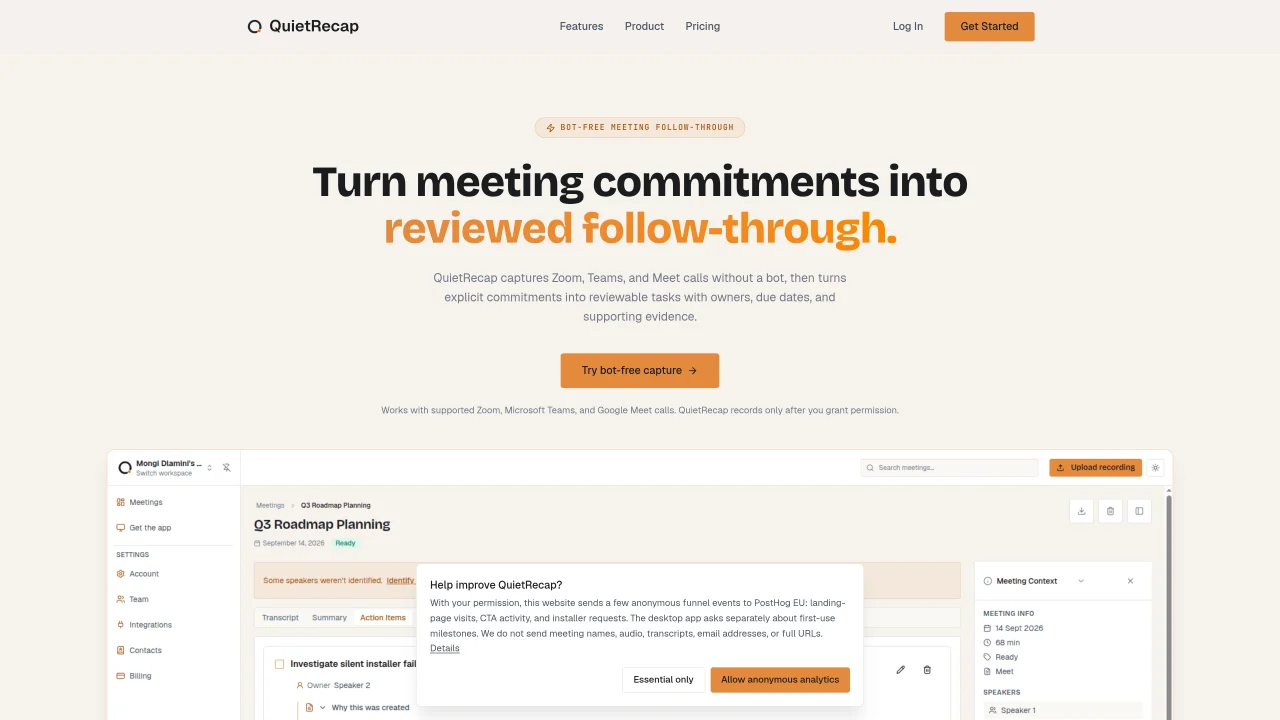
QuietRecap captures Zoom, Microsoft Teams, and Google Meet calls after explicit permission is granted and converts spoken commitments into reviewable tasks with owners, due dates, and source evidence. The desktop app records audio locally, processes it into a timecoded transcript, summary, decisions, and assigned action items, and allows review before sending follow-through to Asana or Slack. It provides read-only calendar access to display meeting context without modifying calendar events. Users must notify participants and obtain consent before recording. The service emphasizes verified commitments by linking each extracted task back to the original timecoded dialogue for verification. Workflows can be completed without re-listening or manual copy-pasting.
QuietRecap captures Zoom, Microsoft Teams, and Google Meet calls after explicit permission is granted and converts spoken commitments into reviewable tasks with owners, due dates, and source evidence. It processes audio into a timecoded transcript, summary, decisions, and assigned action items for review before sending follow-through to Asana or Slack.
QuietRecap is designed for professionals and teams who want to turn meeting commitments into actionable follow-through without manual note-taking. It suits users who rely on tools like Asana or Slack for task management and need verified, timecoded evidence for accountability.
No, QuietRecap does not require a bot in the meeting. It detects supported calls locally and records only after you enable capture and grant permission, without adding a visible participant.
QuietRecap integrates with Asana and Slack for sending follow-through tasks. It also provides read-only calendar access to display meeting context without modifying calendar events.
QuietRecap requires users to notify participants and obtain any consent required before recording a meeting. It does not record without explicit permission and emphasizes compliance with local regulations.
Start by creating a free account on the QuietRecap website. The free plan includes three recorded meetings to evaluate the full workflow. No credit card is required to begin. Paid plans are available for unlimited meetings and additional features.
We use essential cookies to run aitoolnavio™, and optional cookies to analyze traffic and measure our marketing. You choose what we use — optional cookies stay off unless you turn them on. See our Privacy Policy.
One short email a week: fresh tools worth trying, honest takes and the updates that actually matter. No spam, unsubscribe any time.
AI-powered video messaging tool that records, shares, and manages video messages with AI-generated titles, summaries, and tasks.
Hardware device that records conversations and converts them into searchable transcripts, summaries, and notes.
Automate transcription, generate summaries, identify speakers, and timestamps for video-conferencing conversations.
AI-powered meeting recorder and summarizer that captures, transcribes, and generates actionable insights from conversations.
Automatically record, transcribe, take notes, and create summaries with key insights during meetings.
Transforms audio/video to summarized text, instantly, across platforms.
Automatically transcribe meetings, create summaries, and securely store audio files in a searchable format.
Automatically turn meetings into searchable notes and tasks.
Wearable AI device that captures conversations and meetings, then auto-generates transcripts, summaries, action items, mind maps, and searchable notes.
Record, transcribe, and share key insights from virtual trainings, online meetings, and content creation.
Record, transcribe, and summarize online meetings from Google Meet and Zoom with AI, then share insights across collaboration tools.
Transform audio/video to text with precision, supporting 1500+ platforms, enriched by AI features.
Matched on what this tool does — grouped by the job you would be replacing.
matches Timecoded transcript generation · AI-generated meeting summary · Action item extraction with owners and due dates
AI notetaker for sales and customer success teams that records meetings, transcribes with speaker ID, generates summaries and action items, and syncs insights to CRM.
Fellow is the only AI meeting assistant built with privacy and security in mind, supporting accurate meeting transcriptions and human-level AI meeting recaps.
Automate key point identification, generate meeting summaries, and customize with notes and comments.
AI meeting assistant that transcribes calls, generates summaries, action items, and follow-up emails for teams.
matches Local audio capture with explicit permission
Privacy-first desktop notetaker that captures local device audio, auto-joins meetings, and exports structured notes without bots or recordings.
Automatically record Mac meetings, generate notes and follow-ups.
MacOS app that automatically captures, summarizes conversations, and generates follow-up tasks with AI.
Local-first AI assistant for Mac that captures notes, transcribes meetings, and provides context-aware chat