Generate content, correct spelling, suggest synonyms to enhance writing.
173M visits/mo+0.1%#1 Productivity & Office

An AI calendar app that creates, updates, and answers questions about events using natural language with Google Calendar sync.
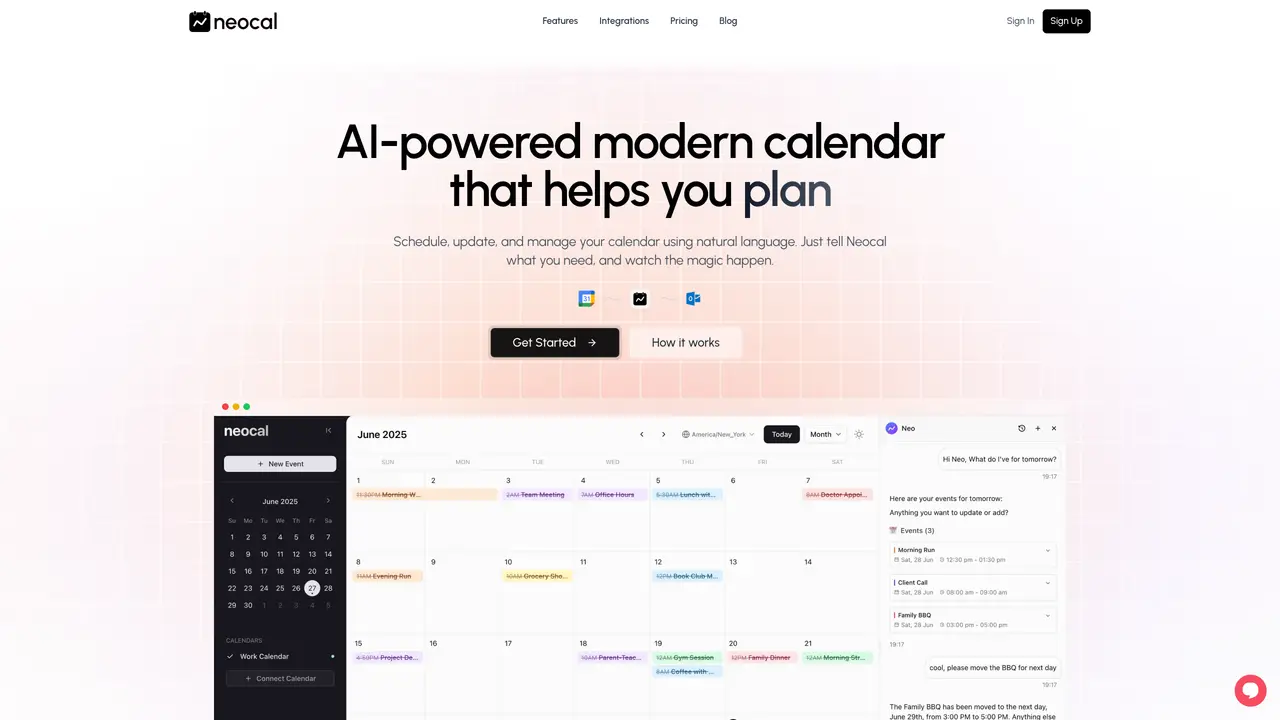
Neocal is a web-based AI calendar and scheduling tool designed for individuals and small teams. It manages events through natural language, allowing users to create, reschedule, or cancel events using plain-language requests via text or voice. The tool integrates with Google Calendar for two-way sync across multiple accounts, ensuring updates appear consistently across devices and existing calendar apps. Neocal includes conflict detection and time zone intelligence to suggest workable scheduling slots and prevent double-booking, particularly useful for international teams. It offers scheduling links and booking pages with real-time availability, customizable reminders, and email notifications, which can be embedded into workflows. Additionally, Neocal supports WhatsApp integration, enabling users to interact with their calendar and receive instant confirmations without leaving their messaging app. The tool is currently free, with premium plans featuring advanced capabilities planned for the future. It stands out by combining AI-driven calendar management, multi-account Google Calendar synchronization, and WhatsApp-based scheduling into a single workflow, reducing the need to juggle separate booking tools, messaging platforms, and calendar assistants.
Neocal currently supports Google Calendar. Integrations with Outlook and Apple Calendar are planned for the future.
Yes, you can connect multiple calendars, including those from different Google accounts, and Neocal will keep them synchronized.
Neocal prioritizes security by accessing only the necessary information to provide its services and does not share personal data with third parties.
Yes, Neocal is accessible on phones, tablets, and computers, allowing you to manage your calendar and interact with the AI from any internet-connected device.
Neocal is currently available at no cost. Premium plans with advanced features are planned for the future.
You can begin using Neocal by signing up on their website and connecting your Google Calendar account to start scheduling and managing events with natural language.
neocal.ai · third-party estimates from Similarweb
Last 4 months · grows by one month every month
Share of visits · estimated visits
Productivity & Office · Sep 2026
Traffic figures are third-party estimates, good for scale and trends; they can differ from a company's own numbers. Updated monthly.
We use essential cookies to run aitoolnavio™, and optional cookies to analyze traffic and measure our marketing. You choose what we use — optional cookies stay off unless you turn them on. See our Privacy Policy.
One short email a week: fresh tools worth trying, honest takes and the updates that actually matter. No spam, unsubscribe any time.
Generate content, correct spelling, suggest synonyms to enhance writing.
Turn messy team ideas into actionable plans with Miro's visual workspace.
Leverage analytics, automate tasks, share documents, and coordinate projects.
Integrates AI into Airtable to analyze data, summarize insights, draft content, and automate workflows without prior AI experience.
Cloud accounting software that automates bookkeeping, invoicing, and financial reporting for small and growing businesses.
Streamline teamwork, manage projects, automate tasks efficiently.
Automate code, research, and documents using agents.
AI assistant for safe, reliable productivity with code, collaboration, and integrations.
Create customizable tables, databases, and spreadsheets, share data securely with team members.
Easy-to-use CRM platform that automates lead capturing, prioritizes tasks, and provides sales pipeline analytics for businesses of all sizes.
Transforms thoughts into actions, enhancing productivity and efficiency.
Write & run code in 50+ languages, auto-complete with AI, and code faster with an intuitive interface.
Matched on what this tool does — grouped by the job you would be replacing.
Paid placement · similar tools from listings that support aitoolnavio™
Instant lead response for home-service pros: your phone rings on every new lead, plus 14 days of follow-up
matches Natural language scheduling and edits via text or voice · Google Calendar integration with two-way sync · Conflict detection and time zone intelligence
matches Scheduling links and booking pages with real-time availability · Embeddable booking experiences · Automated booking confirmations and reminders
matches Google Calendar integration with two-way sync · WhatsApp integration for instant confirmations · Customizable reminders and email notifications
Tailor your booking page, sync availability with calendars, set recurring events, and avoid double-booking with reminders.
Unified Calendar, Scheduling Links, and Task Manager for efficient organization.
AI assistant that coordinates meetings, plans schedules and prioritizes tasks
AI calendar assistant that streamlines meeting scheduling and busy schedule management with fast booking and smart automation.
Appointment scheduling and booking platform that customizes booking pages, manages multiple options, processes payments, and includes marketing tools.
AI-powered booking system and website builder for service businesses
AI-powered WhatsApp assistant for appointment scheduling and management
WhatsApp assistant that manages salon appointments and client chats automatically
AI voice, chat, WhatsApp and email agent for Indian businesses
AI phone and text receptionist that answers calls and texts 24/7
AI receptionist handling appointments, lead qualification and customer queries across website, WhatsApp and
Deploys AI agents that handle calls, messages and appointments across seven channels with CRM sync