

An AI chat platform for roleplaying, storytelling, and learning by chatting with millions of user-created AI characters.
151M visits/mo-5.5%#2 Chatbots & Assistants
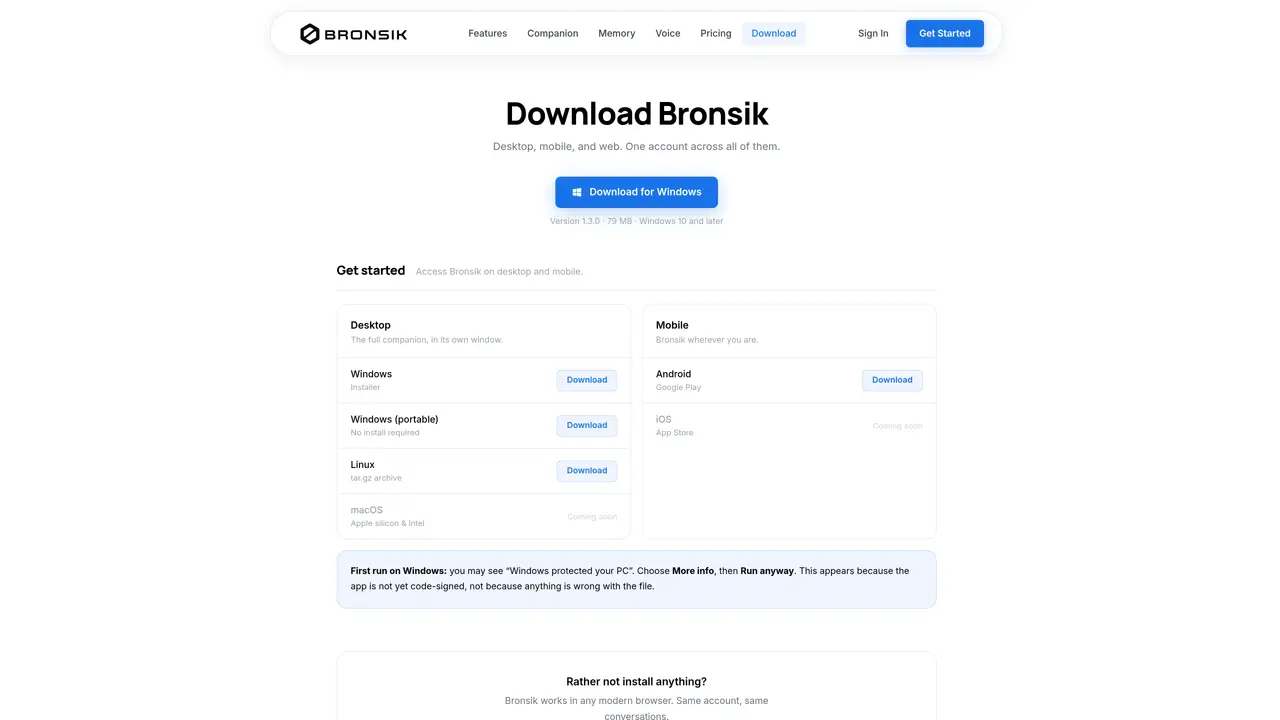
Bronsik provides an AI companion accessible via desktop applications for Windows and Linux, mobile apps for Android, and a web interface. The tool synchronizes a single account across all platforms, allowing users to switch between devices while maintaining conversation history and settings. The desktop version runs as a standalone application, while a portable Windows version requires no installation. Linux users download a tar.gz archive, and macOS support is listed as coming soon. The mobile app is available on Android, with iOS support also planned. The service emphasizes voice interaction, memory retention between conversations, and phone-based actions such as calls and messages. Users can access basic features without an account through the web browser, though advanced functionality requires a subscription.
Basic features are accessible without an account via the web browser, but advanced functionality requires a subscription.
The desktop app provides a standalone windowed experience, while the browser version offers the same account and conversations without requiring installation.
Yes, a single account synchronizes across all platforms, including desktop, web, and mobile, maintaining conversation history and settings.
The warning appears because the app is not yet code-signed, not due to any file issue. Users can proceed by selecting 'More info' and then 'Run anyway'.
The portable Windows version allows users to run Bronsik without installation, making it convenient for temporary or system-restricted environments.
The desktop app supports offline functionality, enabling users to access previously synchronized conversations and features without an active internet connection.
We use essential cookies to run aitoolnavio™, and optional cookies to analyze traffic and measure our marketing. You choose what we use — optional cookies stay off unless you turn them on. See our Privacy Policy.
One short email a week: fresh tools worth trying, honest takes and the updates that actually matter. No spam, unsubscribe any time.
An AI chat platform for roleplaying, storytelling, and learning by chatting with millions of user-created AI characters.
Create and interact with AI companions and virtual characters using GPT-4o on Chub AI's platform.
Create stunning visuals, access image recognition and processing, and express creatively with natural language processing.
Create fully customizable AI companions with persistent memory, selfies, and live voice calls.
Practice conversing with AI, improve pronunciation, and learn a new language in an immersive, safe environment.
Train, customize, optimize, and deploy models easily for powerful AI projects.
AI-powered tarot readings and personalized interpretations for self-reflection and guidance.
Quickly narrow searches by category, control results by country or language, and find relevant, accurate results with ease.
Chat with AI friends, mentors, and characters on the world's largest conversational AI platform for entertainment.
Generate presentations, create interactive slideshows, and customize with themes, fonts, and colors.
Trendspider is a sophisticated all-in-one market research and trading software designed to enhance the trading strategies of investors and traders.
An AI chat platform for immersive, personalized interactions with virtual companions, including image generation.
Matched on what this tool does — grouped by the job you would be replacing.
Paid placement · similar tools from listings that support aitoolnavio™
Instant lead response for home-service pros: your phone rings on every new lead, plus 14 days of follow-up
matches Voice interaction with AI companion · Memory retention between conversations · Multiple voice styles and characters
matches 2D and 3D animated avatars · Mood tracking and goals
An AI chat platform for roleplaying, storytelling, and learning by chatting with millions of user-created AI characters.
Turn your chat history into a personalized AI companion for entertainment, practice, remembrance, and more.
An AI assistant that talks, remembers and performs phone tasks
An open-source AI companion with a lip-syncing face and real-time voice interaction
AI Avatars, Professional Headshots & Animated Profile Videos Generator— from One Selfie
Turns live webcam feeds into animated avatars for streaming, video calls, and content creation in real time.
Turns a single prompt into a native desktop app for Mac, Windows, and Linux