An AI chat platform for roleplaying, storytelling, and learning by chatting with millions of user-created AI characters.
151M visits/mo-5.5%#2 Chatbots & Assistants

AI-powered life simulation chat for decision-making and future self reflection
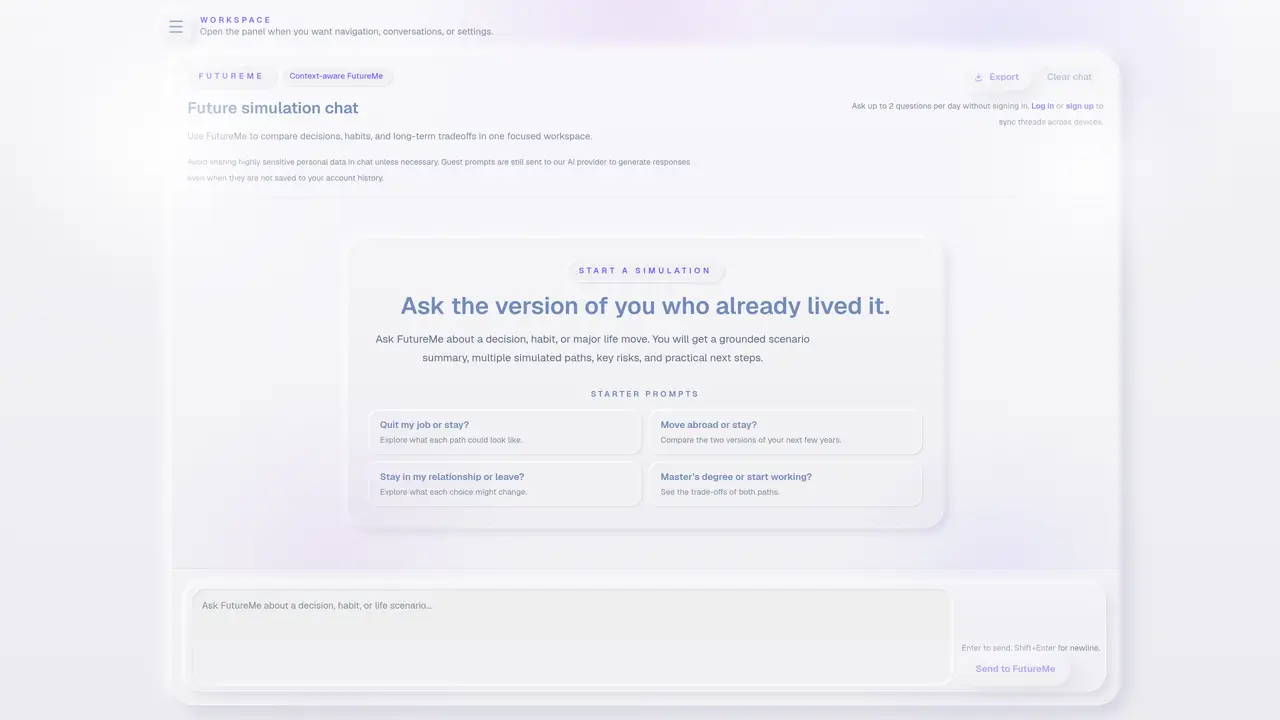
FuturaEngine provides a chat interface for simulating conversations with a future version of oneself. The tool offers a workspace to manage simulations, saved conversations, and account settings. Users can engage in context-aware FutureMe sessions to explore decisions, habits, or major life changes by comparing multiple simulated paths, risks, and practical next steps. The platform includes modes tailored to different user roles such as students, entrepreneurs, athletes, creators, job seekers, and founders. Conversations can be exported, and threads are synced across devices for logged-in users. Guest users can ask up to two questions per day without signing in, though prompts are still processed by the AI provider. The interface supports dark mode and includes a blog and an Android app for accessibility.
FuturaEngine is a chat interface designed for simulating conversations with a future version of oneself. It allows users to explore decisions, habits, or major life changes by comparing multiple simulated paths, risks, and practical next steps in a focused workspace.
The platform includes tailored modes for different user roles, such as students, entrepreneurs, athletes, creators, job seekers, and founders. It is intended for anyone looking to reflect on long-term decisions or life changes.
Users can start a simulation by asking FutureMe about a decision, habit, or major life move. The tool generates a grounded scenario summary, multiple simulated paths, key risks, and practical next steps for comparison.
Yes, guest users can ask up to two questions per day without signing in. However, prompts are still processed by the AI provider, and responses are not saved to an account history.
For logged-in users, threads are synced across devices. This allows access to saved conversations and settings from any device where the user is signed in.
Users are advised to avoid sharing highly sensitive personal data in chats unless necessary. Additionally, guest prompts are processed by the AI provider but are not saved to the user's account history.
We use essential cookies to run aitoolnavio™, and optional cookies to analyze traffic and measure our marketing. You choose what we use — optional cookies stay off unless you turn them on. See our Privacy Policy.
One short email a week: fresh tools worth trying, honest takes and the updates that actually matter. No spam, unsubscribe any time.
An AI chat platform for roleplaying, storytelling, and learning by chatting with millions of user-created AI characters.
Create and interact with AI companions and virtual characters using GPT-4o on Chub AI's platform.
Create stunning visuals, access image recognition and processing, and express creatively with natural language processing.
Create fully customizable AI companions with persistent memory, selfies, and live voice calls.
Practice conversing with AI, improve pronunciation, and learn a new language in an immersive, safe environment.
Train, customize, optimize, and deploy models easily for powerful AI projects.
AI-powered tarot readings and personalized interpretations for self-reflection and guidance.
Quickly narrow searches by category, control results by country or language, and find relevant, accurate results with ease.
Chat with AI friends, mentors, and characters on the world's largest conversational AI platform for entertainment.
Generate presentations, create interactive slideshows, and customize with themes, fonts, and colors.
Trendspider is a sophisticated all-in-one market research and trading software designed to enhance the trading strategies of investors and traders.
An AI chat platform for immersive, personalized interactions with virtual companions, including image generation.
Matched on what this tool does — grouped by the job you would be replacing.
Paid placement · similar tools from listings that support aitoolnavio™
Instant lead response for home-service pros: your phone rings on every new lead, plus 14 days of follow-up
matches Future self chat simulation · Saved conversation history · Multiple user modes (Student, Entrepreneur, Athlete, Creator, Job Seeker, Founder)
AI-powered Life OS that builds a personalized understanding of goals, memories, and decisions to guide daily actions and long-term planning.
A platform that lets fans chat with lifelike AI versions of their favorite social media stars.
Private AI companion for conversation and reflection via voice or text
AI companion app for private emotional support and reflective journaling