An AI chat platform for roleplaying, storytelling, and learning by chatting with millions of user-created AI characters.
151M visits/mo-5.5%#2 Chatbots & Assistants
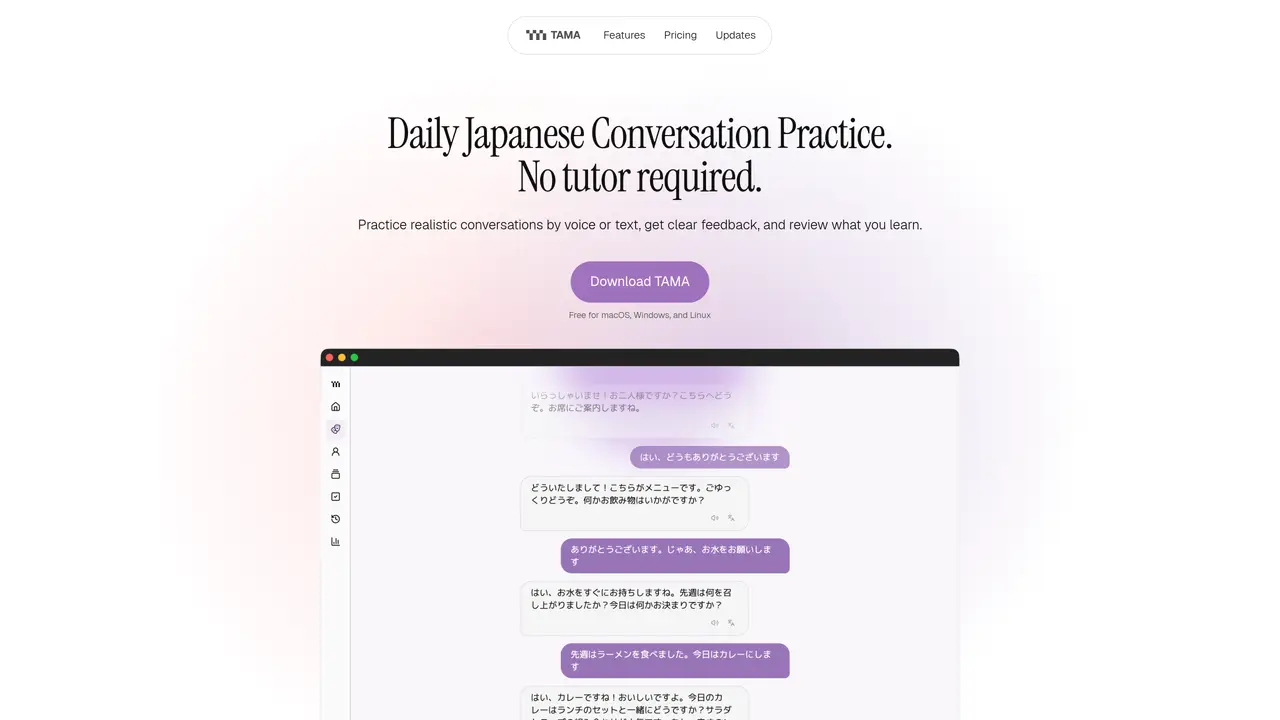
TAMA is a desktop application for practicing Japanese conversation without a tutor. It offers scenario-based practice where users engage in realistic dialogues such as ordering food or checking into a hotel, either by voice or text. After each session, the tool provides clear feedback on areas for improvement and suggests what to practice next. Vocabulary encountered during conversations can be saved directly to flashcards that use spaced repetition to reinforce learning. The app includes a practice dashboard that consolidates daily plans, recent conversations, and due flashcards in one place, allowing users to resume practice without starting from scratch. TAMA supports both local models and user-provided API keys, giving users control over AI providers and associated costs. It is designed primarily for beginner to intermediate learners who already know basic Japanese phrases and wish to improve fluency through practical, everyday scenarios.
Users select a scenario, practice by voice or text, and receive feedback after each conversation. TAMA identifies useful vocabulary and converts saved words into spaced-repetition flashcards for review.
TAMA works best for learners who already know basic words and phrases, particularly those at beginner to intermediate levels. Users can adjust the difficulty of scenarios as they improve.
Yes, TAMA provides public builds for macOS (Apple Silicon), Windows x64, and Linux x64, available for download on the GitHub Releases page.
In the Free app, study history, flashcards, personas, and settings remain on the user's device. Requests are sent only to the chosen AI or speech provider. The managed beta will include separate data disclosure.
The Free version allows users to employ local models or connect their own API keys, while the planned Managed option at $8/month handles the AI service for users without setup requirements.
Costs depend on the chosen provider and model, and users pay the provider directly. Alternatively, users can connect a compatible local model to avoid per-request AI charges.
We use essential cookies to run aitoolnavio™, and optional cookies to analyze traffic and measure our marketing. You choose what we use — optional cookies stay off unless you turn them on. See our Privacy Policy.
One short email a week: fresh tools worth trying, honest takes and the updates that actually matter. No spam, unsubscribe any time.
An AI chat platform for roleplaying, storytelling, and learning by chatting with millions of user-created AI characters.
Create and interact with AI companions and virtual characters using GPT-4o on Chub AI's platform.
Create stunning visuals, access image recognition and processing, and express creatively with natural language processing.
Create fully customizable AI companions with persistent memory, selfies, and live voice calls.
Practice conversing with AI, improve pronunciation, and learn a new language in an immersive, safe environment.
Train, customize, optimize, and deploy models easily for powerful AI projects.
AI-powered tarot readings and personalized interpretations for self-reflection and guidance.
Quickly narrow searches by category, control results by country or language, and find relevant, accurate results with ease.
Chat with AI friends, mentors, and characters on the world's largest conversational AI platform for entertainment.
Generate presentations, create interactive slideshows, and customize with themes, fonts, and colors.
Trendspider is a sophisticated all-in-one market research and trading software designed to enhance the trading strategies of investors and traders.
An AI chat platform for immersive, personalized interactions with virtual companions, including image generation.
Matched on what this tool does — grouped by the job you would be replacing.
Paid placement · similar tools from listings that support aitoolnavio™
Instant lead response for home-service pros: your phone rings on every new lead, plus 14 days of follow-up
matches Scenario-based conversation practice · Voice and text input options · Session feedback and improvement suggestions
matches Smart flashcards with spaced repetition · Practice dashboard for consolidated learning
A spaced repetition flashcard app that builds vocabulary from YouTube, websites, and eBooks with AI explanations and progress tracking.
Master languages with AI-driven quests, real-time feedback, and customization.
AI-powered English speaking practice with real-time feedback
AI-powered app that teaches languages through live speaking practice and personalized feedback
Enhance learning with AI-driven flashcards, tests, and games.
Generate custom flashcards with AI-powered hints, text-to-speech, and spaced repetition for mastering subjects quickly.
AI-powered study workspace for interactive learning and revision
AI-powered medical flashcard app for iOS and Android