AI-powered code assistant that generates, reviews, optimizes, and debugs code with natural language prompts and editor integrations.
13M visits/mo-20.5%#20 Coding & Development

Convert text to stunning visualizations, share and edit interactive outputs.
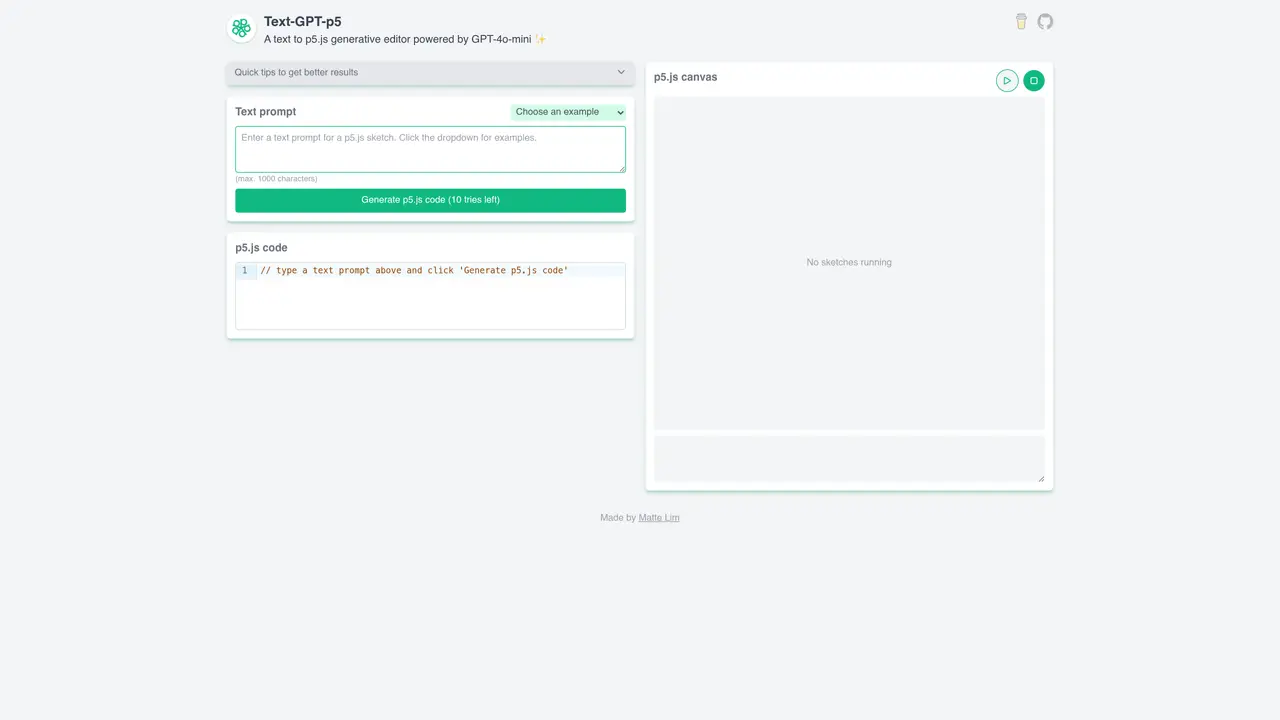
Text â’ GPT â’ p5 is an innovative and powerful tool for anyone interested in exploring the limitless possibilities of text-driven visualizations. With a simple text prompt, users can quickly and easily transform their ideas into interactive visualizations in p5js code. Utilizing OpenAI’s GPT-3 natural language processing, the service automatically generates p5js code that can be used to bring creative visions to life.The intuitive and easy-to-use interface makes it a breeze to get started. Simply enter a text prompt and watch as the text is transformed into a generative p5js code. The resulting visualizations can be instantly viewed, edited, and shared with a few clicks. Text â’ GPT â’ p5 is perfect for coders, visual artists, and anyone who wants to take their creativity to the next level.
Text-GPT-p5 is a text-to-p5.js generative editor powered by GPT-4o-mini. It transforms text prompts into interactive p5.js visualizations that users can view, edit, and share.
The tool is designed for coders, visual artists, and creatives who want to quickly generate and experiment with p5.js code from natural language descriptions.
Enter a text prompt into the interface, and the tool will generate corresponding p5.js code. The resulting visualization can be viewed, edited, and shared directly from the platform.
Yes, the tool provides example prompts such as Conway's Game of Life, 2D flocking animation, 3D forms, and more to help users get started.
The free version of Text-GPT-p5 has a daily usage limit. Users are encouraged to sponsor the project to support continued free access.
Yes, the generated p5.js visualizations can be instantly viewed, edited, and shared with a few clicks through the platform.
We use essential cookies to run aitoolnavio™, and optional cookies to analyze traffic and measure our marketing. You choose what we use — optional cookies stay off unless you turn them on. See our Privacy Policy.
One short email a week: fresh tools worth trying, honest takes and the updates that actually matter. No spam, unsubscribe any time.
AI-powered code assistant that generates, reviews, optimizes, and debugs code with natural language prompts and editor integrations.
Automate customer service tasks, create custom AI functions, and generate AI functionality using large language models like GPT3.
Automatically convert code to any language, batch convert multiple files, with an intuitive user interface for non-coders.
Automate tests, test web elements with full coverage, and set up continuous integration and deployment effortlessly.
Revolutionizing AI code execution with secure, versatile SDKs.
Analyze, share, and automate code reports for improved quality and security.
Automate SQL creation, streamline data management, and cost-effective solution for individuals and small teams.
Convert code between languages like Java to JavaScript with syntax highlighting and debugging support.
Explore live data, create SQL queries with GPT, and visualize results effortlessly.
Automate code reviews, identify bugs, suggest fixes, measure code coverage, and analyze code complexity.
Automate tests effortlessly, navigate and create with ease, and optimize tests with detailed results.
Build production-ready frontend code, reuse components, and securely feed real data into products for faster time-to-market.
Matched on what this tool does — grouped by the job you would be replacing.
matches Convert text prompts into stunning visualizations · Instantly share and edit interactive visualizations · Explore limitless possibilities of text-driven visualizations
Create stunning visuals, develop ideas with AI-powered tools, and instantly share content without coding or formatting.
Generate stunning, interactive charts from text-based data with an intuitive UI and AI-driven automation.
Create stunning diagrams, collaborate in real-time, and utilize templates and icons for quick start.