AI-powered website builder that generates a professional site in under a minute and includes tools for content, SEO, and analytics.
52M visits/mo+0.7%#4 Coding & Development

Local tool that scans and visualizes installed software, dependencies and AI agents on a developer machine
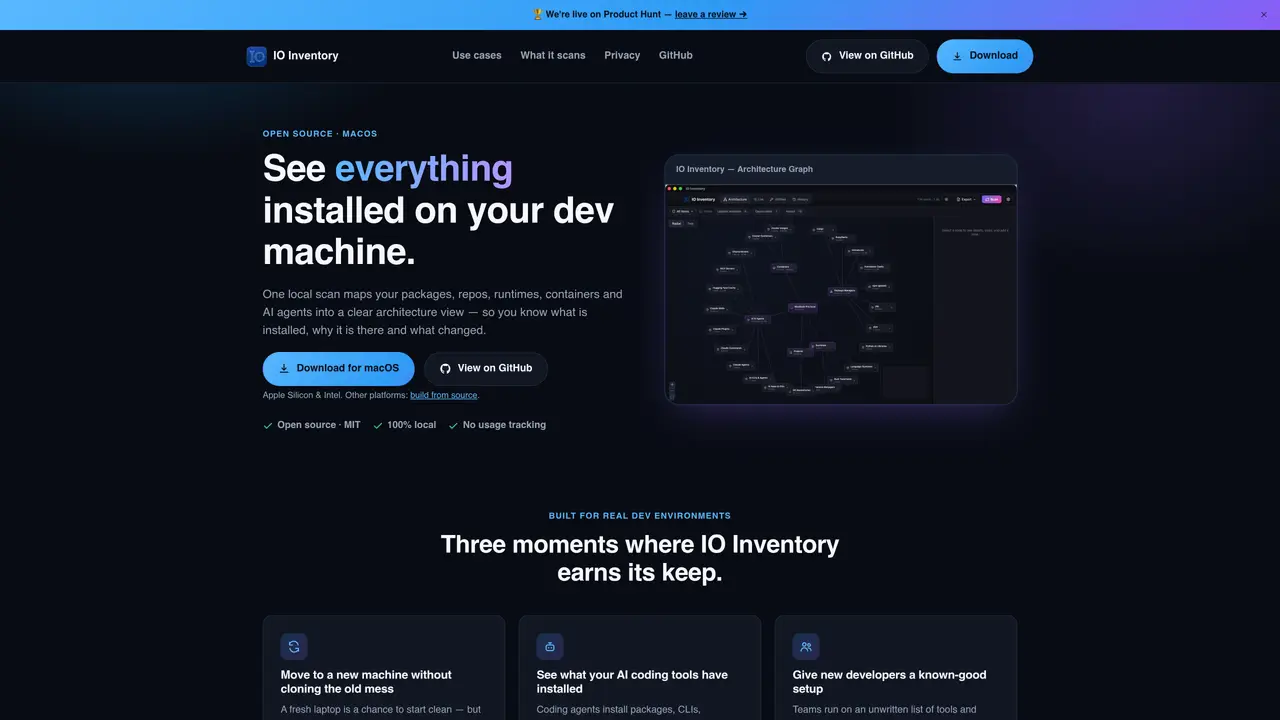
IO Inventory performs a local scan of a developer machine to map installed packages, repositories, runtimes, containers and AI agents into a clear architecture view. It shows what is installed, why it is present and what has changed between scans. The tool provides both a graph and list view to inspect and manage the environment, including support for searching, tagging, updating and uninstalling items with confirmation. Snapshots can be taken to capture the state of a machine or project, then compared to identify additions, removals or updates. IO Inventory is designed to help developers move to new machines without carrying unnecessary dependencies, onboard new team members with a known-good setup, and track changes introduced by AI coding tools. It includes a bundled MCP server to expose inventory data to compatible AI clients. The application runs entirely locally with no usage tracking or data collection.
IO Inventory scans installed packages, repositories, runtimes, containers, AI agents, dependency manifests, and running containers. It covers package managers like Homebrew, npm, pip, and cargo, as well as tools such as Node.js, Python, Rust, Go, Docker, and AI coding agents like Claude Code, Cursor, and Ollama.
IO Inventory is built for developers who need visibility into their local development environment, especially those working with AI coding tools. It helps onboard new team members, migrate to new machines, and track changes introduced by AI agents.
All scans, storage, and the user interface run locally on the user's machine. No data is uploaded or tracked, and IO Inventory does not collect analytics or usage information. It only checks GitHub's public release API for updates without sending personal data.
Yes, IO Inventory includes a bundled MCP server that exposes inventory data to compatible AI clients. This allows AI tools to query the local environment, search for items, and access snapshot context, though it is read-only by default unless configured otherwise.
Download IO Inventory for macOS or build it from source for other platforms. Run a local scan to map your environment, then use the graph or list view to inspect, search, tag, update, or uninstall items. Snapshots can be taken and compared to track changes over time.
Yes, IO Inventory allows users to compare snapshots and bulk-install missing dependencies. It also supports searching, tagging, updating, and uninstalling items with explicit confirmation, providing a clear overview of the local development setup.
We use essential cookies to run aitoolnavio™, and optional cookies to analyze traffic and measure our marketing. You choose what we use — optional cookies stay off unless you turn them on. See our Privacy Policy.
One short email a week: fresh tools worth trying, honest takes and the updates that actually matter. No spam, unsubscribe any time.
AI-powered website builder that generates a professional site in under a minute and includes tools for content, SEO, and analytics.
AI-powered coding platform that uses agents to plan, write, and test software with real-time feedback and verifiable artifacts.
Automate code, research, and documents using agents.
AI-powered code assistant that generates, reviews, optimizes, and debugs code with natural language prompts and editor integrations.
AI assistant for safe, reliable productivity with code, collaboration, and integrations.
AI-powered IDE for autonomous coding tasks and agentic development workflows
Privacy-focused AI chatbot that generates uncensored text, code, images, and translations without storing conversations or requiring an account.
A free web-based AI chatbot and agent for writing, coding, research, and content creation with multilingual support.
Write & run code in 50+ languages, auto-complete with AI, and code faster with an intuitive interface.
An IDE that automates legacy-to-modern code migration using autonomous coding agents.
AI models that return typed decisions with calibrated confidence for software automation
Practice coding challenges, improve technical skills, get detailed explanations, compare performance with peers.
Matched on what this tool does — grouped by the job you would be replacing.
matches Local architecture graph visualization · Snapshot creation and comparison · Package manager and runtime detection
Native Mac app to manage AI coding tools, discover skills and compare models
Local catalog and memory system for software projects on disk
Local review tool for AI-written code changes before they reach GitHub
matches Local SQLite storage with automatic session reload · CLI tool for adding and managing notes · Contradiction detection in memory entries
Local-first tool that turns AI coding sessions into inspectable, reusable workflows
Structured project memory for AI coding agents
Verifies AI coding agents' completion claims with receipts and checks