




AI-powered website builder that generates a professional site in under a minute and includes tools for content, SEO, and analytics.
52M visits/mo+0.7%#4 Coding & Development
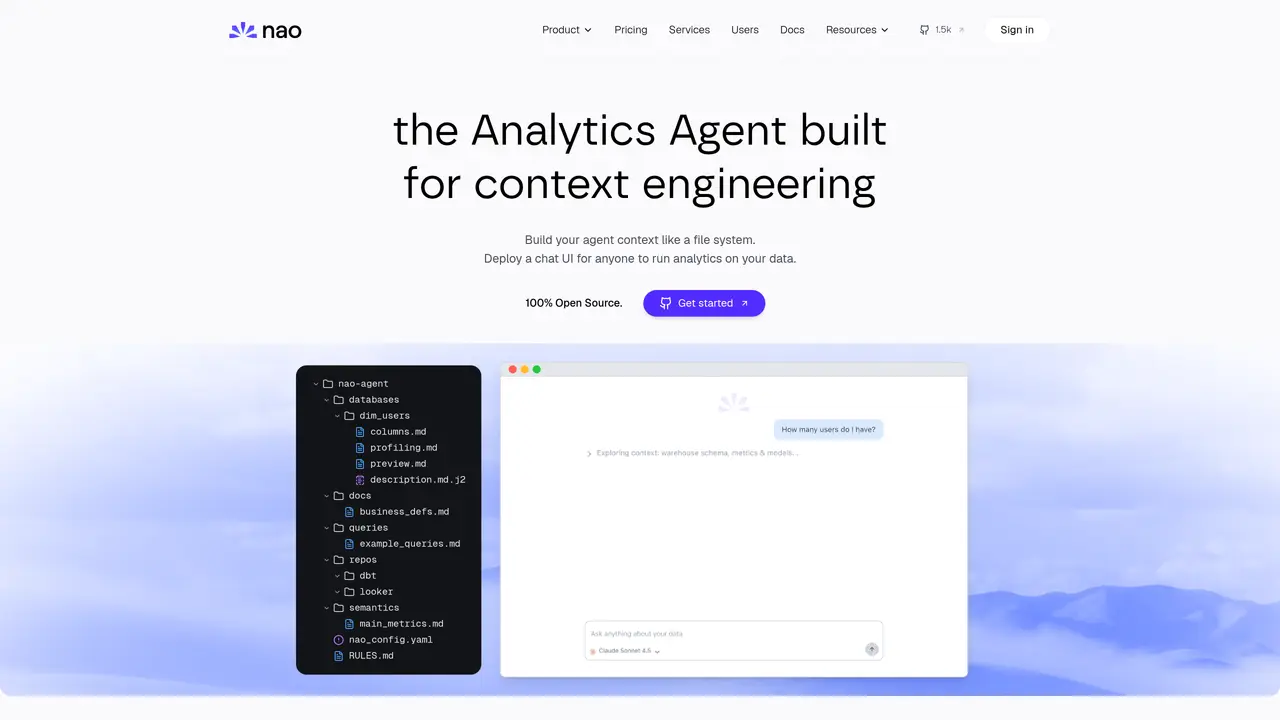
nao is a cutting-edge AI data editor designed specifically for data teams looking to streamline their data management processes. It connects directly to your data warehouse, providing a seamless interface for querying, analyzing, and ensuring data quality. With its AI-driven capabilities, nao simplifies the complex task of managing data by offering real-time code writing and analysis, all while maintaining a high standard of security and privacy. Key Features: Integrated Development Environment (IDE): An intuitive platform where users can view and interact with their data directly, eliminating the need for juggling multiple tools. AI-Powered Code Assistance: The nao AI agent writes and auto-completes code with your data schema in mind, ensuring accuracy and efficiency. Multi-Warehouse Connectivity: Supports connections to major data warehouses like Postgres, Snowflake, and BigQuery, allowing for flexible data management. Data Quality Assurance: The AI agent can test your data, run data diffs, and ensure high data quality, providing peace of mind for data teams.
nao Labs
Paris, France · Founded 2024
nao is an open-source analytics agent builder designed for context engineering, allowing users to build and deploy an analytics agent that interacts with their data using plain English. It enables users to engineer their agent's context by organizing data, metadata, rules, and tools into a file-system-like structure.
nao is suitable for data teams, analysts, and organizations looking to streamline their analytics workflows by deploying a self-hosted, customizable chat interface for data exploration and analysis. It is ideal for those who want to integrate their data warehouses and external sources into a unified context.
nao connects directly to data warehouses such as BigQuery, Snowflake, or Postgres, pulling in schema, metrics, and models to build a comprehensive context for the analytics agent. Users can synchronize existing context from databases, repositories, and external sources like Notion.
Yes, nao supports self-hosting, allowing users to deploy their analytics agent within their own infrastructure for maximum security and control over their data. This ensures that all interactions and data remain under the user's control.
nao supports integrations with major data warehouses, repositories (e.g., dbt), and external tools like Notion. It also offers an MCP (Model Context Protocol) for broader connectivity, enabling interactions via platforms like Slack, Teams, WhatsApp, and Telegram.
To get started, users can initialize their agent's context using the command `nao init`, then add data, metadata, rules, and tools to build their context. The `nao sync` command can pull existing context from connected sources, and `nao chat` deploys the agent for interactive use.
getnao.io · third-party estimates from Similarweb
Last 4 months · grows by one month every month
Share of visits · estimated visits
Other countries: 26.6%
Coding & Development · Sep 2026
Traffic figures are third-party estimates, good for scale and trends; they can differ from a company's own numbers. Updated monthly.
We use essential cookies to run aitoolnavio™, and optional cookies to analyze traffic and measure our marketing. You choose what we use — optional cookies stay off unless you turn them on. See our Privacy Policy.
One short email a week: fresh tools worth trying, honest takes and the updates that actually matter. No spam, unsubscribe any time.
AI-powered website builder that generates a professional site in under a minute and includes tools for content, SEO, and analytics.
AI-powered coding platform that uses agents to plan, write, and test software with real-time feedback and verifiable artifacts.
Automate code, research, and documents using agents.
AI-powered code assistant that generates, reviews, optimizes, and debugs code with natural language prompts and editor integrations.
AI assistant for safe, reliable productivity with code, collaboration, and integrations.
AI-powered IDE for autonomous coding tasks and agentic development workflows
Privacy-focused AI chatbot that generates uncensored text, code, images, and translations without storing conversations or requiring an account.
A free web-based AI chatbot and agent for writing, coding, research, and content creation with multilingual support.
Write & run code in 50+ languages, auto-complete with AI, and code faster with an intuitive interface.
An IDE that automates legacy-to-modern code migration using autonomous coding agents.
AI models that return typed decisions with calibrated confidence for software automation
Practice coding challenges, improve technical skills, get detailed explanations, compare performance with peers.
Collaboration and version control platform for software development and AI model hosting.
Enhance coding efficiency with AI-driven insights.
A mobile IDE for coding, collaborating, and deploying software projects directly from iOS.
Google Cloud Code provides a development environment for building, debugging, and deploying cloud applications with integrated cloud services.
matches Multi-Warehouse Connectivity · Data Quality Assurance · Enhanced Data Security
Open-source backend platform providing Postgres, authentication, APIs, and real-time features to build scalable apps quickly.
Collaborative data analytics platform for teams to explore, analyze, and publish insights using SQL, Python, R, and AI agents in a governed workspace.
Streamline, manage, and scale machine learning lifecycle effortlessly.