AI-powered website builder that generates a professional site in under a minute and includes tools for content, SEO, and analytics.
52M visits/mo+0.7%#4 Coding & Development

AI-powered LeetCode interview coach that provides adaptive hints directly in the editor
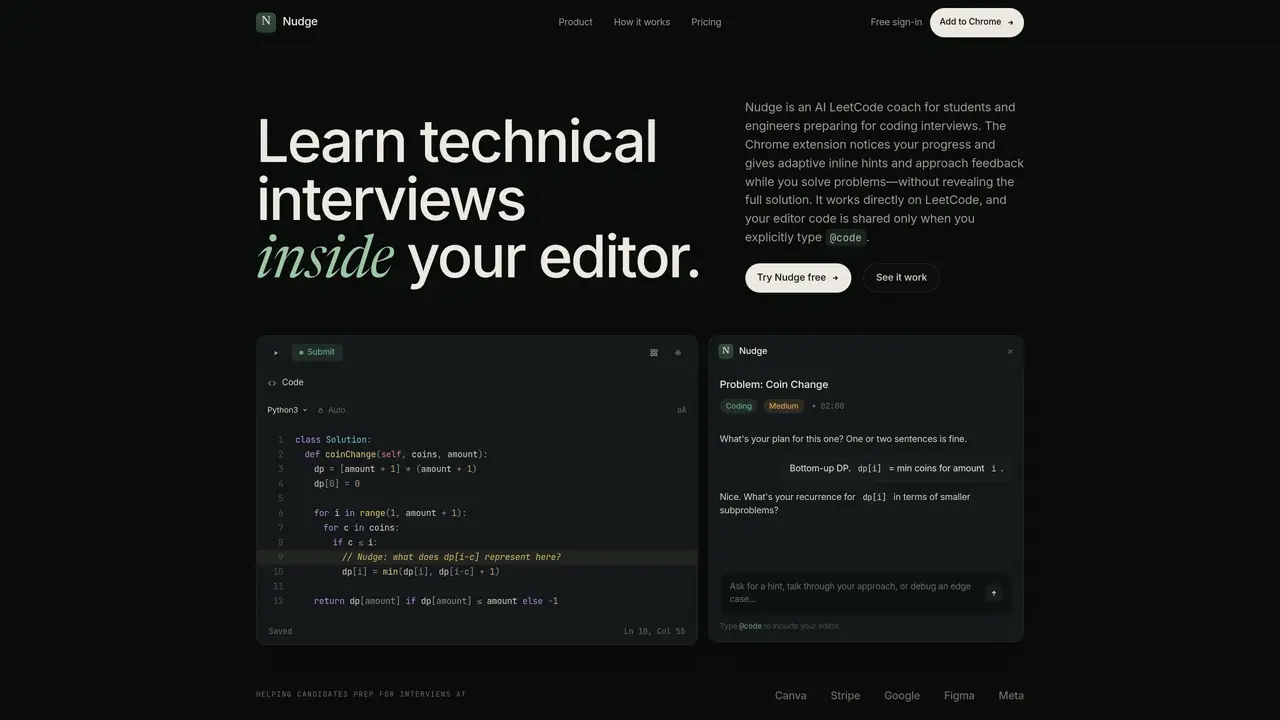
Nudge is a Chrome extension designed to assist students and engineers preparing for coding interviews by providing real-time, adaptive feedback while solving LeetCode problems. It integrates directly into the coding environment on LeetCode, offering inline hints and approach feedback without revealing full solutions. The tool monitors progress and provides context-specific questions to guide problem-solving, such as asking about the recurrence relation in dynamic programming or identifying edge cases. Users can request hints, discuss their approach, or debug issues through a side panel, and share their code context by typing @code. Nudge adapts its feedback based on the user’s progress, whether they are planning, stuck, or nearly finished, ensuring the guidance remains relevant and minimally intrusive. The extension aims to reinforce understanding by encouraging users to derive solutions independently rather than copying answers.
Nudge is a Chrome extension that acts as an AI coach for students and engineers preparing for coding interviews. It provides real-time, adaptive feedback while solving LeetCode problems to reinforce understanding without revealing full solutions.
Nudge integrates directly into the LeetCode coding environment, offering inline hints and approach feedback tailored to the user's progress. It adapts its guidance based on whether the user is planning, stuck, or nearly finished, ensuring relevance and minimal intrusion.
Yes, users can share their code context by typing @code in the side panel, which allows Nudge to provide more specific feedback or help debug issues without exposing the code automatically.
Nudge offers a free tier with limited hints and a Pro tier for unlimited coaching and code sharing. The free tier allows guests to try a small number of hints, while signing in with an account unlocks additional free coaching.
Install the Chrome extension from the Nudge website, then open a LeetCode problem to begin receiving adaptive hints and feedback directly in the coding environment.
Nudge is designed to work directly on LeetCode and integrates with the LeetCode coding environment. It does not support other platforms at this time.
trynudge.dev · third-party estimates from Similarweb
Share of visits · estimated visits
Traffic figures are third-party estimates, good for scale and trends; they can differ from a company's own numbers. Updated monthly.
We use essential cookies to run aitoolnavio™, and optional cookies to analyze traffic and measure our marketing. You choose what we use — optional cookies stay off unless you turn them on. See our Privacy Policy.
One short email a week: fresh tools worth trying, honest takes and the updates that actually matter. No spam, unsubscribe any time.
AI-powered website builder that generates a professional site in under a minute and includes tools for content, SEO, and analytics.
AI-powered coding platform that uses agents to plan, write, and test software with real-time feedback and verifiable artifacts.
Automate code, research, and documents using agents.
AI-powered code assistant that generates, reviews, optimizes, and debugs code with natural language prompts and editor integrations.
AI assistant for safe, reliable productivity with code, collaboration, and integrations.
AI-powered IDE for autonomous coding tasks and agentic development workflows
Privacy-focused AI chatbot that generates uncensored text, code, images, and translations without storing conversations or requiring an account.
A free web-based AI chatbot and agent for writing, coding, research, and content creation with multilingual support.
Write & run code in 50+ languages, auto-complete with AI, and code faster with an intuitive interface.
An IDE that automates legacy-to-modern code migration using autonomous coding agents.
AI models that return typed decisions with calibrated confidence for software automation
Practice coding challenges, improve technical skills, get detailed explanations, compare performance with peers.
Matched on what this tool does — grouped by the job you would be replacing.
matches Inline hints as comments in code · Context-aware questioning based on current line · Side-panel interaction for approach discussion
AI interview copilot that provides live, undetectable assistance during coding and technical interviews via screengrabs or selected text.
AI-powered voice-based mock interviews with detailed feedback
AI-powered mock interviews for software engineers
AI-powered interview practice platform with coding challenges, resume analysis and mock interviews