

AI-powered website builder that generates a professional site in under a minute and includes tools for content, SEO, and analytics.
52M visits/mo+0.7%#4 Coding & Development
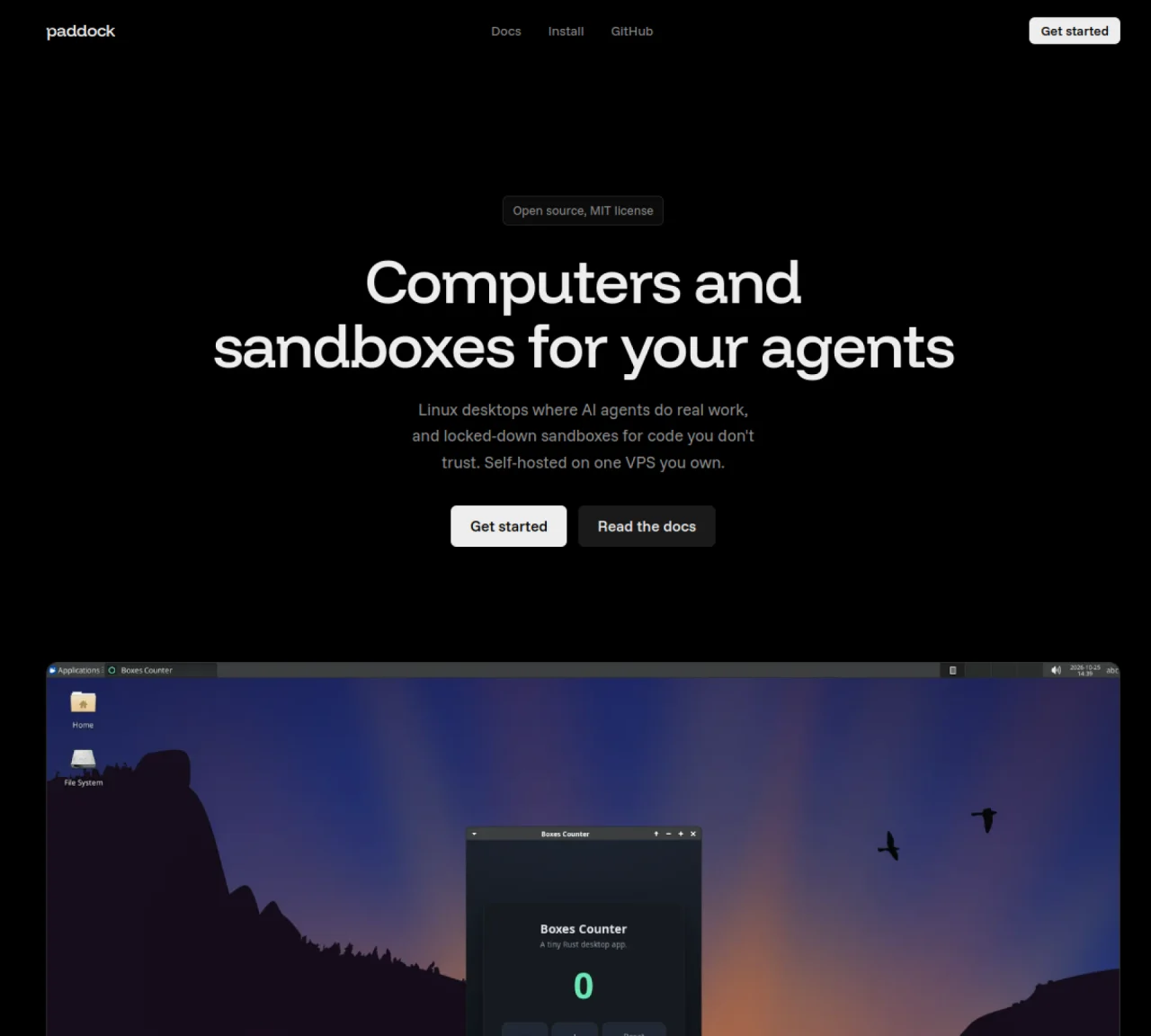
Paddock provides isolated Linux desktops and locked-down sandboxes for AI agents to perform real work. Each agent receives a dedicated Ubuntu XFCE desktop environment with persistent storage, tools, and network controls. Agents can open GUI applications, take screenshots, and interact with the desktop while running on a server under user control. Sandboxes enforce strict network policies, run limits, and snapshot rollback to contain untrusted code. The system runs on a single VPS with Docker and Sysbox for isolation. Users manage boxes via a CLI, HTTP API, TypeScript/Python SDKs, or a web dashboard. Drives can be mounted read-write to one box or read-only to many, and snapshots are saved every minute for recovery. Preinstalled agents include Claude Code, Codex, OpenCode, Pi, Prime, and Kimi, with SSH, SCP, and port forwarding available.
Paddock provides isolated Linux desktops and locked-down sandboxes for AI agents to perform real work. It offers dedicated Ubuntu XFCE desktop environments with persistent storage, tools, and network controls, allowing agents to open GUI applications, take screenshots, and interact with the desktop while running on a server under user control.
Paddock is designed for developers, researchers, and teams who need to run untrusted AI agents or code in a secure, isolated environment. It is particularly useful for those who require persistent desktops, GUI application support, and strict network policies for their workflows.
Paddock enforces strict network policies, run limits, and snapshot rollback to contain untrusted code. It runs on a single VPS with Docker and Sysbox for isolation, and sandboxes can lock the network to deny-all or an allowlist. Snapshots are saved every minute for recovery, and cloud metadata is always blocked.
Paddock offers a CLI, HTTP API, TypeScript/Python SDKs, and a web dashboard for managing boxes. Users can create, control, and monitor boxes through these interfaces, with options for SSH, SCP, and port forwarding access.
Yes, Paddock supports running GUI applications on its Ubuntu XFCE desktop environment. Users can open GUI apps, take screenshots, and interact with the desktop through the provided tools and interfaces.
To get started, install Paddock on a VPS with ports 80 and 443 open using a provided script. Then create a box via the CLI, dashboard, or HTTP API, and hand it to your agent. Detailed instructions are available in the full install guide and documentation.
We use essential cookies to run aitoolnavio™, and optional cookies to analyze traffic and measure our marketing. You choose what we use — optional cookies stay off unless you turn them on. See our Privacy Policy.
One short email a week: fresh tools worth trying, honest takes and the updates that actually matter. No spam, unsubscribe any time.
AI-powered website builder that generates a professional site in under a minute and includes tools for content, SEO, and analytics.
AI-powered coding platform that uses agents to plan, write, and test software with real-time feedback and verifiable artifacts.
Automate code, research, and documents using agents.
AI-powered code assistant that generates, reviews, optimizes, and debugs code with natural language prompts and editor integrations.
AI assistant for safe, reliable productivity with code, collaboration, and integrations.
AI-powered IDE for autonomous coding tasks and agentic development workflows
Privacy-focused AI chatbot that generates uncensored text, code, images, and translations without storing conversations or requiring an account.
A free web-based AI chatbot and agent for writing, coding, research, and content creation with multilingual support.
Write & run code in 50+ languages, auto-complete with AI, and code faster with an intuitive interface.
An IDE that automates legacy-to-modern code migration using autonomous coding agents.
AI models that return typed decisions with calibrated confidence for software automation
Practice coding challenges, improve technical skills, get detailed explanations, compare performance with peers.
Matched on what this tool does — grouped by the job you would be replacing.
matches Ubuntu XFCE desktop per agent · Persistent storage and files between runs · Network allowlist/deny-all controls
Revolutionizing AI code execution with secure, versatile SDKs.
Deploy AI agents as TypeScript functions on isolated Linux microVM sandboxes with hardware-level security.
API-hosted virtual desktops for developers building computer-use AI agents with low-latency control, autoscaling, and session persistence.
Cloud-hosted Linux workstation with preinstalled AI agents and development tools
matches Ubuntu XFCE desktop per agent · Persistent storage and files between runs · Network allowlist/deny-all controls
Private cloud computer for AI agents to collaborate on coding and research tasks
Cloud infrastructure for deploying agents and small apps with versioning and environments