

AI-powered website builder that generates a professional site in under a minute and includes tools for content, SEO, and analytics.
52M visits/mo+0.7%#4 Coding & Development
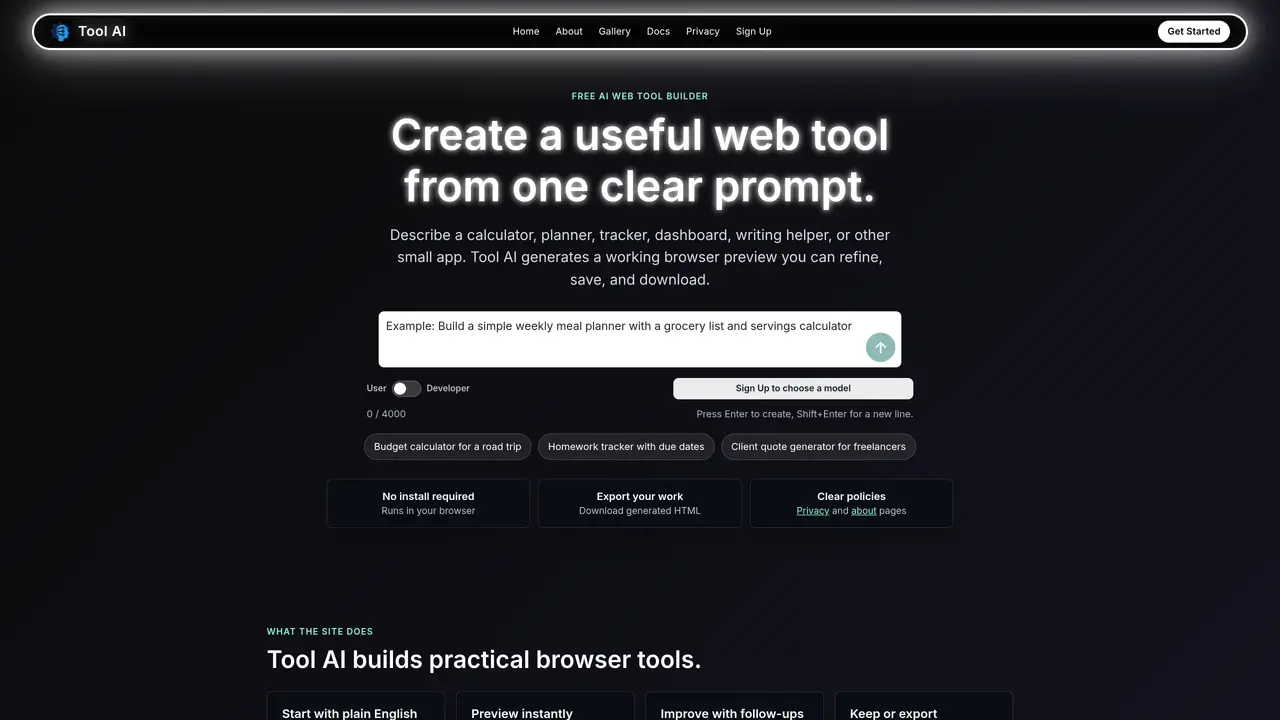
Tool AI generates practical browser-based tools from plain-language descriptions. Users describe the desired functionality, inputs, calculations, or styling, and the system produces a working HTML, CSS, and JavaScript preview in a sandboxed browser environment. The generated tools can be refined through follow-up prompts, saved to an account for later access, or exported as downloadable HTML. It targets students, creators, small teams, and individuals needing quick custom utilities without setting up a development environment. Common outputs include calculators, planners, trackers, writing helpers, and lightweight business tools. The workflow emphasizes iterative improvement, with real-time previews and the ability to request specific changes like layout adjustments or additional features.
Describe the desired outcome, the specific fields or inputs needed, and any style or functionality preferences. More detailed prompts typically yield better tools.
Yes. Use follow-up messages to request changes, fixes, new sections, different styling, or adjustments to wording without starting over.
The privacy policy is available at ToolAI.us/privacy. It outlines the services used and the types of data handled by Tool AI.
Basic tool creation can be tried without a full account. Signing in is required for saving projects and account-based continuity.
Common outputs include calculators, planners, trackers, writing helpers, dashboards, and lightweight business utilities.
Yes. It is designed for students, creators, small teams, and individuals who need custom tools without setting up a development environment.
toolai.us · third-party estimates from Similarweb
Last 2 months · grows by one month every month
Share of visits by channel
Share of visits · estimated visits
Coding & Development · Sep 2026
Traffic figures are third-party estimates, good for scale and trends; they can differ from a company's own numbers. Updated monthly.
We use essential cookies to run aitoolnavio™, and optional cookies to analyze traffic and measure our marketing. You choose what we use — optional cookies stay off unless you turn them on. See our Privacy Policy.
One short email a week: fresh tools worth trying, honest takes and the updates that actually matter. No spam, unsubscribe any time.
AI-powered website builder that generates a professional site in under a minute and includes tools for content, SEO, and analytics.
AI-powered coding platform that uses agents to plan, write, and test software with real-time feedback and verifiable artifacts.
Automate code, research, and documents using agents.
AI-powered code assistant that generates, reviews, optimizes, and debugs code with natural language prompts and editor integrations.
AI assistant for safe, reliable productivity with code, collaboration, and integrations.
AI-powered IDE for autonomous coding tasks and agentic development workflows
Privacy-focused AI chatbot that generates uncensored text, code, images, and translations without storing conversations or requiring an account.
A free web-based AI chatbot and agent for writing, coding, research, and content creation with multilingual support.
Write & run code in 50+ languages, auto-complete with AI, and code faster with an intuitive interface.
An IDE that automates legacy-to-modern code migration using autonomous coding agents.
AI models that return typed decisions with calibrated confidence for software automation
Practice coding challenges, improve technical skills, get detailed explanations, compare performance with peers.
Matched on what this tool does — grouped by the job you would be replacing.
matches Plain-language prompt input · Instant browser preview of generated tools · Iterative refinement via follow-up messages
Turn natural language ideas into functional apps, games, and interactive tools instantly—no coding required.
A no-code platform that turns natural language prompts into functional web apps without coding.
AI-powered tool that converts text prompts into responsive websites and web apps
Builds software and AI apps from plain English instructions without coding