Efficiently answer research queries, translate natural language to SQL, and utilize OpenAI WebGPT and larger language models.
92M visits/mo-3.7%#3 Chatbots & Assistants
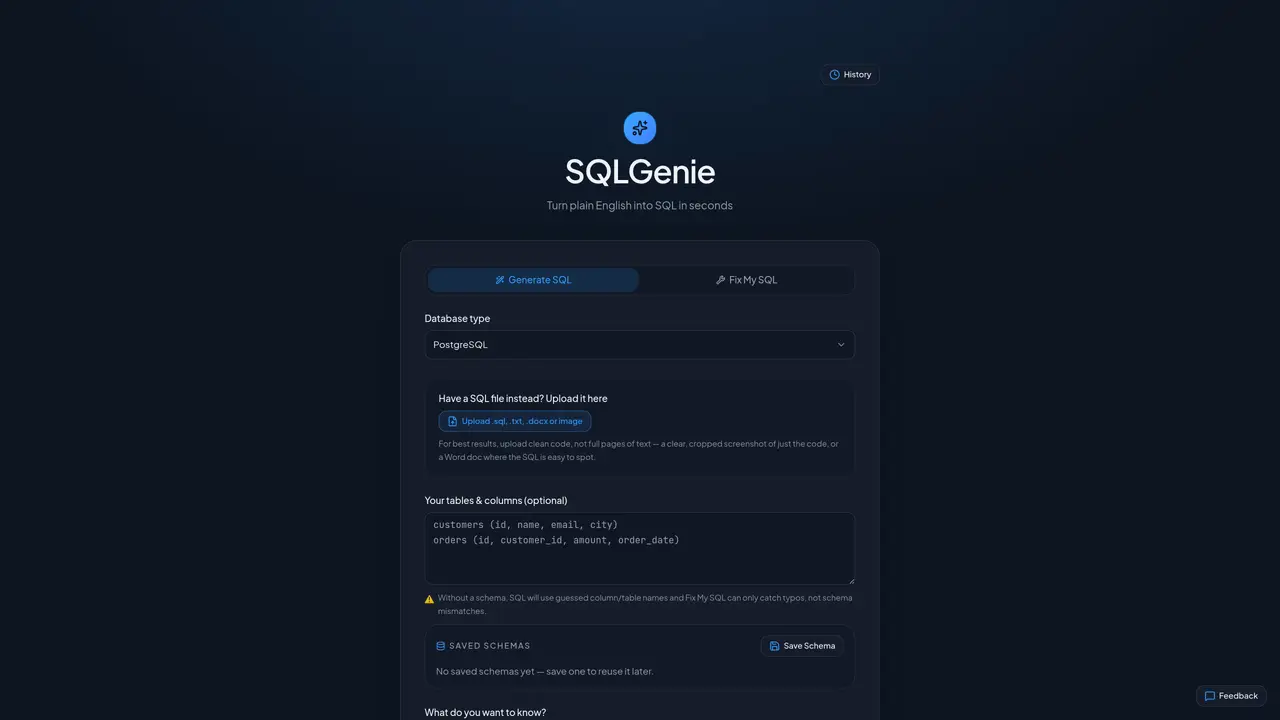
SQLGenie translates natural language questions into executable SQL code. Users can describe the data they need in plain English, and the tool generates the corresponding SQL query. It also offers a feature to correct or refine existing SQL code by identifying and fixing errors such as typos or syntax issues. The platform supports uploading SQL files or code snippets in formats like .sql, .txt, .docx, or even images containing SQL code. For optimal results, users are advised to upload clean, well-structured code rather than full pages of text. The tool can operate with or without a predefined database schema; if no schema is provided, it makes educated guesses for table and column names. Users can save and reuse schemas to improve accuracy in future queries.
SQLGenie converts plain English questions into executable SQL code. It also corrects or refines existing SQL by identifying and fixing errors such as typos or syntax issues.
SQLGenie is designed for users who need to generate SQL queries from natural language or refine existing SQL code, including those without deep SQL expertise.
Yes, SQLGenie can operate without a predefined schema by making educated guesses for table and column names, though providing a schema improves accuracy.
SQLGenie supports uploading SQL files or code snippets in formats such as .sql, .txt, .docx, or even images containing SQL code.
For optimal results, upload clean, well-structured code rather than full pages of text. Providing a saved schema also enhances accuracy in future queries.
Users can save a database schema in SQLGenie to reuse it later, which helps improve the accuracy of generated SQL queries.
We use essential cookies to run aitoolnavio™, and optional cookies to analyze traffic and measure our marketing. You choose what we use — optional cookies stay off unless you turn them on. See our Privacy Policy.
One short email a week: fresh tools worth trying, honest takes and the updates that actually matter. No spam, unsubscribe any time.
Efficiently answer research queries, translate natural language to SQL, and utilize OpenAI WebGPT and larger language models.
Open-source backend platform providing Postgres, authentication, APIs, and real-time features to build scalable apps quickly.
Securely store, analyze, and scale data while enhancing security and performance with encryption and automated backups.
Column-oriented OLAP database for real-time analytics at scale
Open-source graph database for storing, managing, and analyzing connected data with real-time insights and application development.
Trace family history, uncover ancestral matches, and utilize advanced genetic features.
Monitor progress, automate data analysis, create and share custom reports securely.
Automate SQL creation, streamline data management, and cost-effective solution for individuals and small teams.
Connect, analyze, and automate data from various sources, creating dashboards and reports effortlessly.
Personalized book recommendations and a library of reviews and ratings.
Automate tasks, customize workflows, and securely manage data for increased efficiency and ease.
Scale up/down, ensure data consistency, and deploy on any cloud platform effortlessly.
Matched on what this tool does — grouped by the job you would be replacing.
matches Plain English to SQL conversion · SQL error correction · Typo detection in SQL code
Converts plain-English questions into SQL queries for PostgreSQL, MySQL, or SQLite
Query databases naturally, with a streamlined chat-based interface and intelligent error correction.
Translate queries to SQL, validate for errors, and analyze data from multiple databases effortlessly.
Generate SQL code from queries, save time and effort, perfect for DB admins, web devs, and data analysts.
matches Schema saving and reuse · Schema-free operation with guesses
Natural-language interface for querying databases and spreadsheets without SQL
AI tool that turns database queries into plain-English insights for SMEs