Automate error tracking, monitor application performance, and gain insights with advanced analytics.
2.9M visits/mo-2.4%#50 Coding & Development

AI-powered bug reporting and feedback collaboration tool that streamlines issue identification and resolution for developers.
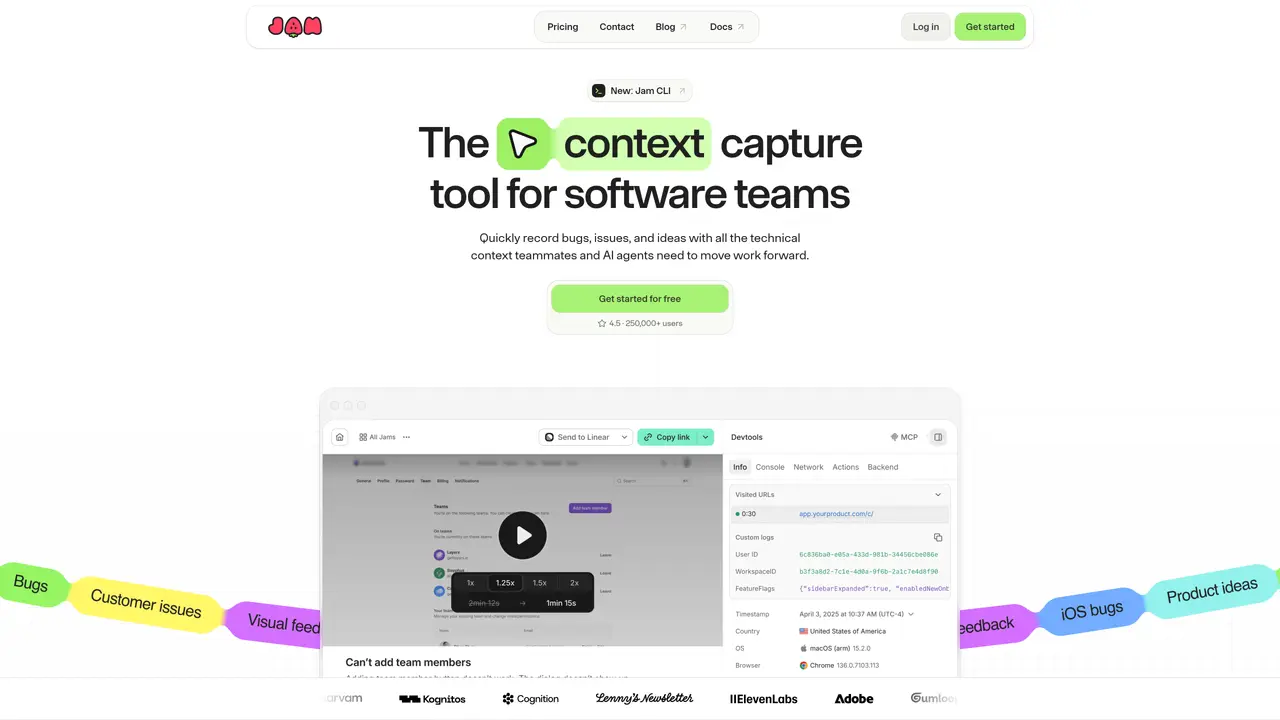
Jam is a developer-first bug reporting and feedback tool that simplifies the process of capturing, documenting, and resolving issues in software projects. It allows users to record bugs directly from their browser with one click, automatically capturing screenshots, console logs, network requests, and technical metadata without disrupting workflows. The platform provides an intelligent assistant that helps identify and summarize issues, reducing the manual effort required to write detailed bug reports. Jam integrates natively with popular development and project management tools such as Slack, Jira, GitHub, Linear, and Notion, enabling teams to centralize feedback and streamline issue resolution across workflows. Designed for QA professionals, product designers, and remote development teams, Jam supports asynchronous collaboration by allowing stakeholders to review, annotate, and comment on bug reports in real time. Its browser extension and desktop app ensure compatibility across different environments, while features like session replay and environment details help teams reproduce and diagnose issues more efficiently. By automating the capture of technical context and providing structured reporting, Jam accelerates debugging cycles and improves communication between developers and non-technical stakeholders.
Jam is a screen recording tool that allows users to capture bugs, feedback, and ideas with full technical context, including screen recordings, logs, and system information. It helps software teams document issues and collaborate more effectively.
Jam is designed for software teams, including developers, QA professionals, product designers, and support teams who need to capture and share technical feedback or bug reports efficiently.
Jam integrates with popular project management and development platforms such as Slack, Jira, GitHub, Linear, and others through plugins, webhooks, and direct integrations to streamline workflows.
Yes, Jam offers an iOS app and SDK to collect mobile feedback with full context, including screen recordings and logs, making it useful for mobile app development teams.
The Jam CLI is a command-line interface that allows users to request recordings directly from their workflows, enabling automation and integration into existing development processes.
Users can get started with Jam by downloading the browser extension, iOS app, or using the CLI, and then integrating it with their preferred tools or workflows to begin capturing and sharing feedback.
jam.dev · third-party estimates from Similarweb
Last 4 months · grows by one month every month
Share of visits by channel
Share of visits · estimated visits
Other countries: 55.3%
How people reach this site from other AI tools
1.1K a month · 0.2% of all visits
Coding & Development · Sep 2026
Traffic figures are third-party estimates, good for scale and trends; they can differ from a company's own numbers. Updated monthly.
We use essential cookies to run aitoolnavio™, and optional cookies to analyze traffic and measure our marketing. You choose what we use — optional cookies stay off unless you turn them on. See our Privacy Policy.
One short email a week: fresh tools worth trying, honest takes and the updates that actually matter. No spam, unsubscribe any time.
Automate error tracking, monitor application performance, and gain insights with advanced analytics.
Instant threat detection and response, AI-powered prevention, unified dashboard for full visibility and control.
Open-source platform combining product analytics, session replay, A/B testing, and feature flags in one toolkit for product engineers.
AI development platform for experiment tracking, model optimization, and team collaboration in machine learning workflows.
Open-source framework for reliable, cross-browser web testing with auto-waiting, parallel execution, and built-in debugging tools.
CodeRabbit is an AI tool that helps you review and improve your code easily.
Labelbox is an enterprise-grade data labeling platform designed to help organizations create, manage, and deploy AI applications.
An AI-native cloud testing platform for developers and QA teams to automate cross-browser and real-device tests with self-healing automation and reporting.
Parallel AI coding agent IDE that runs multiple agents side by side in isolated git worktrees for faster, comparative development.
Monitor IT infrastructure, detect and resolve system issues, and proactively identify risks and threats.
Create tests, evaluate results in real-time with analytics, and save time and money with advanced automation.
An AI-powered code review tool that automates GitHub and GitLab pull request reviews with inline comments, PR summaries, and custom rules for software teams.
Matched on what this tool does — grouped by the job you would be replacing.
matches AI-assisted bug identification and reporting · Seamless integration with Slack, Jira, GitHub, and Linear · Collaborative review capabilities for teams
AI-powered software testing platform that automates test case generation, script writing, and bug detection for development and QA teams.
Bugasura is an AI-powered bug tracking tool that helps teams report, track, and resolve bugs faster with streamlined workflows and integrations.
Streamline GitHub management with automated responses, triage bugs, and update docs.
Bug reporting tool with session replay and technical evidence capture