Create detailed 3D models instantly from text.
15M visits/mo+9.6%#8 Image & Design
Generates seamless PBR textures from prompts or images for 3D engines in seconds.
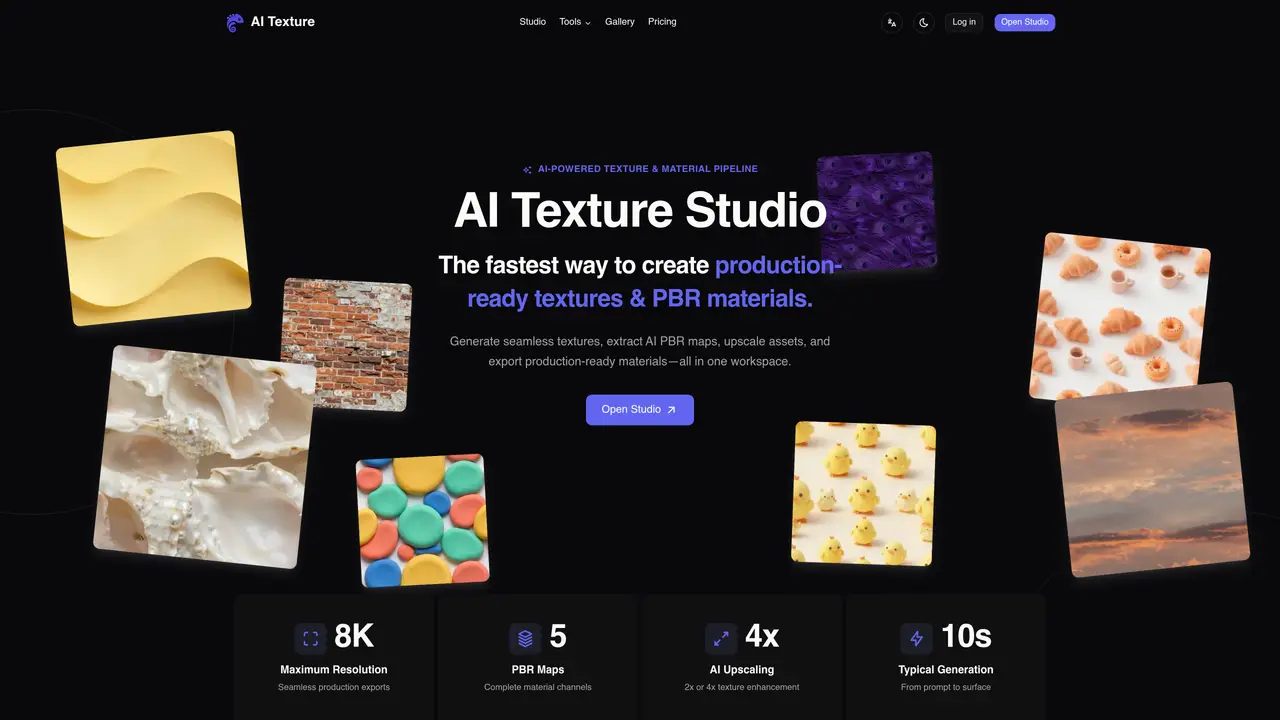
AI Texture Studio is a web-based AI tool that creates seamless, tileable textures and complete PBR material map sets from text prompts or image references. It produces all standard maps—Basecolor, Normal, Roughness, Height, AO, and Metalness—in a single workflow, and packages outputs for Blender, Unreal Engine, Unity, and Godot. Users can start from a written description, a reference photo, or an existing texture, with results delivered in approximately 15 seconds. The tool streamlines the process of generating high-quality textures for 3D artists and game developers, reducing manual work and iteration time. It supports both beginners and professionals by simplifying texture creation while maintaining compatibility with major 3D software. New accounts receive 10 starter credits at no cost, with additional credits available for purchase as needed. The tool is designed to integrate smoothly into existing pipelines, making it a practical solution for real-time asset production.
AI Texture Studio generates seamless, tileable textures and complete PBR material map sets from text prompts or image references. It produces standard maps like Basecolor, Normal, Roughness, Height, AO, and Metalness in a single workflow.
The tool is designed for 3D artists, game developers, and professionals who need to create high-quality textures efficiently. It supports both beginners and experienced users by simplifying texture creation and reducing manual work.
AI Texture Studio operates on a credit-based system, where users receive starter credits upon account creation and can purchase additional credits as needed. The exact pricing details are available on the tool's pricing page.
The tool supports export formats compatible with major 3D software, including Blender, Unreal Engine, Unity, and Godot. It also provides engine presets to streamline the integration process.
The quality of generated textures depends on the input prompts or reference images. Additionally, the availability of credits may limit usage for some users, as each generation or upscaling consumes credits.
Users can start by creating an account to receive starter credits. From there, they can begin generating textures by providing a text prompt, uploading an image, or using an existing texture as a reference.
We use essential cookies to run aitoolnavio™, and optional cookies to analyze traffic and measure our marketing. You choose what we use — optional cookies stay off unless you turn them on. See our Privacy Policy.
One short email a week: fresh tools worth trying, honest takes and the updates that actually matter. No spam, unsubscribe any time.
Create detailed 3D models instantly from text.
Meshy turns text prompts or images into fully textured 3D models in minutes.
Effortlessly generate realistic 3D models with AI.
Create precise 3D models, collaborate on designs, and analyze simulations in real-time.
Create realistic 3D environments, customize 3D creations, and generate high-resolution visuals using AI-driven technology.
Generate lifelike 3D visuals, transform 2D media, and capture intricate details for video production, games, and animations.
API-first platform for integrating image, video, and 3D generative AI models into applications with fast inference and pay-as-you-go pricing.
An AI design agent that turns natural language prompts into logos, social graphics, videos, 3D assets, and web pages in a single web canvas.
Turn hand-drawn sketches into editable 3D models and photorealistic images with AI.
AI-powered 3D editor that lets users create, edit, and animate 3D models using simple text prompts.
A web-based AI toolkit that converts text prompts or images into textured 3D models with exports to FBX, OBJ, GLB, and STL formats.
Build 3D models, optimize for real-time use, and generate within game engines using the Sloyd SDK.
Matched on what this tool does — grouped by the job you would be replacing.
matches Generates seamless, tileable PBR textures · Produces all standard PBR maps in one workflow · Accepts text prompts or image references as input
A web-based AI toolkit that converts text prompts or images into textured 3D models with exports to FBX, OBJ, GLB, and STL formats.
Browser-based AI texture generator and material workflow for 3D engines
AI-powered texture generator that creates production-ready 4K textures for 3D models from text prompts in seconds.
Free AI tool that generates realistic, tileable textures for 3D modeling, gaming, or animation from text prompts.