
AI platform for upscaling images, enhancing photos, and generating high-quality creative assets with contextual detail.
80M visits/mo-3.3%#1 Image & Design
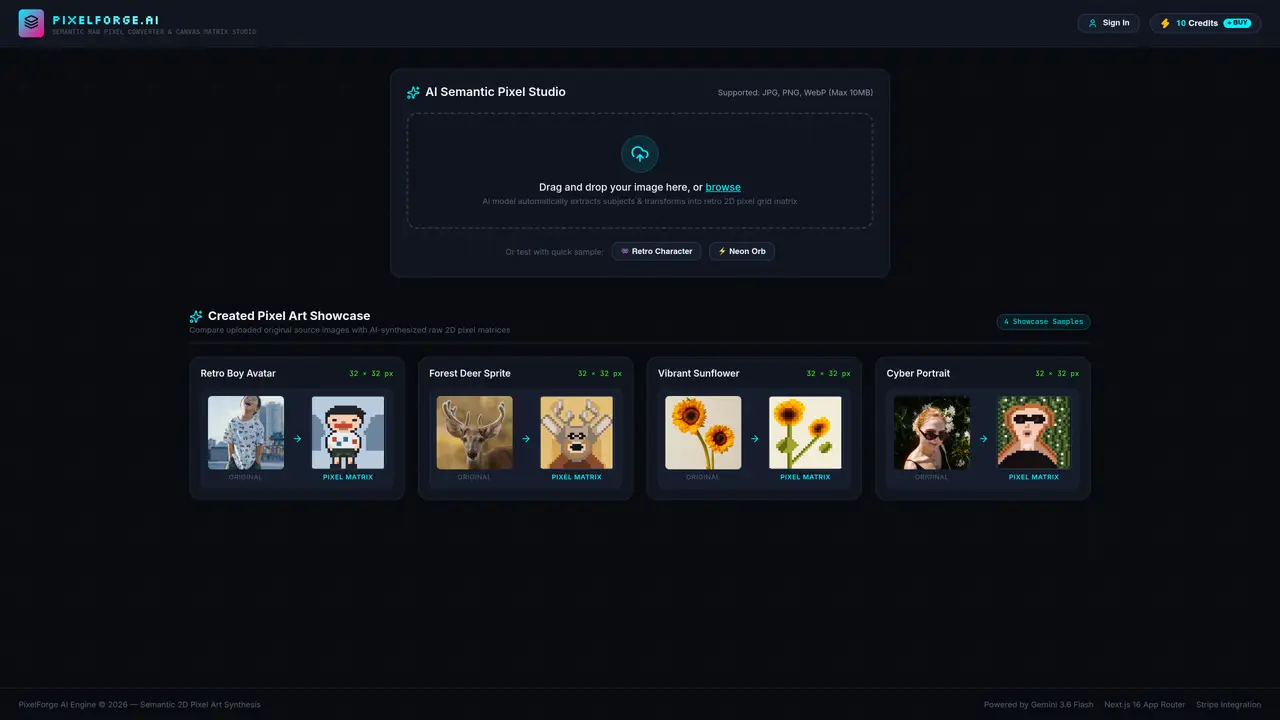
PixelForge AI is a web-based tool that transforms photographs and digital images into stylized pixel art. It uses an AI model to analyze uploaded images and automatically extract subjects before rendering them as retro 2D pixel grid matrices. The process involves uploading a supported file format such as JPG, PNG, or WebP up to 10MB in size, after which the system generates a pixelated version of the image. Users can compare the original source with the AI-synthesized pixel matrix to evaluate the transformation. The tool includes a showcase feature displaying sample conversions of various subjects, including characters, objects, and scenes. It operates within a web interface built on Next.js 16 with an App Router and is powered by the Gemini 3.6 Flash model.
PixelForge AI is a web-based AI pixel art generator that converts photographs and digital images into stylized retro 2D pixel art. It analyzes uploaded images, extracts subjects, and renders them as pixel grid matrices for a classic video game aesthetic.
The tool is designed for artists, game developers, designers, and hobbyists who need to create pixel art from existing images or reference materials. It suits users seeking a quick, AI-assisted way to generate retro-style visuals.
PixelForge AI supports JPG, PNG, and WebP file formats with a maximum file size of 10MB. Users can upload images via drag-and-drop or file selection in the web interface.
The tool uses an AI model to automatically extract subjects from uploaded images and transform them into pixel grid matrices. The process involves semantic analysis to preserve key features while converting to a retro 2D style.
Yes, PixelForge AI provides a side-by-side comparison feature that displays the original source image alongside the AI-generated pixel matrix. This allows users to evaluate the transformation and quality of the output.
PixelForge AI is powered by the Gemini 3.6 Flash model, which handles the semantic analysis and pixel art synthesis. The tool operates within a Next.js 16 web interface with an App Router architecture.
We use essential cookies to run aitoolnavio™, and optional cookies to analyze traffic and measure our marketing. You choose what we use — optional cookies stay off unless you turn them on. See our Privacy Policy.
One short email a week: fresh tools worth trying, honest takes and the updates that actually matter. No spam, unsubscribe any time.
AI platform for upscaling images, enhancing photos, and generating high-quality creative assets with contextual detail.
Generate unique artwork, customize with an intuitive interface, and push creative boundaries with AI-generated art.
Generate unique AI art, share your creations, and explore a vast selection of AI artwork.
Easily find and explore diverse AI art and prompts with a vast library of 10 million+ creations.
Generate accurate visuals, create impressionist-style art from text, and explore a range of options effortlessly.
Generate art, explore vTuber & anime content, and create visuals effortlessly.
Generate stunning images, boost productivity, explore creativity effortlessly.
Generate unique palettes, create personalized looks, and find perfect colors for any concept.
Vheer is a free AI image generator that turns your ideas into stunning visuals.
Create custom illustrations, generate blog post images, and design anime-style art for any purpose.
Free stock image platform offering over 16,000 AI-generated photos, illustrations, and 3D assets with commercial use rights.
Transform text into art, create unique stylish images, and generate surreal visuals effortlessly.
Matched on what this tool does — grouped by the job you would be replacing.
matches Drag-and-drop image upload · AI semantic pixel synthesis · Original vs. pixel matrix comparison
AI-powered tool to transform existing images via text prompts without creating from scratch
AI-powered image upscaler and enhancer for photos, anime and old images
matches AI semantic pixel synthesis · Original vs. pixel matrix comparison
AI platform for upscaling images, enhancing photos, and generating high-quality creative assets with contextual detail.
Free, open-source AI image upscaler that enlarges JPG, PNG, and WEBP images while reducing blur and noise on desktop or web.
Online tool to reduce pixelation and compression artifacts in photos