Remove image backgrounds instantly, save time with advanced AI, and create stunning images effortlessly.
54M visits/mo-8.6%#2 Image & Design

Free online AI photo editor with object removal, background replacement and enhancement
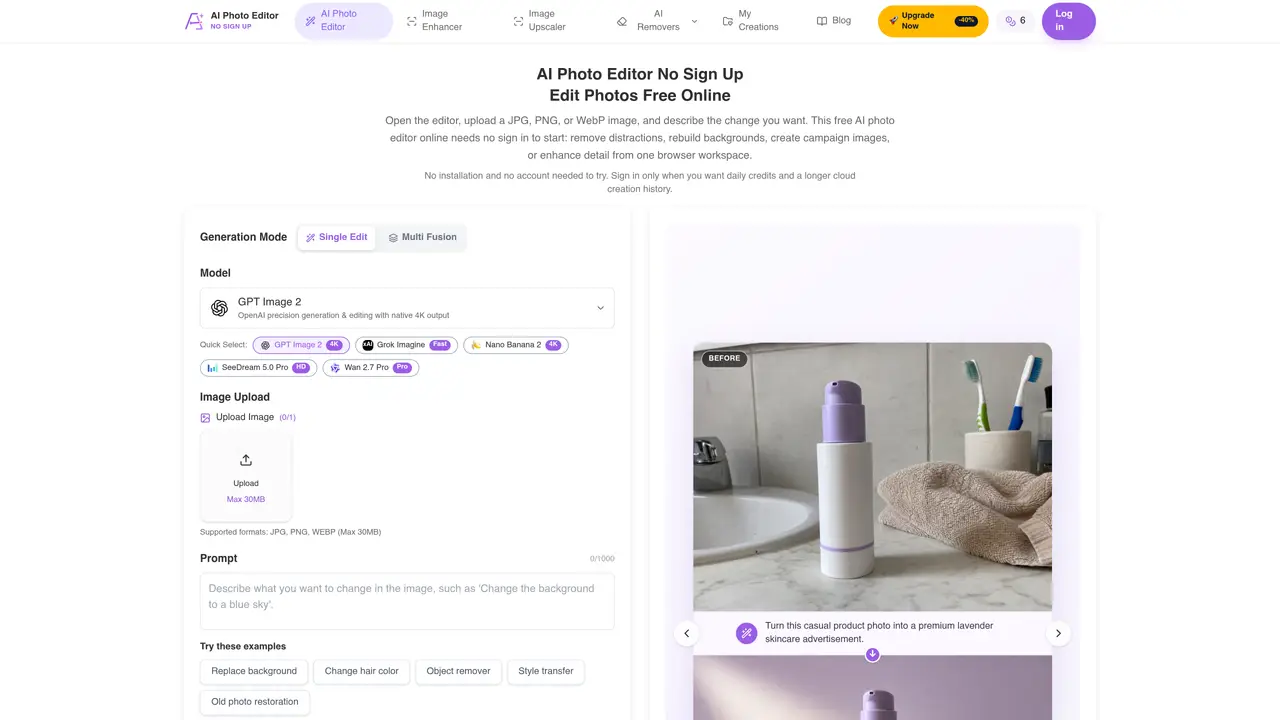
AI Photo Editor No Sign Up is a browser-based tool that provides generative photo editing without requiring user registration. It supports common editing tasks such as removing objects, replacing backgrounds, changing styles, restoring old photos, and upscaling images. Users upload JPG, PNG, or WebP files up to 30 MB and describe the desired change in a prompt. The editor offers multiple generation models including GPT Image 2, xAI Grok, Imagine Fast, Nano Banana 2, SeeDream 5.0 Pro HD, and Wan 2.7 Pro, with native 4K output available. Editing can be done in Single Edit or Multi Fusion modes, with adjustable aspect ratios and resolution settings. Results are available for download immediately and stored temporarily in a guest history that persists for 24 hours without an account. The tool emphasizes prompt clarity, source image quality, and iterative refinement to preserve important details like edges, faces, and text. It is positioned as a quick-start alternative to desktop software, with optional account creation for extended history and daily credits.
AI Photo Editor No Sign Up is a browser-based generative photo editing tool that allows users to edit images without creating an account. It supports tasks like removing objects, replacing backgrounds, changing styles, restoring old photos, and upscaling images using text prompts.
The tool is ideal for creators, marketers, and professionals who need quick, no-signup photo editing for tasks like product campaigns, social media content, or image enhancements without the overhead of desktop software or account creation.
No, the tool operates entirely without requiring an account for basic use. Users can edit images, download results, and access a temporary guest history for 24 hours. Account creation is optional for extended history and additional daily credits.
The tool supports JPG, PNG, and WebP files up to 30 MB in size. Users can upload one image for Single Edit or multiple images for Multi Fusion mode, depending on the selected generation model.
To get started, open the editor in a browser, upload an image, choose a generation model, write a prompt describing the desired change, and click generate. No installation or registration is required for the initial use.
Yes, the tool can be used for commercial projects such as creating product campaigns, marketplace listings, or social media content. Users should ensure the source image quality and prompt clarity to achieve the best results.
We use essential cookies to run aitoolnavio™, and optional cookies to analyze traffic and measure our marketing. You choose what we use — optional cookies stay off unless you turn them on. See our Privacy Policy.
One short email a week: fresh tools worth trying, honest takes and the updates that actually matter. No spam, unsubscribe any time.
Remove image backgrounds instantly, save time with advanced AI, and create stunning images effortlessly.
AI platform for upscaling images, enhancing photos, and generating high-quality creative assets with contextual detail.
Remove backgrounds, adjust colors, add text, filters, and shapes with ease.
Unleash creativity: edit photos, videos, and designs with AI-enhanced tools.
Transform photos effortlessly with AI: edit, enhance, and remove backgrounds.
Web and mobile AI platform for generating, editing, and training custom visuals from prompts with community models and face-swap tools.
Convert raster images into scalable vector graphics within seconds.
Create stunning designs, edit photos, remove objects, make collages, and transform images with powerful AI tools and effects.
Create stunning visuals, access image recognition and processing, and express creatively with natural language processing.
Cloudinary provides APIs and tools to integrate, manage, and optimize images and videos for AI-driven visual experiences.
All-in-one AI suite for creators to automate workflows, edit media, and generate content across video, design, and productivity tools.
Identify stolen identities, uncover copyright infringements, and find unauthorized use of images with precision.
Matched on what this tool does — grouped by the job you would be replacing.
matches Object removal with context-aware reconstruction · Background replacement and transparent background export · Generative fill for adding or modifying elements
Free online AI photo editor with no sign-up or watermark
Online AI photo editor for editing images with text prompts and references
Online AI photo editor for object removal, background changes and generative edits
Free AI tool for background removal, watermark removal, and 4K image enhancement
matches Style transfer and color changes · Old photo restoration · Image upscaling and enhancement
matches Generative fill for adding or modifying elements · Multiple aspect ratio options
AI platform for upscaling images, enhancing photos, and generating high-quality creative assets with contextual detail.
AI-enhanced photo editing with background removal and enhancements.
Online AI image enhancer for unblurring, restoring and upscaling photos
AI-powered product photography and image generation for ecommerce and creators
Free, no-login AI platform for instant image generation, editing, and refinement from text prompts.
Web-based AI image and video generator with no login required
AI-powered tool to transform existing images via text prompts without creating from scratch
Online AI photo generator and editor that creates or modifies images from text prompts or uploaded photos