




Remove image backgrounds instantly, save time with advanced AI, and create stunning images effortlessly.
54M visits/mo-8.6%#2 Image & Design

An iOS AI photo editor for retouching portraits, removing objects, and applying creative effects with professional-grade tools.
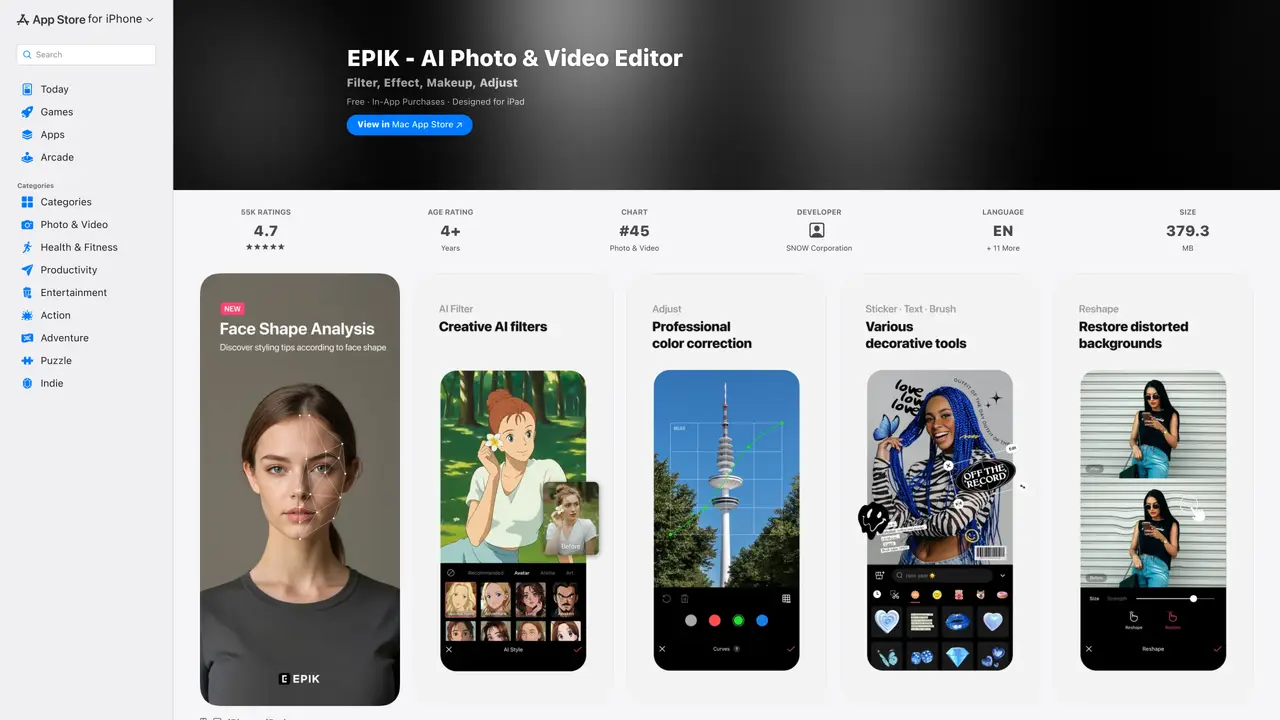
EPIK is an AI-powered iOS photo editing app designed for both professionals and casual users. It integrates advanced AI features with traditional editing tools to enhance image quality, remove unwanted elements, and apply professional-grade retouching. The app excels in portrait editing, offering skin smoothing, wrinkle reduction, makeup adjustments, and facial reshaping for natural-looking results. Users can also separate figures and objects from backgrounds, remove distracting elements, and apply a variety of filters, stickers, and templates. Creative tools include collage creation, spot color highlighting, mosaics, and even video mosaic editing. EPIK provides a comprehensive suite of features for customizing and enhancing images, making it suitable for quick social media edits or detailed professional work.
Apple Inc.
Cupertino, United States · Founded 1976
EPIK is an AI-powered iOS photo and video editing app designed for both professionals and casual users. It combines traditional editing tools with advanced AI features to enhance images, remove unwanted elements, and apply professional-grade retouching.
EPIK provides AI skin correction, wrinkle reduction, makeup adjustments, facial reshaping, and one-tap beauty looks. It also includes tools for hairstyle and hair color changes, as well as body adjustments for full-body photos.
Yes, EPIK includes video editing features such as video mosaics with automatic figure tracking, retro clip creation, and video face retouching for natural-looking results.
EPIK is free to download and includes a range of editing tools. Some advanced features may require in-app purchases or subscriptions, which can be explored through the app's settings.
Creative tools include AI collage creation, spot color highlighting, mosaic and blur effects, customizable templates, stickers, text, and unique filter creation. Users can also design custom backgrounds and layouts.
Download EPIK from the App Store, open the app, and start editing photos or videos using the available tools. For advanced features, explore in-app purchases or subscription options through the app's settings.
We use essential cookies to run aitoolnavio™, and optional cookies to analyze traffic and measure our marketing. You choose what we use — optional cookies stay off unless you turn them on. See our Privacy Policy.
One short email a week: fresh tools worth trying, honest takes and the updates that actually matter. No spam, unsubscribe any time.
Remove image backgrounds instantly, save time with advanced AI, and create stunning images effortlessly.
AI platform for upscaling images, enhancing photos, and generating high-quality creative assets with contextual detail.
Remove backgrounds, adjust colors, add text, filters, and shapes with ease.
Unleash creativity: edit photos, videos, and designs with AI-enhanced tools.
Transform photos effortlessly with AI: edit, enhance, and remove backgrounds.
Web and mobile AI platform for generating, editing, and training custom visuals from prompts with community models and face-swap tools.
Convert raster images into scalable vector graphics within seconds.
Create stunning designs, edit photos, remove objects, make collages, and transform images with powerful AI tools and effects.
Create stunning visuals, access image recognition and processing, and express creatively with natural language processing.
Cloudinary provides APIs and tools to integrate, manage, and optimize images and videos for AI-driven visual experiences.
All-in-one AI suite for creators to automate workflows, edit media, and generate content across video, design, and productivity tools.
Identify stolen identities, uncover copyright infringements, and find unauthorized use of images with precision.
Matched on what this tool does — grouped by the job you would be replacing.
matches AI-powered skin retouching and wrinkle removal · Portrait makeup adjustments and facial reshaping · Natural-looking corrections for portraits
AI-powered selfie editor and profile picture generator for enhancing photos and videos with filters and touch-ups.
Create stunning selfies, transform photos & videos, and edit videos in real-time with intuitive controls, filters, and retouching.
AI-powered tool that enhances and retouches headshots with professional results in seconds.
Enhance skin tones, facial features, add photo-realistic makeup and accessories, and customize images to stand out.
matches Background object removal and separation · Collage creation and spot color highlighting · Mosaic and video mosaic editing
matches Trendy filters, stickers, and templates · Professional-grade image enhancement tools
Create stunning designs, edit photos, remove objects, make collages, and transform images with powerful AI tools and effects.
AI-powered photo editor for beginners to remove backgrounds, replace skies, enhance portraits, and create quick montages across web, desktop, and mobile.
Remove backgrounds, adjust colors, and automate object removal and color correction for images.
Change photo backgrounds, apply effects and filters, enhance images, and touch up photos with one-tap tools.
Funy AI is an all-in-one AI creative hub that empowers creators to breathe life into photos through its Image-to-Video feature and generate stunning scenes from scratch using Text-to-Video.
Adjust exposure, color, contrast, and more, automate photo problems, and create stunning visuals with an intuitive UI.
AI photo editing platform for facial expression edits, portrait relighting, background replacement, and photo-to-video animations.
Create stunning images, adjust colors, retouch photos, apply effects, and edit HDR and 360° photos professionally.