



Remove image backgrounds instantly, save time with advanced AI, and create stunning images effortlessly.
54M visits/mo-8.6%#2 Image & Design

Web-based AI photo editor that edits faces, swaps faces, removes backgrounds, and generates headshots with no installation required.
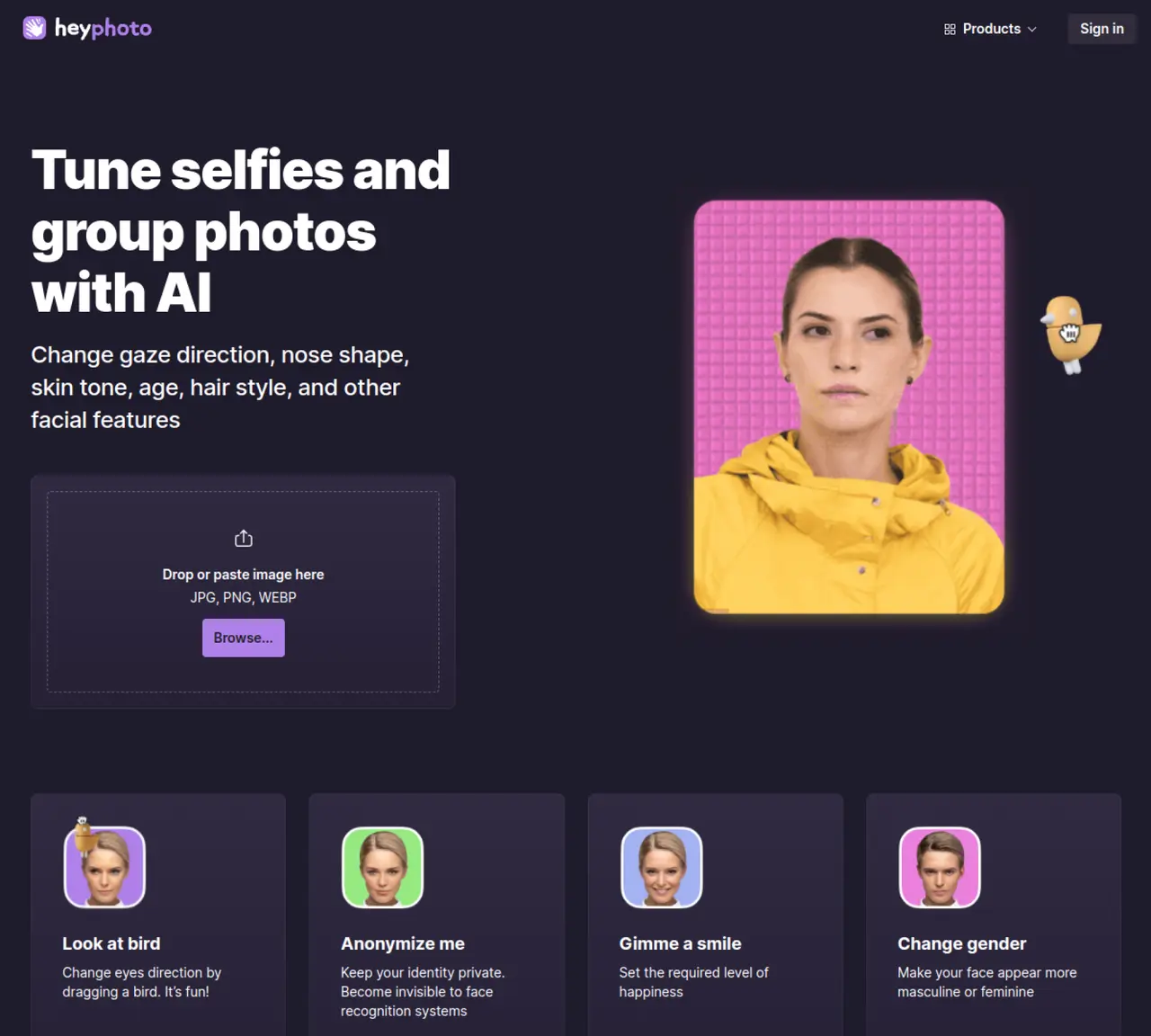
HeyPhoto is a web-based AI photo editor designed for consumers who want to retouch selfies and portraits without traditional editing skills. The tool specializes in AI face editing, allowing users to adjust gaze direction, add smiles, tweak emotions, change age, modify skin tone, and apply gender transformations. It also offers makeup and appearance tweaks, including adding makeup and trying different hairstyles, though availability may vary by region or tool version. Utility edits include background removal, face anonymization to reduce identifiability, and face swap or face generation for creating photorealistic headshots. HeyPhoto provides API access and plugins for drag-and-drop workflows, making it suitable for integration into existing processes. The platform emphasizes fast, face-aware edits while maintaining the original image size and quality. Uploads are stored temporarily with user-controlled deletion, and exports include a watermark in the free tier, which is removed in paid subscriptions along with offering unlimited edits and extended storage.
HeyPhoto is an AI-powered online photo editor that allows users to retouch selfies and portraits by adjusting facial features, emotions, age, skin tone, and more without traditional editing skills.
HeyPhoto is designed for consumers who want to enhance their photos quickly and easily, as well as professionals integrating AI photo editing into their workflows via API or plugins.
HeyPhoto securely stores uploaded images temporarily and allows users to delete them at any time, prioritizing privacy and user control over data.
High-quality photos with faces directly facing the camera yield the best results, though slight rotations are also acceptable. The tool supports images up to 5 MB with faces up to 1024x1024 pixels.
Yes, HeyPhoto is free to use, but exports include a watermark. Paid subscriptions remove the watermark and offer additional features like unlimited edits and extended storage.
Yes, HeyPhoto provides API access and plugins that allow drag-and-drop workflows, enabling integration into existing processes and software.
hey-photo.com · third-party estimates from Similarweb
Last 4 months · grows by one month every month
Share of visits by channel
No measurable traffic from Paid Referrals.
Share of visits · estimated visits
Other countries: 58.6%
Image & Design · Sep 2026
Traffic figures are third-party estimates, good for scale and trends; they can differ from a company's own numbers. Updated monthly.
We use essential cookies to run aitoolnavio™, and optional cookies to analyze traffic and measure our marketing. You choose what we use — optional cookies stay off unless you turn them on. See our Privacy Policy.
One short email a week: fresh tools worth trying, honest takes and the updates that actually matter. No spam, unsubscribe any time.
Remove image backgrounds instantly, save time with advanced AI, and create stunning images effortlessly.
AI platform for upscaling images, enhancing photos, and generating high-quality creative assets with contextual detail.
Remove backgrounds, adjust colors, add text, filters, and shapes with ease.
Unleash creativity: edit photos, videos, and designs with AI-enhanced tools.
Transform photos effortlessly with AI: edit, enhance, and remove backgrounds.
Web and mobile AI platform for generating, editing, and training custom visuals from prompts with community models and face-swap tools.
Convert raster images into scalable vector graphics within seconds.
Create stunning designs, edit photos, remove objects, make collages, and transform images with powerful AI tools and effects.
Create stunning visuals, access image recognition and processing, and express creatively with natural language processing.
Cloudinary provides APIs and tools to integrate, manage, and optimize images and videos for AI-driven visual experiences.
All-in-one AI suite for creators to automate workflows, edit media, and generate content across video, design, and productivity tools.
Identify stolen identities, uncover copyright infringements, and find unauthorized use of images with precision.
Face AI is an all-in-one online face swap toolkit that lets you swap faces in photos, videos, and GIFs with fast, realistic AI results.
AI fashion photo editing for Shopify sellers that swaps models, generates faces, and processes catalogs in bulk.
Online AI tool that swaps faces in images or videos with a few clicks, ideal for creative projects and quick edits.
Swap faces in images using customizable templates while preserving surrounding areas.
matches Background removal and face anonymization · Maintains original image size and quality
Transform images with AI-powered enhancements.
Generate stunning images with AI, easily remove or change backgrounds, and add blur effects to achieve professional results in seconds.
Removes image backgrounds automatically in full HD without watermarks