
Remove image backgrounds instantly, save time with advanced AI, and create stunning images effortlessly.
54M visits/mo-8.6%#2 Image & Design
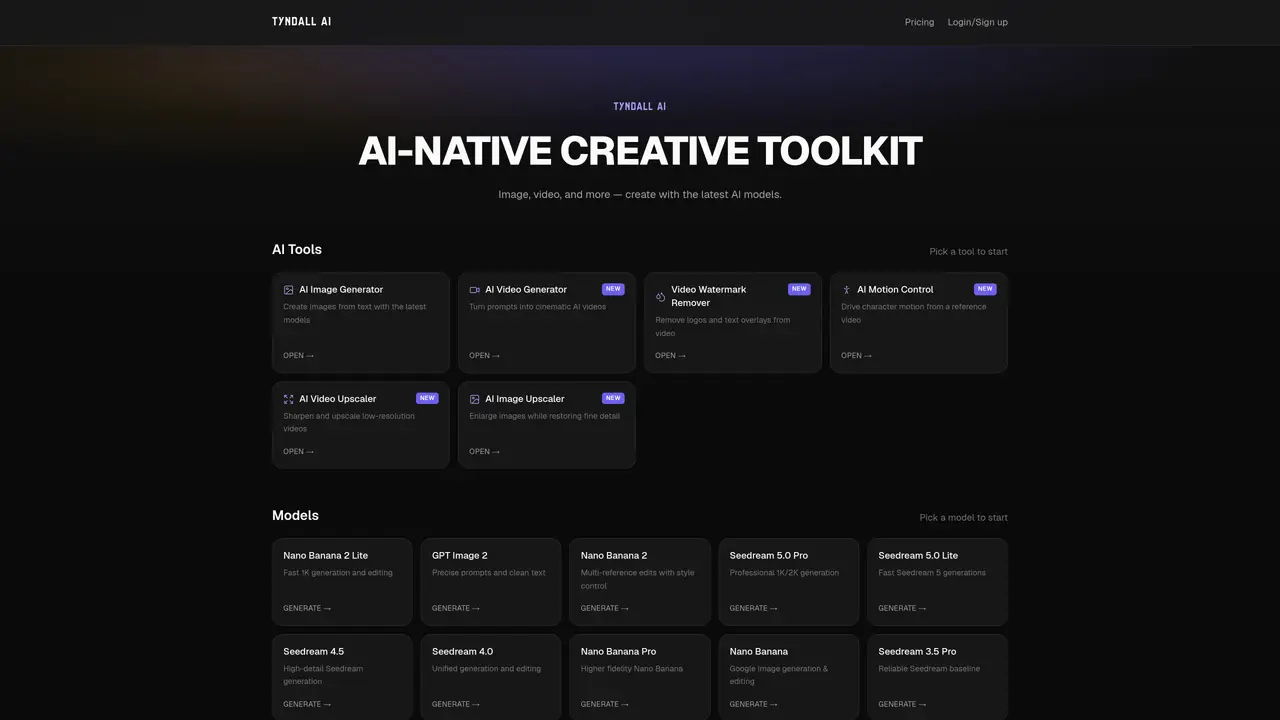
Tyndall AI is an AI-native creative toolkit designed to streamline image and video production through advanced generative and editing capabilities. The platform enables users to create images from text prompts using models optimized for speed, precision, or professional output, such as Nano Banana, GPT Image, and Seedream variants. It also supports cinematic video generation from prompts, allowing creators to produce high-quality visual content efficiently. Beyond generation, Tyndall AI offers specialized tools like Video Watermark Remover for eliminating logos and text overlays, AI Motion Control for driving character motion from reference videos, and AI Video Upscaler for enhancing low-resolution footage. Additional utilities include image and video upscaling to restore fine details and enlarge content while maintaining quality. The toolkit is tailored for creative professionals, designers, and content creators seeking AI-driven workflows to accelerate visual content production with flexibility and precision.
Tyndall AI is an AI-native creative toolkit designed for generating, editing, and enhancing images and videos. It offers specialized tools such as an AI Image Generator, AI Video Generator, Video Watermark Remover, AI Motion Control, and AI Video Upscaler.
The platform is tailored for creative professionals, designers, and content creators who need advanced AI-driven workflows for visual content production, including image and video generation, editing, and enhancement.
Tyndall AI provides multiple AI models optimized for different needs, such as speed, precision, multi-reference editing, or professional output. Users can select a model based on their specific requirements, such as Nano Banana for fast generation or Seedream 5.0 Pro for high-resolution outputs.
Yes, Tyndall AI includes a Video Watermark Remover tool that allows users to remove logos and text overlays from videos.
Yes, Tyndall AI offers an AI Video Upscaler tool to sharpen and upscale low-resolution videos, as well as an AI Image Upscaler for enlarging images while restoring fine detail.
To get started, visit the Tyndall AI website, select a tool or model based on your needs, and begin creating or editing content. The platform provides an intuitive interface for generating images and videos from text prompts or enhancing existing media.
We use essential cookies to run aitoolnavio™, and optional cookies to analyze traffic and measure our marketing. You choose what we use — optional cookies stay off unless you turn them on. See our Privacy Policy.
One short email a week: fresh tools worth trying, honest takes and the updates that actually matter. No spam, unsubscribe any time.
Remove image backgrounds instantly, save time with advanced AI, and create stunning images effortlessly.
AI platform for upscaling images, enhancing photos, and generating high-quality creative assets with contextual detail.
Remove backgrounds, adjust colors, add text, filters, and shapes with ease.
Unleash creativity: edit photos, videos, and designs with AI-enhanced tools.
Transform photos effortlessly with AI: edit, enhance, and remove backgrounds.
Web and mobile AI platform for generating, editing, and training custom visuals from prompts with community models and face-swap tools.
Convert raster images into scalable vector graphics within seconds.
Create stunning designs, edit photos, remove objects, make collages, and transform images with powerful AI tools and effects.
Create stunning visuals, access image recognition and processing, and express creatively with natural language processing.
Cloudinary provides APIs and tools to integrate, manage, and optimize images and videos for AI-driven visual experiences.
All-in-one AI suite for creators to automate workflows, edit media, and generate content across video, design, and productivity tools.
Identify stolen identities, uncover copyright infringements, and find unauthorized use of images with precision.
Matched on what this tool does — grouped by the job you would be replacing.
matches AI Image Generator · AI Image Upscaler · Multiple AI models (Nano Banana, GPT Image, Seedream variants)
Browser-based AI image generator, editor, and upscaler that turns text prompts into images and refines them with multiple models.
AI-powered image and video generation with editing tools
Banana Pro is an AI-powered creative platform that generates high-quality images and videos with exceptional speed and precision.
AI image generator and editor for structured layouts and multilingual text
matches AI Video Generator · Video Watermark Remover · AI Motion Control
Vheer is a free AI image generator that turns your ideas into stunning visuals.
AI-powered suite for video and image generation, editing and enhancement
Transform text and images into dynamic videos with templates, motion controls, and smart editing.
Unified AI image and video generation with a single credit balance