AI chatbot for conversation, work, research, coding, and content creation.
5.9B visits/mo+5%#1 Chatbots & Assistants
Generates custom stickers, clipart and emoji-style graphics from text descriptions
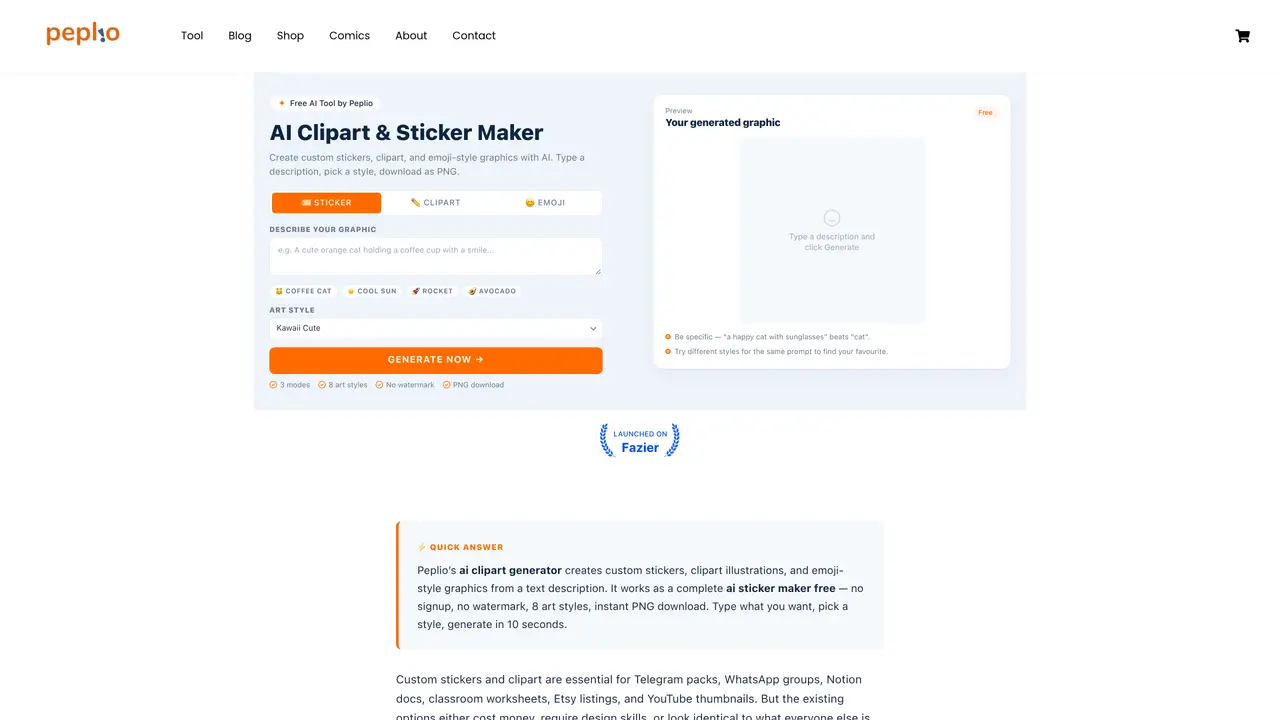
AI Clipart Generator creates custom stickers, clipart illustrations and emoji-style graphics from text descriptions. Users select one of three modes—Sticker, Clipart or Emoji—and one of eight art styles including Kawaii Cute, Cartoon Flat, Line Art, 3D Cute, Vintage Retro, Hand-drawn, Modern Flat and Watercolor. The tool accepts a text prompt, applies a mode-specific modifier to shape the output, and generates a 600×600 PNG in 10–15 seconds. Outputs are delivered without watermarks, require no sign-up, and allow commercial use. The generator is designed for users without design experience who need unique, context-specific graphics for messaging apps, social media, educational materials, product designs and thumbnails. It uses the FLUX.1-schnell model and outputs are Apache 2.0 licensed.
AI Clipart Generator is a free tool that creates custom stickers, clipart illustrations, and emoji-style graphics from text descriptions. Users select a mode and art style, input a prompt, and receive a 600×600 PNG download within 10–15 seconds without watermarks or sign-up requirements.
The tool is designed for users without design experience who need unique, context-specific graphics for messaging apps, social media, educational materials, product designs, and thumbnails. It suits solo creators, educators, marketers, and small businesses.
The tool offers three modes—Sticker, Clipart, and Emoji—and eight art styles including Kawaii Cute, Cartoon Flat, Line Art, 3D Cute, Vintage Retro, Hand-drawn, Modern Flat, and Watercolor. Each mode and style shapes the output to match specific use cases.
Yes, outputs are Apache 2.0 licensed, allowing commercial use. Generated graphics can be used for Etsy products, client work, commercial campaigns, and other business applications without restrictions.
To get started, visit the tool’s website, choose a mode and art style, type a detailed description of the graphic you want, and click Generate. The output appears in 10–15 seconds and can be downloaded as a PNG file.
The tool does not support vector formats like SVG, and outputs are limited to a 600×600 PNG resolution. While highly customizable, the quality and style of results depend on the specificity of the text prompt provided by the user.
We use essential cookies to run aitoolnavio™, and optional cookies to analyze traffic and measure our marketing. You choose what we use — optional cookies stay off unless you turn them on. See our Privacy Policy.
One short email a week: fresh tools worth trying, honest takes and the updates that actually matter. No spam, unsubscribe any time.
AI chatbot for conversation, work, research, coding, and content creation.
Generate captions, optimize content, and enhance with custom images for maximum engagement.
xAI builds Grok frontier AI models for reasoning, coding, voice, images, video, enterprise workflows, and developer APIs.
Explore and test Google’s experimental AI tools and prototypes before they become products.
Creates licensed videos, images, music.
Privacy-focused AI chatbot that generates uncensored text, code, images, and translations without storing conversations or requiring an account.
Web and mobile AI platform for generating, editing, and training custom visuals from prompts with community models and face-swap tools.
A drag-and-drop design platform for presentations and social graphics with AI photo tools and a large template library.
Generate unique artwork, customize with an intuitive interface, and push creative boundaries with AI-generated art.
Generate unique AI art, share your creations, and explore a vast selection of AI artwork.
Generate custom visuals for blogs, create unique social media images, and design eye-catching visuals for marketing campaigns.
Easily find and explore diverse AI art and prompts with a vast library of 10 million+ creations.
Matched on what this tool does — grouped by the job you would be replacing.
matches Three output modes: Sticker, Clipart, Emoji · Eight art styles including Kawaii Cute and Watercolor · Regenerate option for variations
AI emoji generator that turns text descriptions into Apple-style custom emojis with 3 free daily generations.
Generate 10 unique sticker designs instantly, create beautiful artwork effortlessly, and save time with AI-powered design.
Generates hyper-realistic emoji reactions from screenshots or themes
matches 10–15 second generation time · 600×600 PNG output with transparency · Apache 2.0 licensed outputs
Turns text prompts into seamless, print-ready repeating patterns in seconds with 19 art styles and high-resolution exports.
A web-based text-to-SVG generator that creates downloadable, editable vector graphics with multiple AI models, styles, and aspect ratios.
AI illustration generator that lets non-designers quickly create website-ready artwork from text prompts.