
AI chatbot for conversation, work, research, coding, and content creation.
5.9B visits/mo+5%#1 Chatbots & Assistants

Build unique Midjourney prompts using an interactive builder, while learning about parameters and features to improve your prompting skills
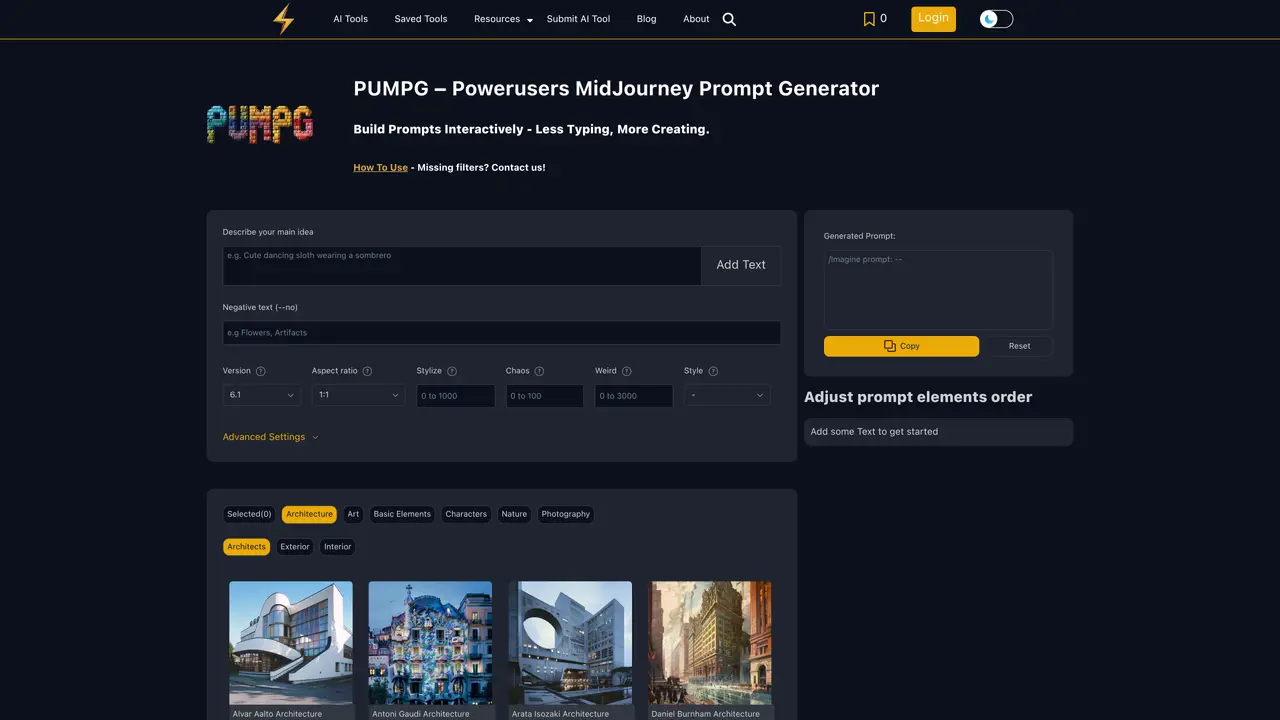
PUMPG is a tool that simplifies the process of prompt creation for AI art generation, specifically with Midjourney. It allows users to start with basic elements and gradually add more details, such as mood, lighting, and objects, to refine their prompts. Additionally, it offers advanced settings for more control over the final output, including image references for style or character consistency, and tips for optimizing prompt effectiveness, like the use of weights and separation symbols. PUMPG is designed for users who want to create unique Midjourney prompts quickly and easily, while also learning about the features and capabilities of Midjourney. The tool’s interactive builder allows users to experiment with different parameters and settings, making it easier to achieve the desired output. By using PUMPG, users can get rid of creativity blocks when creating new AI art and improve their prompting skills over time.
PUMPG is a Midjourney prompt generator that helps users create detailed and effective prompts for AI art generation. It provides an interactive builder to construct prompts step by step, including options for style, lighting, mood, and advanced parameters like image references and model versions.
PUMPG is designed for artists, designers, and creators who use Midjourney for AI-generated art. It suits both beginners looking to learn prompt crafting and experienced users seeking to refine their outputs with advanced settings and consistency controls.
PUMPG offers a variety of styles, themes, and filters to spark inspiration when users feel stuck. It also provides structured guidance through tooltips and parameter explanations, making it easier to explore new ideas and artistic directions.
Yes, PUMPG supports style references (Sref) and character references (Cref) in its advanced settings. Users can upload images to influence the aesthetic or characterization of the generated output, with adjustable weights to control the strength of these references.
Advanced settings include style and character references, seed values for consistent outputs, speed and quality adjustments for GPU efficiency, stopping percentages for partial generations, and repeat options for multiple iterations of the same prompt.
Start by describing your main idea or subject, then use the interactive builder to add details like style, lighting, and mood. Explore tooltips for guidance, adjust advanced settings if needed, and generate the prompt to use in Midjourney. Iterate as necessary to refine the results.
We use essential cookies to run aitoolnavio™, and optional cookies to analyze traffic and measure our marketing. You choose what we use — optional cookies stay off unless you turn them on. See our Privacy Policy.
One short email a week: fresh tools worth trying, honest takes and the updates that actually matter. No spam, unsubscribe any time.
AI chatbot for conversation, work, research, coding, and content creation.
Generate captions, optimize content, and enhance with custom images for maximum engagement.
xAI builds Grok frontier AI models for reasoning, coding, voice, images, video, enterprise workflows, and developer APIs.
Explore and test Google’s experimental AI tools and prototypes before they become products.
Creates licensed videos, images, music.
Privacy-focused AI chatbot that generates uncensored text, code, images, and translations without storing conversations or requiring an account.
Web and mobile AI platform for generating, editing, and training custom visuals from prompts with community models and face-swap tools.
A drag-and-drop design platform for presentations and social graphics with AI photo tools and a large template library.
Generate unique artwork, customize with an intuitive interface, and push creative boundaries with AI-generated art.
Generate unique AI art, share your creations, and explore a vast selection of AI artwork.
Generate custom visuals for blogs, create unique social media images, and design eye-catching visuals for marketing campaigns.
Easily find and explore diverse AI art and prompts with a vast library of 10 million+ creations.
PUMPG – Midjourney Prompt GeneratorSubscription Midjourney Prompt BuilderFreePUMPG – Midjourney Prompt GeneratorSubscription
 Midjourney Prompt InspirationFreePUMPG – Midjourney Prompt GeneratorSubscription
 MidJourney Random Commands GeneratorFreePUMPG – Midjourney Prompt GeneratorSubscription
 MidJourney Styles & KeywordsFree Trial
Matched on what this tool does — grouped by the job you would be replacing.
matches Interactive prompt builder · Advanced settings for control over final output · Image references for style or character consistency
A free tool that builds custom Midjourney prompts with adjustable parameters for creative projects.
Explore creative passions, break through blocks, and structure work with tailored prompts.
Generate random MidJourney commands quickly with a drag-and-drop interface and pre-made command library.
Boost search rankings, engage audience, and create memorable content with powerful keyword advice and style tips.
matches Image references for style or character consistency · Advanced settings for control over final output · Tips for optimizing prompt effectiveness
RenderNet is an advanced AI tool for creating visuals with consistent characters while offering detailed control over their poses, composition, and styles.











