Enhance learning with AI-driven flashcards, tests, and games.
72M visits/mo+70.8%#1 Lifestyle & Education

Web-based AI flashcard generator that converts PDFs, text, images, and YouTube links into Anki-compatible decks for faster study creation.
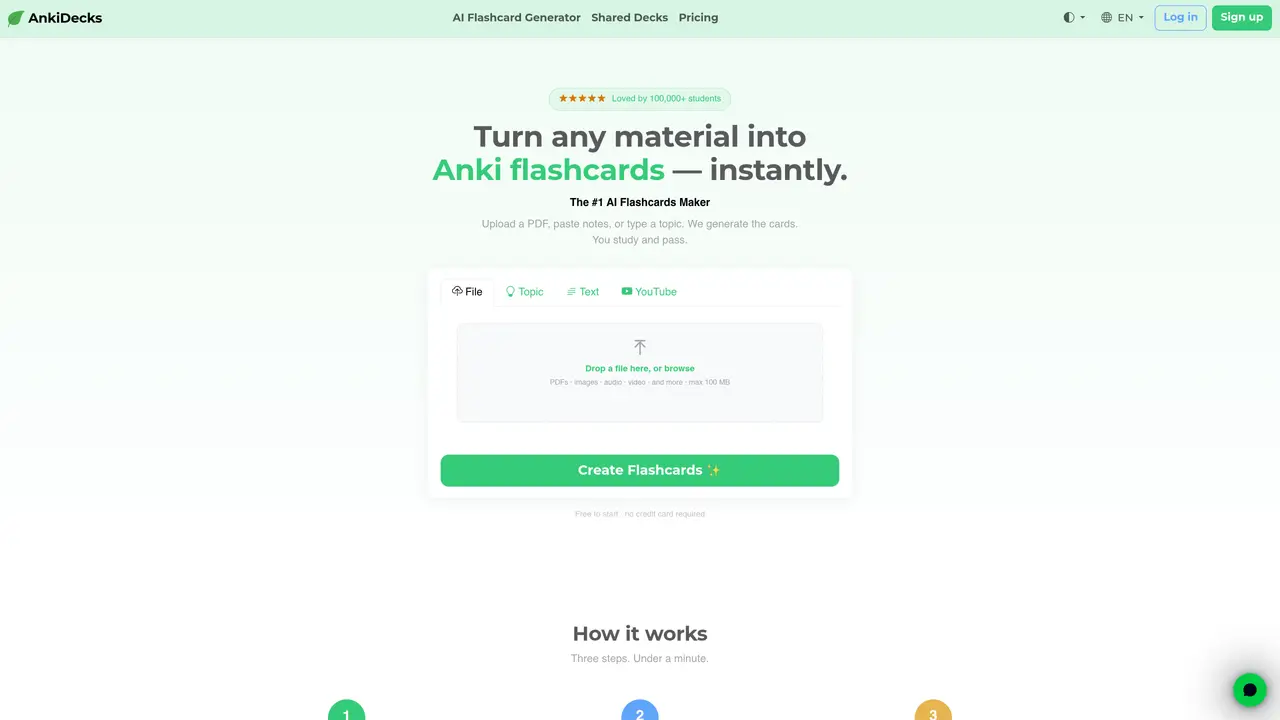
AnkiDecks is a web-based AI flashcard generator designed for students, including medical students and language learners, who need to build Anki-ready study decks quickly from existing materials. Users can upload PDFs, PowerPoint, Word, EPUB files, or paste text directly to generate flashcards without manual formatting. The tool supports multiple Anki-style card types, including Question-Answer, Cloze, Multiple Choice, and Image Occlusion, with an editable preview before export. It features automatic image occlusion to extract and mask labels from diagrams, such as anatomy images, to produce occlusion cards. Generated decks can be exported as Anki-compatible .apkg files or studied directly in-browser using a built-in FSRS scheduler. AnkiDecks complements Anki rather than replacing it, focusing on speed and compatibility while saving users time in deck creation. The platform operates on a freemium model, with a free plan allowing up to 4 generated decks per month and an optional Pro plan for additional features.
Creating Anki flashcards manually can be time-consuming and tedious. AnkiDecks uses AI to generate flashcards from your files or text in seconds, significantly reducing the time and effort required to build study decks.
Yes, AnkiDecks supports a wide range of file formats, including PDF, PowerPoint, Word, EPUB, and more. Simply upload your file, and the AI will extract key concepts to generate flashcards automatically.
Yes, AnkiDecks supports over 50 languages. You can choose your preferred language when creating flashcards, making it ideal for language learners or multilingual study.
AnkiDecks supports multiple flashcard types, including Question-Answer, Cloze (fill-in-the-blank), Multiple Choice, and Image Occlusion. These options cater to different learning styles and study needs.
The Image Occlusion feature automatically detects labels in images, such as anatomy diagrams or maps, and creates occlusion cards. You can study by revealing hidden parts one by one, enhancing recall through active testing.
Yes, you can export generated flashcards as Anki-compatible .apkg files with one click. This allows you to use your decks in Anki desktop, mobile, or other Anki-compatible platforms.
anki-decks.com · third-party estimates from Similarweb
Last 4 months · grows by one month every month
Share of visits · estimated visits
Other countries: 55.7%
How people reach this site from other AI tools
527 a month · 0.1% of all visits
Lifestyle & Education · Sep 2026
Traffic figures are third-party estimates, good for scale and trends; they can differ from a company's own numbers. Updated monthly.
We use essential cookies to run aitoolnavio™, and optional cookies to analyze traffic and measure our marketing. You choose what we use — optional cookies stay off unless you turn them on. See our Privacy Policy.
One short email a week: fresh tools worth trying, honest takes and the updates that actually matter. No spam, unsubscribe any time.
Enhance learning with AI-driven flashcards, tests, and games.
Automatically check student papers for plagiarism, generate originality reports, and offer powerful grading tools.
Create interactive lessons, track student progress, deliver assessments for personalized learning.
Practice coding challenges, improve technical skills, get detailed explanations, compare performance with peers.
AI-powered homework help with step-by-step textbook solutions, expert Q&A, writing tools, and exam prep.
Easily create and track training courses, design learning environments, and access from any device with an intuitive interface.
AI-generated text detector with 99.98% verified accuracy, supporting 20+ languages and integrations with LMS platforms.
Solve math problems, learn topics from basic to advanced, and get hints and insights for difficult problems.
Revolutionize education with AI: lesson planning, IEPs, assessments, enhanced communication.
Online language-learning platform offering interactive courses, progress tracking, rewards, and personalized feedback for all skill levels.
IB and MYP exam prep platform with 35k+ practice questions, AI grading, flashcards, and study tools for students and schools.
AI-powered learning app that helps students and pupils organize study materials, stay motivated, and improve grades with smart tools and features.
Matched on what this tool does — grouped by the job you would be replacing.
matches Converts PDFs, text, images, and YouTube links into Anki-compatible decks · Export decks as .apkg files for use in Anki
AI-powered flashcard generation from PDFs with Anki export
An AI-powered flashcard maker for students, language learners, and self-directed learners.
Converts PDFs into Anki flashcard packages for spaced repetition study
matches Converts PDFs, text, images, and YouTube links into Anki-compatible decks · Supports multiple card types: Question-Answer, Cloze, Multiple Choice, and Image Occlusion · Automatic image occlusion for extracting and masking labels from diagrams
matches In-browser study mode with built-in FSRS scheduler · Freemium pricing model with free and Pro plans
An AI tutoring platform that converts PDFs, YouTube videos, slides, and lectures into notes, quizzes, flashcards, and chat-based study help.
AI quiz builder that turns text, URLs, YouTube, PDFs, DOCX, PPTX, and images into quizzes, flashcards, and summaries for educators and learners.
An AI study app that converts PDFs, notes, and links into flashcards, quizzes, and summaries with spaced repetition for students and self-learners.
Converts notes, PDFs or prompts into flashcard decks for spaced-repetition study
A note-taking and spaced-repetition flashcard app for students and learners, with PDF annotation plus AI tools for generating cards, quizzes, and study summaries.
Turn notes into flashcards. Spend less time preparing and remember more when it matters.