
Enhance learning with AI-driven flashcards, tests, and games.
72M visits/mo+70.8%#1 Lifestyle & Education
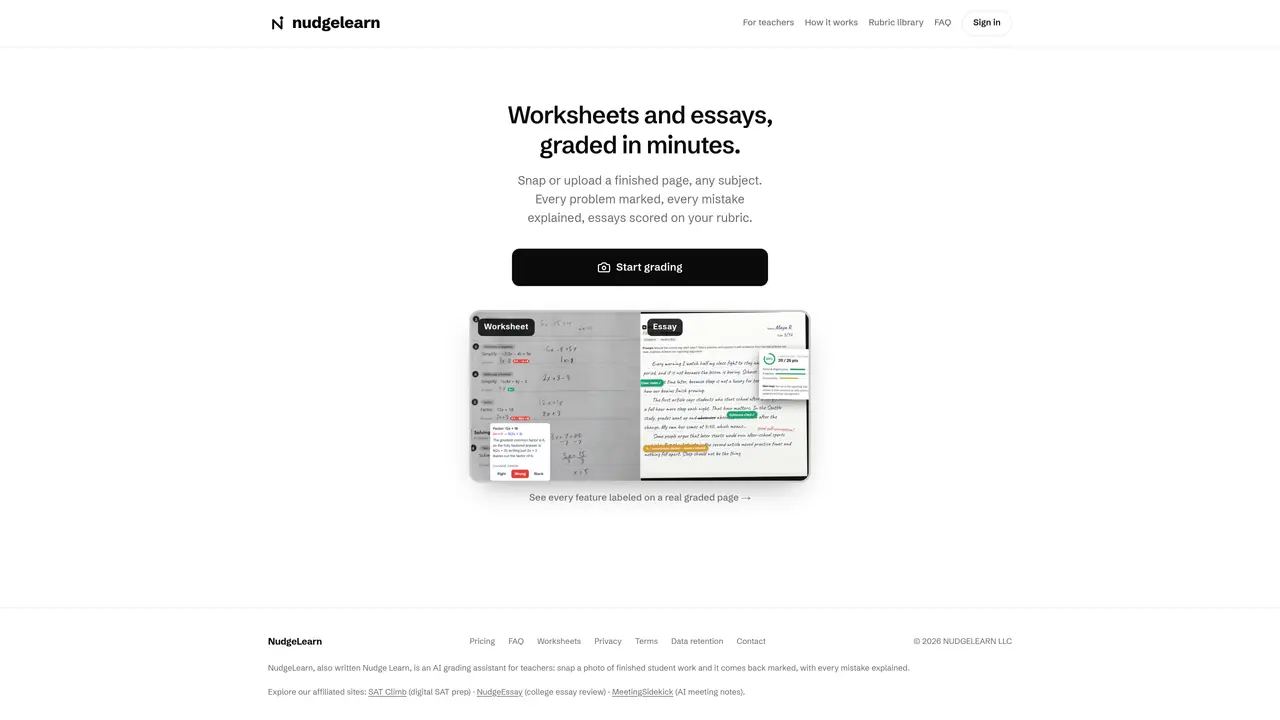
Grader is an AI-based grading assistant designed for teachers. It accepts handwritten worksheets and essays by photo or scanned upload, then returns marked work with every problem graded and each mistake explained. Worksheets are evaluated problem by problem, while essays are scored against a teacher-defined rubric. The tool supports any subject and provides step-by-step feedback on each error. Teachers can review graded work directly on the platform or export grades to spreadsheets. Analytics are available by class, student, or assignment to track progress over time. Grader integrates with Google Classroom and Canvas on paid plans, allowing class rosters to be imported and grades to be sent back automatically.
Grader is an AI-based grading assistant for teachers that marks handwritten worksheets and essays from photos or scanned uploads. It evaluates each problem, explains mistakes, and scores essays against a teacher-defined rubric.
Grader is designed for teachers who need to grade handwritten worksheets and essays efficiently. It supports any subject and provides detailed feedback for students.
Yes, Grader integrates with Google Classroom and Canvas on paid plans. Teachers can import class rosters and send grades back automatically to their gradebook.
Grader offers a free tier with a limited number of graded items per month. Paid plans include Pro and Max tiers, with additional features such as class rosters, rubric libraries, and analytics. Overages are charged at a fixed rate.
Yes, student work graded in Grader is tied to the teacher's account and is never shared or used for advertising. The tool adheres to privacy standards.
Teachers can start using Grader for free by signing up on the platform. The free tier allows grading up to 20 items per month, and paid plans unlock additional features.
We use essential cookies to run aitoolnavio™, and optional cookies to analyze traffic and measure our marketing. You choose what we use — optional cookies stay off unless you turn them on. See our Privacy Policy.
One short email a week: fresh tools worth trying, honest takes and the updates that actually matter. No spam, unsubscribe any time.
Enhance learning with AI-driven flashcards, tests, and games.
Automatically check student papers for plagiarism, generate originality reports, and offer powerful grading tools.
Create interactive lessons, track student progress, deliver assessments for personalized learning.
Practice coding challenges, improve technical skills, get detailed explanations, compare performance with peers.
AI-powered homework help with step-by-step textbook solutions, expert Q&A, writing tools, and exam prep.
Easily create and track training courses, design learning environments, and access from any device with an intuitive interface.
AI-generated text detector with 99.98% verified accuracy, supporting 20+ languages and integrations with LMS platforms.
Solve math problems, learn topics from basic to advanced, and get hints and insights for difficult problems.
Revolutionize education with AI: lesson planning, IEPs, assessments, enhanced communication.
Online language-learning platform offering interactive courses, progress tracking, rewards, and personalized feedback for all skill levels.
IB and MYP exam prep platform with 35k+ practice questions, AI grading, flashcards, and study tools for students and schools.
AI-powered learning app that helps students and pupils organize study materials, stay motivated, and improve grades with smart tools and features.
Matched on what this tool does — grouped by the job you would be replacing.
matches Photo or scan upload for handwritten work · Step-by-step error explanations · Rubric-based essay scoring
AI grading platform for educators that scores essays and open-ended responses using standards-aligned rubrics and LMS integrations.
Quickly identify copied content, provide detailed feedback reports, and generate error reports for grading accuracy.
Grade essays quickly and efficiently using our AI enabled grading tools
AI essay grading Chrome extension for teachers that grades in Google Docs and LMSs, generates rubric-based feedback, and checks for plagiarism and AI writing.
matches Photo or scan upload for handwritten work · Step-by-step error explanations · Instant AI-driven feedback on handwritten math assignments
An instructor-led AI platform for higher education math that builds assignments, grades work, and provides 24/7 Socratic tutoring with LMS integrations.
AI teaching assistant that delivers instant, personalized feedback on handwritten math assignments to streamline grading and enhance student learning.
AI-powered math solver that delivers step-by-step solutions for equations, word problems, and uploaded math images.